Wednesday, 15 June 2022

Making the Switch from Universal Analytics to Google Analytics 4 (GA4)

In 2019, Google introduced Google Analytics 4 as an alternative to Universal Analytics. Users were free to choose between using standard analytics properties or jumping to the new version. Now, Google plans to sunset Universal Analytics in 2023 and transition all users to Google Analytics 4.

If you use Google Analytics and haven’t made the jump yet, you need to understand what Analytics 4 offers and how it’s different from Universal Analytics. Fortunately, you have plenty of time to acquaint yourself with the service and make the change before Universal Analytics ceases to function.

In this article, we’re going to talk about what Google Analytics 4 does differently from its predecessors. We’ll also show you how to transition your account to Google Analytics 4 and discuss some tips to help you get the most out of the platform. Let’s get to it!

What’s Happening With Universal Analytics?

For almost a decade, Universal Analytics has been the standard for measuring performance and engagement for websites. It has also been a vital tool for determining the success of keyword strategies.

However, the platform was initially designed for an era where we mostly interacted with sites through desktop computers. Although Universal Analytics can also measure mobile and app metrics, it doesn’t offer a unified experience for properties across multiple channels.

“People expect to interact with businesses when and how they like, such as browsing a brand’s website to research a product and then purchasing it later using the brand’s app. Getting insight into these cross-platform journeys is critical for businesses to predict customer needs and provide great experiences—but it can be very challenging.”

Russell Ketchum, Director of Product Management for Google Analytics

Google Analytics 4 was designed to help remedy that problem and improve privacy standards in collecting measurements. Since its introduction in 2019, it has existed alongside Universal Analytics so that users could choose between both experiences:
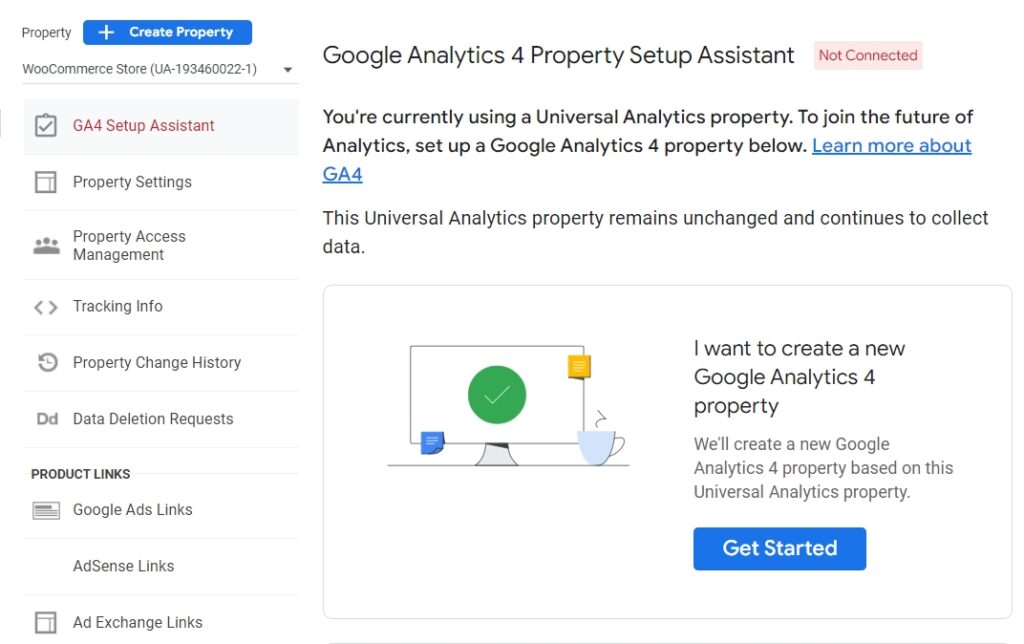
GA4 Setup Assistant

Now Google plans to retire Universal Analytics, starting on July 1, 2023. Existing analytics properties will stop collecting data on that date. If you’re using Universal Analytics 360, you get a few extra months of data collection, with the service retiring on October 1, 2023:
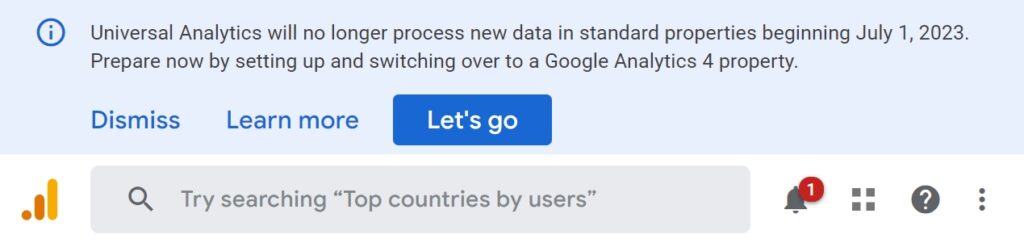
Universal Analytics data collection end date message

That gives you plenty of time to get acquainted with Google Analytics 4 and make the transition. Before we talk about how to do that, let’s go over the changes to the service.

An Introduction to Google Analytics 4

For a long time, analytics focused on helping you measure desktop web metrics, with mobile data being almost an afterthought. Google Analytics 4 changes that approach by helping you unify multiple types of properties into singular user journeys:
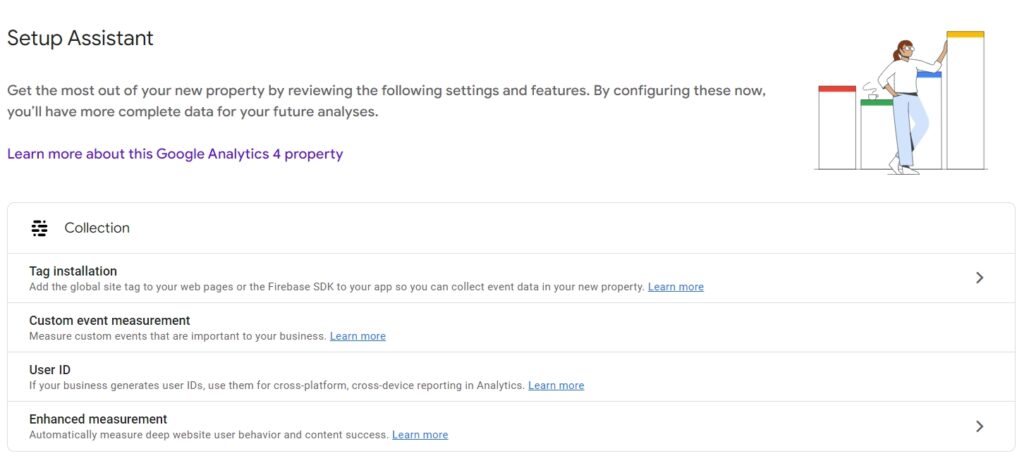
GA4 Setup Assistant tags

With Google Analytics 4, you can see measurements for your websites and apps. You can also gain insights from machine learning algorithms into how to optimize those properties.

Another key aspect of Google Analytics 4 is that it doesn’t rely solely on cookies. It offers an increased emphasis on user privacy.

“Universal Analytics was built for a generation of online measurement that was anchored in the desktop web, independent sessions and more easily observable data from cookies. This measurement methodology is quickly becoming obsolete.”

Russell Ketchum, Director of Product Management for Google Analytics

Arguably, one of the main drivers behind the shift in how Google Analytics collects data comes from the General Data Protection Regulation (GDPR). The GDPR has had a massive impact on how websites and platforms can legally collect and store user data.

Get Content Delivered Straight to Your Inbox

Subscribe to our blog and receive great content just like this delivered straight to your inbox.

Cookies have come under fire in recent years due to increased privacy concerns. That means many companies are looking into alternative data collection streams.

With Google Analytics 4, measurements no longer rely on sessions. The platform is capable of recognizing and measuring multiple types of human interaction “events”, including:

  • Page views
  • Scrolls
  • Outbound clicks
  • In-site searches
  • Video engagement metrics
  • File downloads

With previous versions of Google Analytics, measuring several metrics involved manually setting up complex events. Now, the platform can automatically tag the events for you, which gives you access to more data from the get-go.

Finally, Google Analytics 4 brings better funnel reports to the table, including cross-platform analysis. You can use the platform to identify key steps in the customer journey and see where users enter it and drop out. The service also enables you to understand what users are doing in-between steps in the funnel:
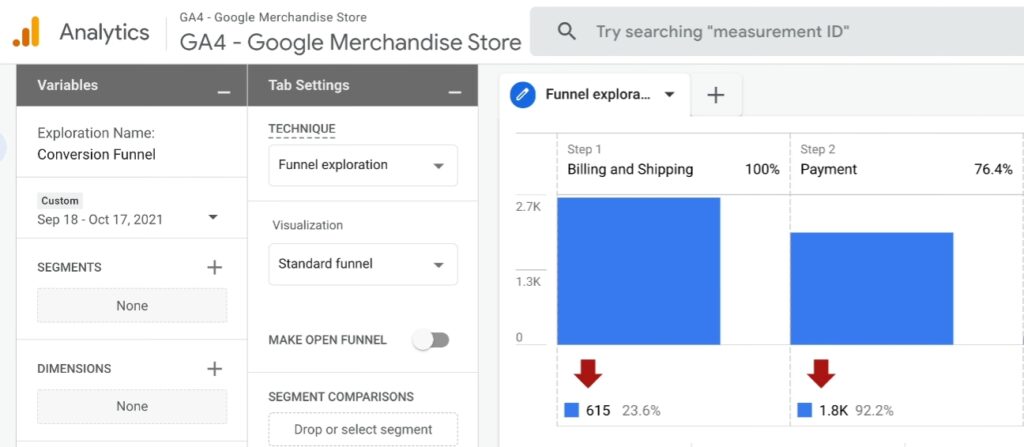
GA4 funnels report

If you’re moving from Universal Analytics, Google Analytics 4 can seem very different at first glance. However, setting up and configuring a Google Analytics 4 property is relatively simple. Fortunately, the platform offers an onboarding process.

How to Move from Universal Analytics to Google Analytics 4

Although we’re talking about transitioning from Universal Analytics to Google Analytics 4, you can use both services simultaneously for now. That means you can still collect data using cookies until Universal Analytics retires in 2023. At the same time, you can begin collecting data from events with Analytics 4.

Step 1: Create a Google Analytics 4 Property

Firstly, you’ll want to make sure that you’re not already using Google Analytics 4. If you set up a property after October 14, 2020, it’s likely already using Google Analytics 4. To verify this, access your Google Analytics account and look at your list of properties.

Properties using Universal Analytics will have a UA prefix in their analytics IDs. Properties using Google Analytics 4 will display G4A designations:
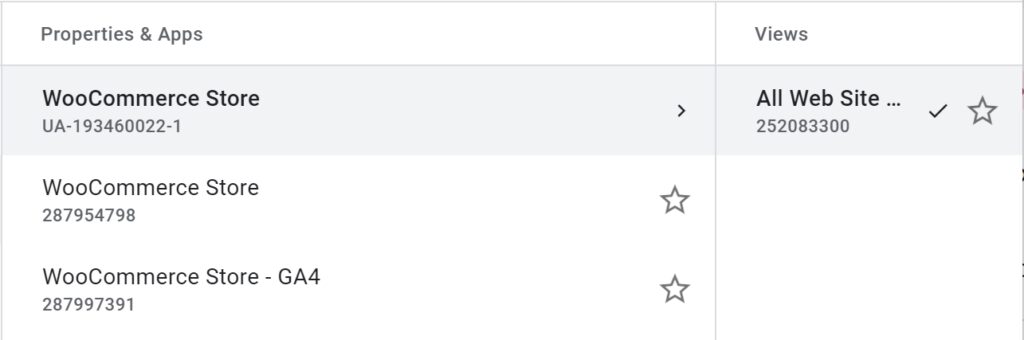
GA4 properties list

To get started, select a property using Universal Analytics and access its ADMIN settings. Select the option that says G4A Setup Assistant under the property’s name.

Now click on the Get Started button under the message that says, I want to create a new Google Analytics 4 property:
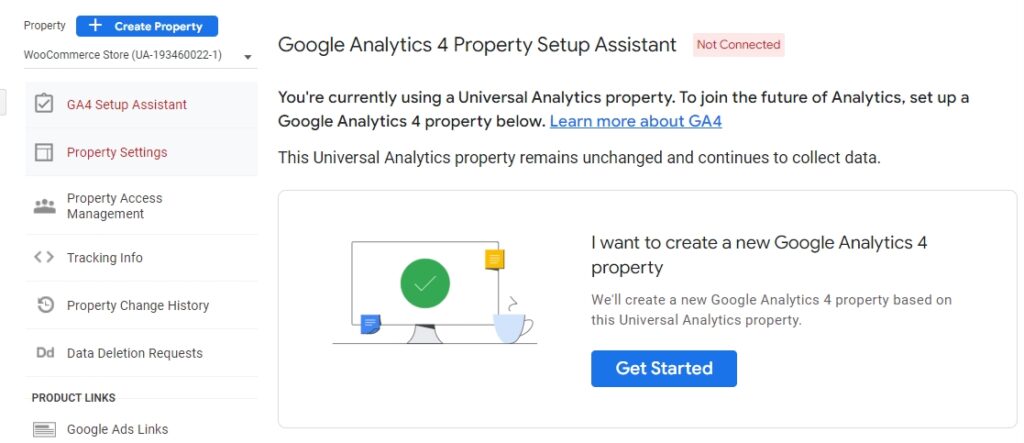
GA4 Setup Assistant not connected message

After clicking on that button, Google Analytics will show you a brief rundown of the setup steps. The platform will set up a new property for you without deleting your Universal Analytics configurations. It’ll copy data from the Universal Analytics property and enable “enhanced measurements” immediately. That means you can start measuring complex events from the get-go:
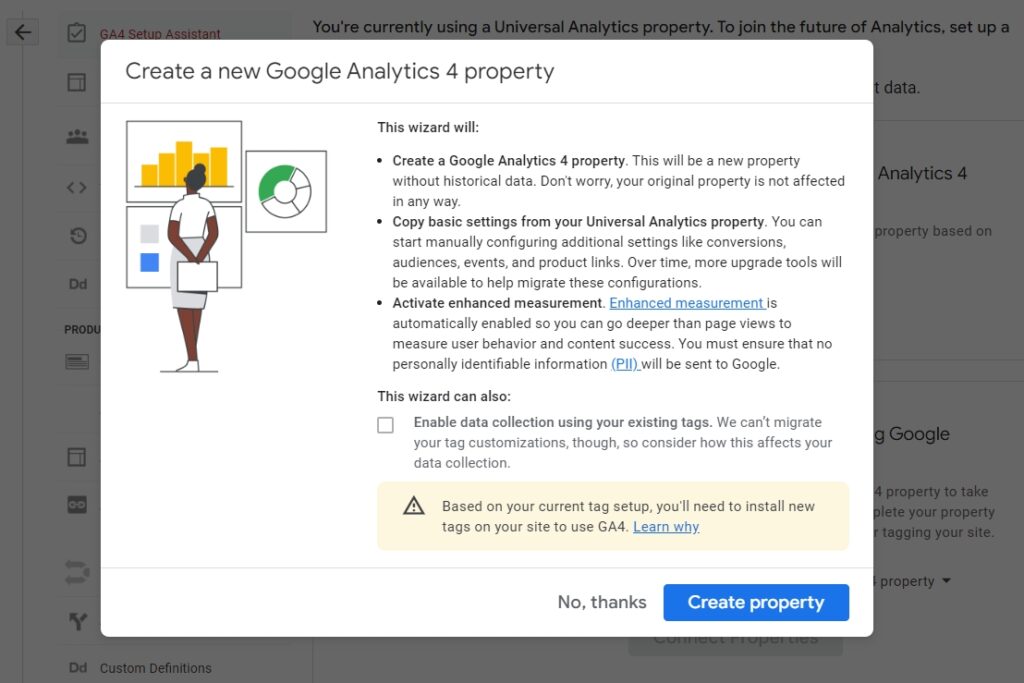
create a new GA4 property

Click on Create property to get the process started. You’ll return to the GA4 Setup Assistant tab, which will indicate the property is ready.

Step 2: Configure Your Google Analytics 4 Property

Now click on See your G4A property to configure its settings:
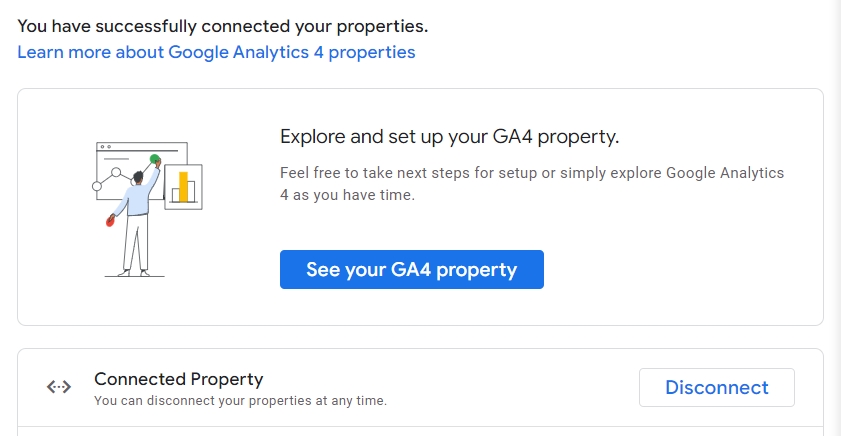
successful GA4 connection

To get started using Google Analytics 4 correctly, you’ll need to configure one or more data streams.

When you open a new Google Analytics 4 property, the platform will send you to the Setup Assistant page. Here, look for the section that says Collection and select the Tag installation option:
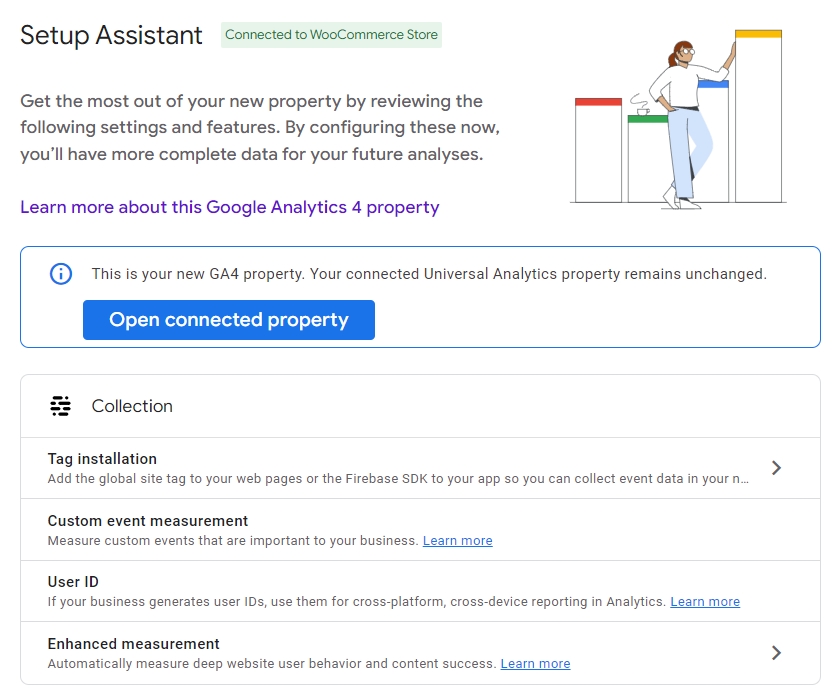
GA4 Setup Assistant

The Tag Installation option lets you configure “data streams”. Each Google Analytics property can have streams of information from websites and apps. Typically, you’ll have one stream for the web and one each for iOS and Android devices if you utilize apps:
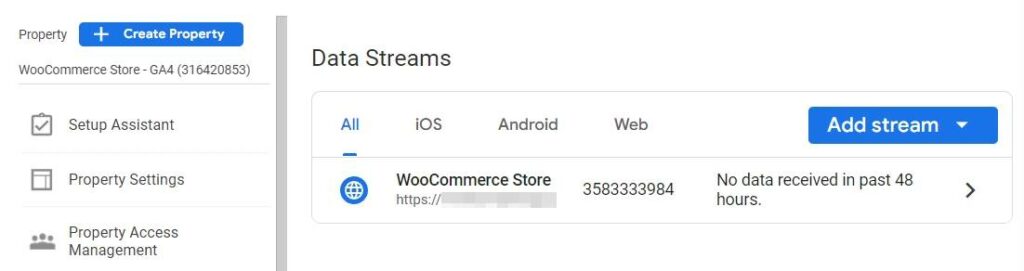
GA4 add new data stream

When you select the Add stream option, the platform will ask you what type of stream you want to set up. If you’re adding a web property, Google Analytics will ask for its URL, the site’s name, and which measurements you want to track:
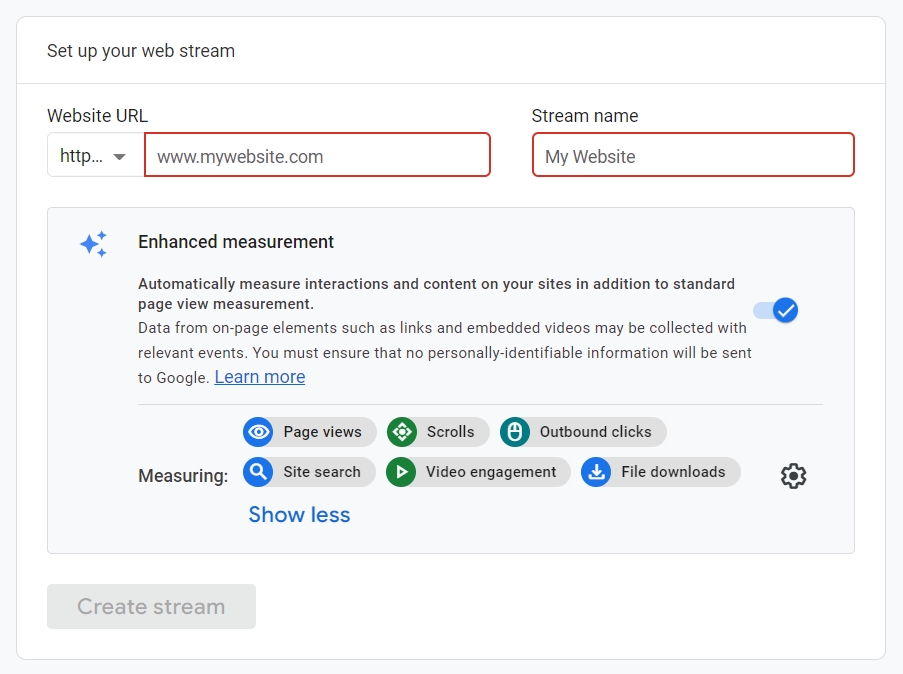
set up a new GA4 web stream

To confirm that you own the website, Google Analytics will ask you to add a tag to it. You can complete this step by adding a JavaScript tag manually or by using Google Tag Manager:
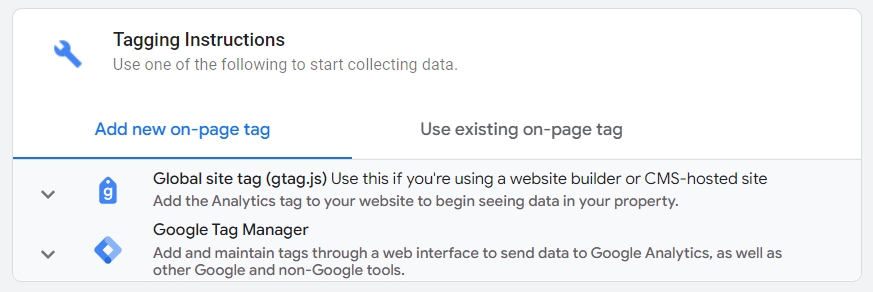
GA4 add new tag

Once you verify ownership of the property, Google Analytics will start collecting data from it. Like with Universal Analytics, you’ll be able to track all of that information from the dashboard.

Once you start setting up custom insights, you’ll get an idea of how big the difference between Universal Analytics and Google Analytics 4 is:
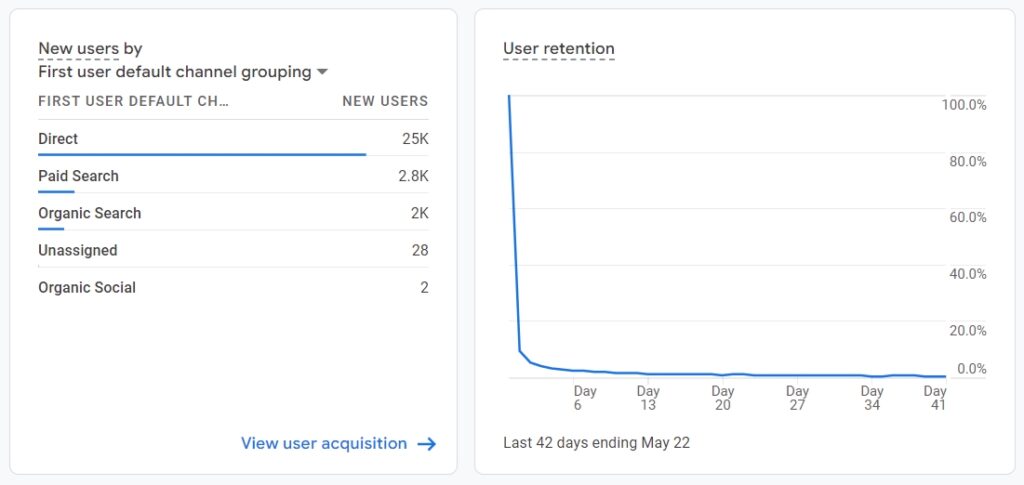
GA4 User Reports

If you want to experiment with Google Analytics 4 before setting up a new property, there’s an official demo account that you can use. Additionally, keep in mind that you can switch between Universal Analytics and Google Analytics 4 properties by selecting either option from your list of properties.

Common Issues With Google Analytics 4

Although transitioning to Google Analytics 4 is simple, users report some common issues when first using the “new” platform. Let’s talk about some of those issues and how to tackle them!

Configuring Google Analytics 4 Takes Time

Google Analytics 4 automatically sets up tracking for several types of events when you configure it for your website. However, the platform really shines when and if you take the time to set up custom events and reports.

If you don’t configure Google Analytics to track custom events, you’re missing out on what is perhaps the most powerful feature the platform offers. With custom events, you can collect data on the measurements that matter the most to you, all without adding custom code to your site.

Reports in Google Analytics Are Limited

Out of the box, reports in Google Analytics 4 are somewhat limited. For the platform to provide you with deeper insights into your customers’ behavior, you need to configure it to track the specific events you want and show that data in the way you need.

Google Analytics 4 makes this process relatively straightforward, depending on what type of events you want to track. However, even after setting up custom reports, accurate numbers may take a while to show up on your dashboard. This is because Analytics 4 uses machine learning to improve how it reports information.

There Are Differences in Reports Between Universal Analytics and Google Analytics 4

One of the most common complaints among new Google Analytics 4 users is that the numbers you see in the dashboard might not match your Universal Analytics property. This difference in data is because both services collect and count data differently. Whereas Universal Analytics relies on cookies and sessions, Analytics 4 tracks events.

For now, you can rely on metrics from both services to inform your decisions. However, you’ll need to get used to the Analytics 4 approach as we near the retirement date for Universal Analytics.

Google Analytics 4 Doesn’t Track Bounce Rate

There is a lot of discussion about whether the way bounce rate is currently measured makes sense or not. Google Analytics 4 does away with bounce rate entirely, and instead, it measures “engagement”:
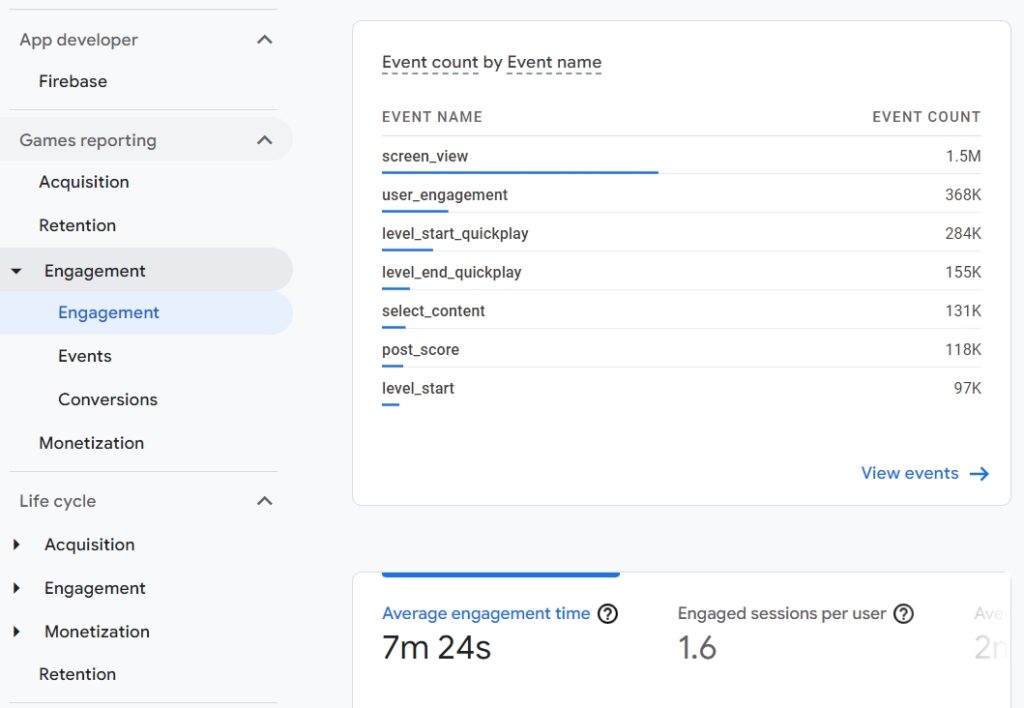
GA4 events report

Engagement reports use a broad range of metrics to provide a comprehensive overview of how users first perceive your website. If you want to continue measuring bounce rate, you can use Universal Analytics while it’s still active.

What the Future Holds for Google Analytics

The transition to Google Analytics 4 hasn’t been entirely smooth. Reception to the new platform has been somewhat lukewarm among users. However, if you use Google Analytics, it’s essential to start getting acquainted with Google Analytics 4, even if you plan on using Universal Analytics for the time being.

In the coming year, Universal Analytics will cease to collect data. You should have a Google Analytics 4 property set up and configured by the time that happens. If you want to get the most out of Google Analytics 4, we also recommend taking the time to configure custom events and reports for your property.

Analytics tools can help you measure the effectiveness of your Search Engine Optimization (SEO) and marketing strategies. If you don’t have a plan, we can help you with our Pro SEO Marketing Services.

Analytics & SEO Made Easy

We take the guesswork (and actual work) out of measuring and growing your website traffic.

DreamCare website tech support

The post Making the Switch from Universal Analytics to Google Analytics 4 (GA4) appeared first on Website Guides, Tips & Knowledge.


source https://www.dreamhost.com/blog/universal-analytics-to-ga4/

Monday, 13 June 2022

PHP 8.2: What to Expect (Developer’s Guide)

PHP 8.2 is expected to release in November this year, with the most recent stable version being PHP 8.1.5. While it’s still early, there has been mixed reception about the update.

However, knowing what to expect can help you prepare for the latest PHP version. By learning about the new features and the ones being deprecated, you can understand how the update may affect development. This knowledge can also help you get ready for the eventual release.

In this post, we’ll recap the most recent PHP versions. Then we’ll cover what’s new in PHP 8.2 and discuss the release schedule. Let’s jump in!

An Overview of PHP Versions

PHP is the primary programming language of WordPress. It plays a vital role in converting data from your database into HTML web pages for your site’s visitors.

As a website owner or developer, you’re likely already familiar with the importance of keeping your WordPress core, themes, and plugins updated. However, it’s also critical to keep your PHP up to date.

Currently, WordPress recommends using at least PHP 7.4. Older versions no longer receive active support for security updates and bug fixes. Therefore, upgrading to the latest stable version of PHP can result in better site security, enhanced performance, and higher levels of support (we emphasize stable because WordPress isn’t fully PHP 8.0 compatible just yet, so approach updates with caution).

PHP 7.4 introduced typed properties, an underscore numeric separator, and various improvements. Since then, there have been a couple more iterations of PHP released.

PHP 8.0, released in November 2020, brought a handful of essential features. In addition to syntax and performance enhancements, the release included:

  • Named parameters
  • Match syntax
  • Union types
  • Constructor Property Promotion
  • JIT (which affects how PHP executes source code)

A year later came PHP 8.1, the latest major PHP version. This update includes significant features, such as:

  • Intersection types
  • Readonly properties
  • Enums
  • Fibers
  • Never return type

Staying on top of the latest versions of PHP can help boost the performance and security of your website. However, it’s important to know which changes to expect before upgrading. If you’re interested in testing the current state of PHP 8.2, you can do so via GitHub.


What’s New in PHP 8.2

PHP 8.2 is expected to be released by the end of 2022. Here is the current release schedule, with General Availability (GA) programmed for November 24, 2022:

    • June 9: Alpha 1
    • June 23: Alpha 2
    • July 7: Alpha 3
    • July 19: Feature freeze
    • July 21: Beta 1
    • August 4: Beta 2
    • August 18: Beta 3
    • September 1: Release candidate 1
  • September 15: Release candidate 2
  • September 29: Release candidate 3
  • October 13: Release candidate 4
  • October 27: Release candidate 5
  • November 10: Release candidate 6
  • November 24: GA

According to the official documentation on the PHP website, there should be a handful of new features and deprecated functions. Let’s take a look at what to expect!

New memory_reset_peak_usage Function

PHP 8.2 will include a new function called memory_reset_peak_usage. It will reset the peak memory usage returned by the memory_get_peak_usage function.

This function will be helpful for cases that involve invoking an action several times and recording the peak memory usage of each iteration. Developers will be able to use this new feature to reset the peak memory usage at any given point during the lifetime of the request.

Get Content Delivered Straight to Your Inbox

Subscribe to our blog and receive great content just like this delivered straight to your inbox.

Readonly Classes

Introduced in PHP 8.1, readonly properties will be expanded in PHP 8.2 to add syntactic sugar so that all class properties are readonly at once:

readonly class Post
{
public function __construct(
public string $title,
public Author $author,
public string $body,
public DateTime $publishedAt,
) {}
}

This will prevent dynamic properties from being added to classes.

Null and False Standalone Types

In PHP 8.2, the return type of false will be available as a standalone type rather than strictly a union type for when an error occurs, which is already possible:

function alwaysFalse(): false
{
return false;
}

The same is true for the null type. For example, as a standalone type, unlike before, NullPost::getAuthor()will be able to only return null.

Deprecate Dynamic Properties

Dynamic properties will be deprecated in PHP 8.2, resulting in an ErrorException by PHP 9.0. These properties are set on an object:

class Post
{
public string $title;
}
// …
$post->name = 'Name';

Dynamic properties allow flexibility when creating classes (e.g., value objects) without a strict class declaration. Their deprecation will likely be an issue for developers who rely on dynamic properties because it will push them more toward static analysis. For this reason, some developers are apprehensive about this change with PHP 8.2.

However, classes using __get and __set will still support dynamic properties, as will objects of stdClass.

Alternatively, developers can use the new #[AllowDynamicProperties]attribute, declared in the global namespace, on classes to those properties:

#[AllowDynamicProperties]
class User() {}
$user = new User();
$user->foo = 'bar';

While it’s not recommended, another option is to disable deprecation warnings.

New /n Modifier

PHP 8.2 will include support for the /n (no capture) modifier to the preg_* function family. When used, any groups with()meta-characters won’t capture apart from captured groups that are named. Essentially, the result is the same as marking each group as non-capturing.

The reasoning behind this change is that the modifier simplifies complex regular expressions for multiple groups. Rather than marketing every group as non-capturing, developers can mark all groups as non-capturing. Then, they can select and name specific groups that need to capture.

Redact Parameters in Back Traces

Many developers use services that track stack traces and production errors from codebases. These services can notify users if and when something goes wrong. For instance, tracing call stacks is helpful when debugging an application.

However, sometimes stack traces can have sensitive information, such as usernames and passwords. PHP 8.2 will include a #[SensitiveParameter] attribute that will prevent this information from being included in stack traces when things go wrong:

function test(
$foo,
#[\SensitiveParameter] $bar,
$baz
) {
throw new Exception('Error');
}
test('foo', 'bar', 'baz');

PHP 8.2 will use the sensitive parameters to redact private information from stack traces, making them more secure. These parameters ensure that the data won’t end up in error logs. Note that this attribute will only be available to use on parameters.

Deprecate ${} String Interpolation

There are multiple ways to embed variables in strings with PHP. However, PHP 8.2 will deprecate two methods. The first is using ${} in strings:

"Hello ${world}";

The second is using ${} (variable variables):

"Hello ${(world)}";

This likely won’t be a significant issue for developers as the two most popular string interpolation methods will still work.

Deprecate Partially Supported Callables

Another deprecated change will be with partially supported callables. There are multiple ways to create a callable in PHP. It can be called either with or without parameters with the $callable() syntax, the user_call_func(/a_array), or using a function with a callback.

The deprecated callable patterns include the following:

$callable = "self::method";
$callable = "parent::method";
$callable = "static::method";
$callable = ["self", "method"];
$callable = ["parent", "method"];
$callable = ["static", "method"];
$callable = ["MyClass", "MyParentClass::myMethod"];
$callable = [new MyClass(), "MyOtherClass::myMethod"];

Starting from PHP 8.2, calling any of the above will result in the following deprecation notice:

class Test {
public static function myMethod(): void {
echo "Called";
}

public static function call(): void {
$callable = 'self::myMethod';
call_user_func($callable);
}
}

$callable = Test::call();
// "Called";

However, passing these callables to the is_callable function or using them with the callable parameter types won’t generate the deprecation message. To prevent the deprecation notice, developers can instead convert parent, self, and static keywords in callable code to their respective class names using the::class magic method.

Part of the reason behind the change is to allow callables to be used for typed properties. It makes them less context-dependent.

MySQLi Can No Longer Be Compiled With libmysql

In the past, PHP has supported two libraries for connecting MySQL databases: mysqlnd and libmysql. As of PHP 5.4, the former has been the default library. However, it’s been possible to compile MySQLi through extensions.

Beginning with PHP 8.2, compiling a MySQLi extension with libmysql won’t be supported. Attempting to do so will result in a configuration error:

./configure --with-mysqli=FOO

Linking mysqli against external library is no longer supported

This won’t likely cause any significant errors for developers. However, the two biggest features supported by libmysql that aren’t available with mysqlnd are supported for automatic reconnecting and authentication through LDAP and SASL.

Keep Your WordPress PHP Version Up to Date

As a developer, it’s essential to test your code against upcoming versions of PHP. In this case, developers should begin testing their code against PHP 8.2 as soon as possible to ensure your code doesn’t break users’ sites when they update.

The Perfect Development Environment

We offer budget-friendly Shared Hosting services with robust features and resources to help you create the perfect website. Plans start at $1.99/mo.

shared hosting

The post PHP 8.2: What to Expect (Developer’s Guide) appeared first on Website Guides, Tips & Knowledge.


source https://www.dreamhost.com/blog/php-8-2/

Wednesday, 8 June 2022

How to Change Your Domain Without Hurting SEO and Losing Website Traffic

If you’re a freelancer or a small business owner, chances are you’ve had to learn by doing. This works really well for many things (perhaps excluding rocket science).

While this learn-as-you-go approach can take you far in the technical realm, it can occasionally have its downsides. For instance, changing your entire website domain, all your site’s URLs, all the organic history that comes along with it, may not be the best area to “wing it.” You risk causing substantial harm to your online presence.

The good news is that you can change your domain name. And you can do so without permanently impacting your SEO. And we’ll show how to do it, right here in this post.

What a deal!

In this post, we’ll first cover a few reasons why you might change your domain name, as well as the potential SEO dangers of doing so. Then, we’ll show you how to modify your domain without damaging your site’s visibility. Let’s get started!

Why You May Want to Change Your Domain Name (Common Reasons)

For many website owners, choosing a domain name is one of the most important decisions they can make when crafting an online presence. While some may get lucky and select a domain that lasts a lifetime, it’s possible that your domain name needs changing at some point:

searching for the right domain name

Here are just a few reasons you might want to consider a domain change:

  • Rebranding. Many of the best online businesses will either evolve or pivot in order to succeed in the competitive e-commerce marketplace. You may need to update your domain name to reflect your site’s new image.
  • Copyright issues. Even the most well-intentioned entrepreneur can make a mistake. If you find out that your domain name is infringing on someone’s intellectual property, you will likely need to change it to prevent legal issues.
  • Growth. Your small business may need to modify its domain in order to expand. For example, if your old domain name is too specific, you might need to change it to something more general.
  • Relocation. If you run an online store, moving locations may not be a very big deal. However, if your domain has a country code Top-Level Domain (ccTLD) such as .us or .ca, you might need to modify it to avoid confusion.

These are just a few common scenarios that may require you to register a new domain name. However, you might have other reasons. For instance, maybe you’ve been monitoring your ideal domain and found that it’s become available. There’s nothing wrong with upgrading simply because you’ve found something better.

The (Avoidable) Dangers of Changing Your Domain Name

If you’re considering changing your domain name, chances are you already know a bit about Search Engine Optimization (SEO). In a nutshell, SEO is when you make an intentional effort to get your pages to rank higher in Google’s search engine results. For most site owners and digital marketers, SEO and site performance are a top priority these days.

Therefore, you’ve likely heard some horror stories about people changing their domain and losing all their hard-earned rankings. This type of loss can have serious consequences for any business. That’s because when your site is no longer visible, new visitors won’t be able to find it, and search engines won’t show it in search results.

While this can happen, you don’t need to panic. As long as you follow some simple SEO best practices and change your domain name the right way, you can avoid most of the damage to your search engine rankings. What’s more, you can even minimize other inconveniences, like unnecessary downtime.

Get Content Delivered Straight to Your Inbox

Subscribe to our blog and receive great content just like this delivered straight to your inbox.

How to Change Your Domain Name Without Hurting SEO

Now that you know some of the common motivations for changing your domain name and how it could affect your website, you’re probably wondering how to do it with minimal side effects. Here are five steps you can follow to change your domain name without damaging your site’s visibility.

Step 1: Choose a New Domain Name with Lasting Power

The first step is to simply choose a good domain name. For starters, you’ll want to pick a domain with an appropriate Top-Level Domain (TLD).

It’s also a good idea to make your new domain easy to spell, type, and pronounce. That way, you can avoid visitors becoming frustrated by frequent typos. It will also encourage users to share your domain name verbally.

You’ll also want to make sure that your new domain offers flexibility. This will help ensure that it can grow with your online business and avoid the need for another name change in the future.

Once you’re satisfied with your research, you can go ahead and buy a domain name.

Step 2: Audit Your Backlinks & Referring Domains

Even though you’ve picked the right domain name, you’re not quite ready to make the switch yet. Before you make any sudden changes, you would be wise to conduct a thorough audit of all the places where your old domain appears online.

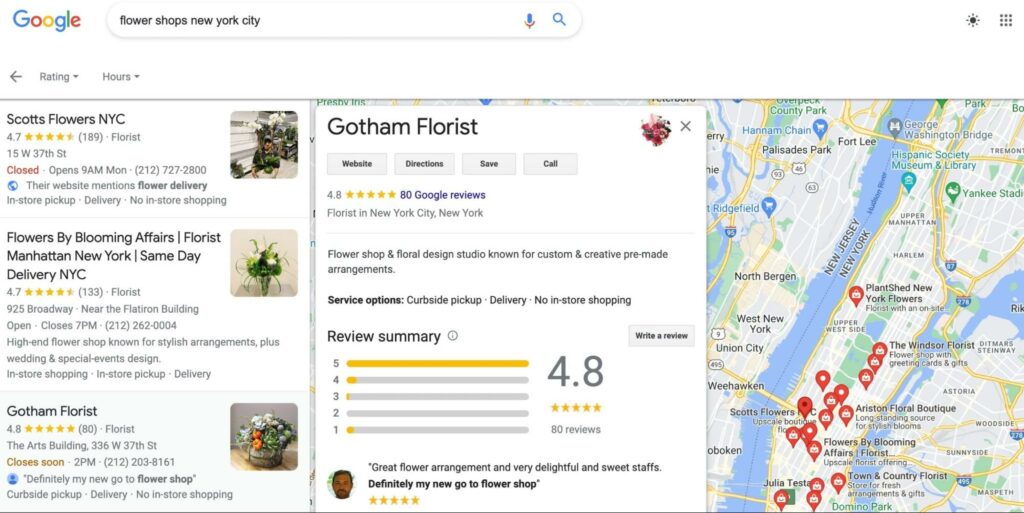
For instance, you may have it listed in all your social media bios or in your Google Business Profile:

Google Business Profile

Some people may recommend running an audit as a last step, but you’ll want to minimize the time that your old website is listed in these locations. Therefore, it’s best to be prepared beforehand. It’s important that you make note of all these locations, so you can return to this list later to update your website URLs.

Step 3: Migrate Your Site to the New Domain

After you’ve purchased your shiny new domain name (congratulations!) and conducted your audits, you’re ready to get your hands dirty. It’s time to migrate your website to the new domain.

This process will vary depending on your hosting provider. However, it can be a bit tricky, as it requires moving all of your site’s files and databases.

If you plan to do it manually, you’ll need to use a Secure File Transfer Protocol (SFTP) client, such as FileZilla:

FileZilla

If you’re not confident that you can complete the migration process on your own, you might consider hiring a WordPress developer. You could also check whether your existing hosting provider offers this service.

For example, all DreamHost plans come with free migration services, which include WordPress domain transfers. So, if you’ve been meaning to change your hosting provider, now might be a good time to do it.

Step 4: Set Up Redirects

Now that you’ve migrated your site, you’ll need to start mapping URLs by setting up permanent (301) redirects. Essentially, a redirect takes users (and search engines) visiting an old URL to your new one. This will be essential for minimizing the negative effects of changing your domain, as broken links can damage your SEO.

Unless you’re comfortable accessing your site’s core files, the quickest and easiest way to set up your redirects is with a WordPress plugin, such as Redirection:

Redirection Plugin

There are many types of redirects, but the 301 redirect is the best option for this scenario. That’s because it’s permanent and will transfer the SEO value of your old pages. Even if you’re using a plugin, you’ll want to do this transition carefully. That way, you can avoid creating redirect errors, which might damage your site’s performance and hurt your SEO.

Step 5: Update Online SEO Tools & Search Console

Now, all that’s left to do is wrap up with some digital housekeeping and tell Google, “Hey, I moved my site.” You’ll want to do this immediately after migrating your site and setting up your redirects to avoid any long-term damage to your site’s search engine visibility.

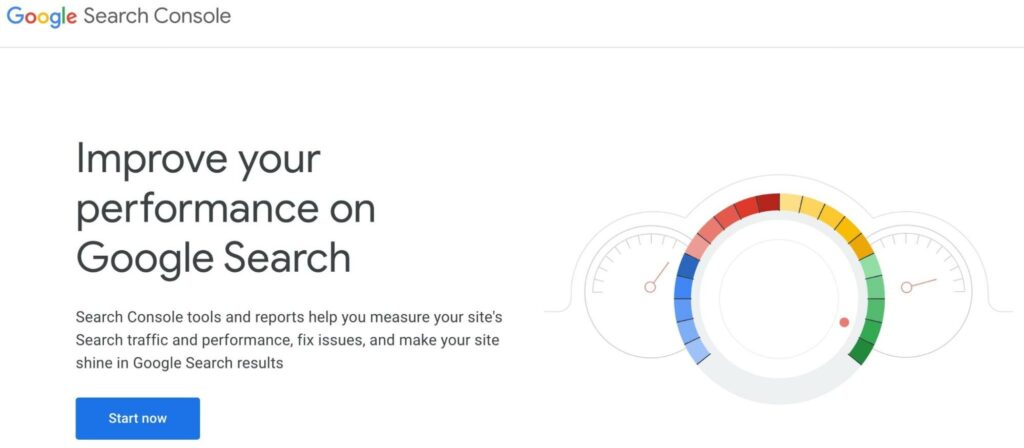
First, navigate to Google Search Console, to verify your new domain name and submit a Change of Address. This way, Google is made aware of the change and you can continue to monitor your site’s indexing in the search engine rankings:

Google Search Console

Additionally, if you have an active Google Analytics account, now is a good time to update it to reflect your new website’s location. You’ll need to repeat this process for any other SEO tools you use. Finally, you can revisit the list you created in your audit (step two) and change all those URL mentions to your new domain name.

Change Your Domain Name the Right Way

There are many reasons you may not want to stick with the original domain name you chose for your website. Luckily, you can change your domain with relative ease. However, you’ll need to do it carefully, so you don’t cause your site to drop in the Search Engine Results Pages (SERPs).

Looking for an easy way to ensure that your site does well in the search rankings? Consider leaving the SEO work to DreamHost’s professionals when you sign up for our Pro Services!

Search Engine Optimization Made Easy

We take the guesswork (and actual work) out of growing your website traffic with SEO.

website tech support

The post How to Change Your Domain Without Hurting SEO and Losing Website Traffic appeared first on Website Guides, Tips & Knowledge.


source https://www.dreamhost.com/blog/domain-change-seo/

Monday, 6 June 2022

Attention Online Sellers: .SHOP Domains Now Free for a Limited Time

Premium Partnership

Get Your Free .SHOP Domain

DreamHost is launching a partnership with the top-five most registered new TLDs, with over 1.2 million .SHOP domains registered to date. The partnership is with GMO Registry, a member of the GMO Internet Group, to give away 300,000 free .SHOP domains to DreamHost’s existing customers.

A .SHOP is a generic top-level domain (gTLD) extension created in 2016 for e-commerce. It allows a business to showcase itself as a standout branded merchant in a crowded internet, which is beneficial given the increase in online shopping within the last several years that continues to surge. In fact, DreamHost internal data show that more websites have been e-commerce enabled in recent years than ever before.

This domain extension is ideal for a broad range of entrepreneurs and businesses of all sizes that want to make their distinctive mark in e-commerce. Shopping platforms, large retail brands including https://www.netflix.shop/, brick-and-mortar stores establishing or expanding their online presence, crafters and thrifters wanting to move off of third-party marketplaces like Etsy and eBay to their own online stores, and even blogs and other publications that cover shopping topics are just a few of the prime users that can all reap the rewards of having a .SHOP extension on their domain names.

Although more than 1.2 million .SHOP domains have been registered since its inception, many more potential domain names are available for DreamHost customers to choose from. It’s crucial that customers secure their preferred .SHOP domains promptly, before they’re taken.

Customers will not be required to pay fees for the first year of their domain registrations. They’ll only do so beginning with their first renewal.

Any existing DreamHost users, including hosting and domain-only customers, are eligible to receive and claim one .SHOP domain credit through December 31, 2022. Terms and conditions of service may be found here.

How to Claim Your Free .SHOP Domain

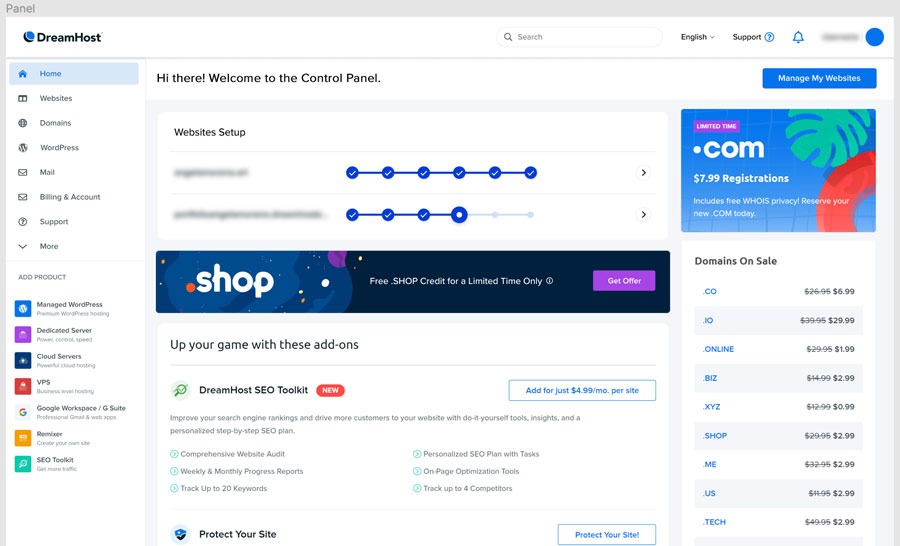
  1. Customers will see a banner graphic in a prime position on the Home page of their Control Panels for the initial 60 days of the offer.
    Get Your Free .SHOP Domain
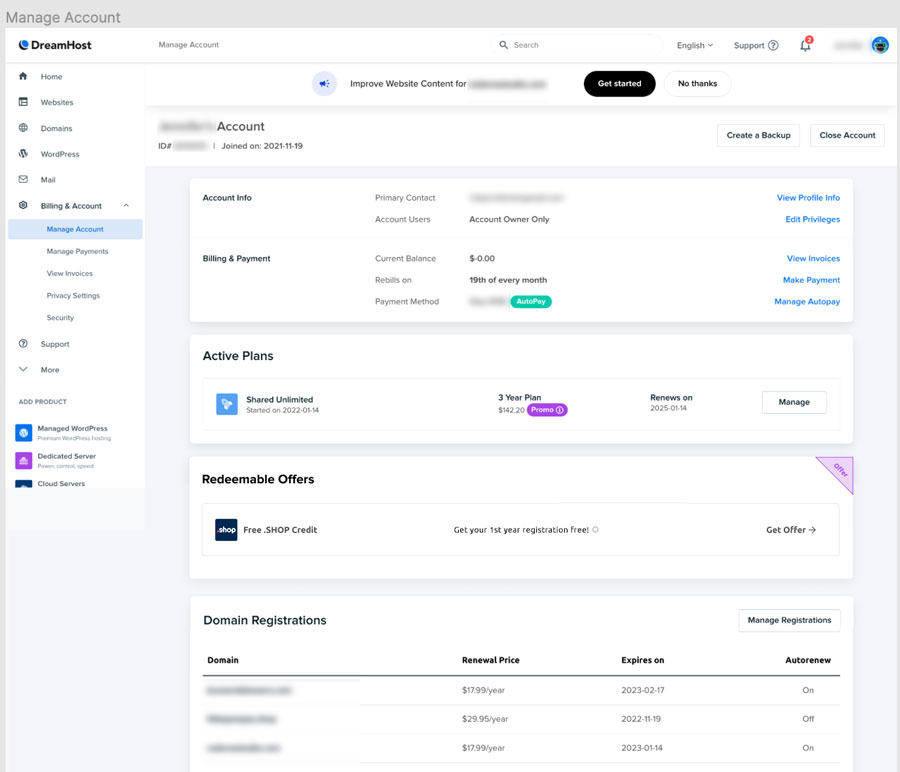
  2. When customers click on the banner, they will land on the following page to claim the free domain credit, located under Redeemable Offers.
    Get Your Free .SHOP Domain

Get Content Delivered Straight to Your Inbox

Subscribe to our blog and receive great content just like this delivered straight to your inbox.

The post Attention Online Sellers: .SHOP Domains Now Free for a Limited Time appeared first on Website Guides, Tips & Knowledge.


source https://www.dreamhost.com/blog/get-free-shop-domain/

Friday, 3 June 2022

Picture It: LGBTQ+ Representation in Stock Photography (+26 Sources)

Image Crisis

The stock photography industry, which began to emerge and gain prominence in the 1920s, has experienced an image crisis in recent years as being stagnant in its stock even while the previously-marginalized LGBTQ+ community has welcomed a long-overdue inclusive seat at contemporary society’s table, but the industry is slowly but surely undergoing an absolutely fabulous makeover.

Stock photography is professional, high-quality photographs of generic people, places, things, events and situations, and other categories that are made available via numerous websites and are licensed, usually either paid or free-of-charge, in exchange for attribution, for commercial, editorial, creative, and personal uses. It can even include video footage. This photography can be a cost-effective way to illustrate a wide variety of media and other projects without the need to hire a photographer.

One common complaint often leveled against the stock photography industry, however, is that it has tended to be lacking in diversity, especially LGBTQ+ and minorities, when portraying people either individually or in groups. The standard has, a majority of the time, been that of white people – particularly white, heterosexual couples and families.

And studies show that when minorities and other marginalized populations, including the LGBTQ+ community, aren’t well-represented in advertising and the media, it can negatively impact their feelings of self-worth and self-esteem.

However, the scarcity of diverse, non-stereotyped images inclusive of the lives of lesbian, gay, bisexual, transgender, queer, and gender-noncomforming people, and those of other sexualities – including from all races and those with disabilities – could be on its way to becoming a thing of the past, as evidenced by the growing number of websites offering LGBTQ+ themed stock photos. And while the stock photo industry still has a long way to go before it truly represents the full spectrum of the community’s diversity and place in society, it’s a start.

We compiled a list of 26 such sites below as a resource for you to use when representing the LGBTQ+ community in your communications and projects.

26 LGBTQ+ Inclusive Stock Photography Websites

Things to know:

  • The LGBTQ+ community can encompass a variety of keywords that you can use when searching the below websites for relevant stock photos. They include: LGBT, LGBTQ, LGBTQ, gay, lesbian, bisexual, transgender, queer, pride, gay pride, gay pride flag, rainbow flag, gay couple, gay family, and others. Try different ones and different combinations to maximize your search results.
  • Always carefully check the licensing (including Creative Commons types), usage, and attribution requirements of images from stock photo sites before you use them. Restrictions can vary from image to image on a single site.
  • When using sites that offer free photos, always do your due diligence to link a photo to their original photographers and provide attribution to them when possible.
  • Always be respectful and mindful of how you use stock photos, especially when the images are of people. Consider how a subject in a photo might feel about the context their likeness appears in.

01. 123RF

Cost Structure: One-month free trial that includes 10 free images, then paid subscription

02. Affect The Verb

Cost Structure: Free

LGBTQ+ representation in stock photography
Photo Credit: Chona Kasinger

03. Alamy

Cost Structure: Paid, premium

04. Burst

Cost Structure: Free for commercial use

05. CanStockPhoto

Cost Structure: Create free account, then purchase credits or subscriptions

06. Creative Commons

Cost Structure: Free

07. Depositphotos

Cost Structure: Paid on-demand or subscription options

08. Envato Elements

Cost Structure: Paid, subscription

LGBTQ+ representation in stock photography
Photo Credit: sofiiashunkina

09. Flickr

Cost Structure: Free

10. Freepik

Cost Structure: Attribution is required for free use. Premium photos are marked with a crown.

11. The Gender Spectrum Collection

Cost Structure: Free

LGBTQ+ representation in stock photography
Photo Credit: Zackary Drucker

12. Getty Images

Cost Structure: Prices for photos vary by image size

13. iStockPhoto

Cost Structure: Paid, premium pricing

14. Pexels

Cost Structure: Free

LGBTQ+ representation in stock photography
Photo Credit: Karolina Grabowska

15. Photos for Work

Cost Structure: Most photos are free for commercial use, with no attribution specifically required.

16. Pikwizard

Cost Structure: Monthly and annual subscriptions; annual subscription includes 30-day free trial. Two types of licenses: standard, and extended.

17. Pixabay

Cost Structure: Free

18. Queer in Tech by Mapbox

Cost Structure: Free, attribution required

LGBTQ+ representation in stock photography
Photo Credit: CC BY 3.0 US Mapbox Uncharted ERG

19. Rawpixel

Cost Structure: Sort photos by free, premium, and public domain; most are paid.

20. Shutterstock

Cost Structure: One-month free trial includes 10 free images; then paid on-demand, FLEX Subscription, Image Subscription, Team, and Enterprise plans.

21. StockFreeImages

Cost Structure: https://www.stockfreeimages.com/faq.html

22. Storyblocks (includes stock video footage)

Cost Structure: Create a free account to download watermarked previews to try in your project. Then two paid plans for individuals and one business plan.

23. Twenty20

Cost Structure: You may have access to these photos for free if you have an Envato Elements subscription. If not, there is a Cost Structure.

24. Unsplash

Cost Structure: Free

LGBTQ+ representation in stock photography
Photo Credit: @theyshane

25. VistaCreate

Cost Structure: Free Starter plan and paid Pro plan, with monthly or annual subscription options. Images marked with a diamond icon are available only with Pro plan.

26. Wikimedia

Cost Structure: Free; attribution usually required

Get Content Delivered Straight to Your Inbox

Subscribe to our blog and receive great content just like this delivered straight to your inbox.

The post Picture It: LGBTQ+ Representation in Stock Photography (+26 Sources) appeared first on Website Guides, Tips & Knowledge.


source https://www.dreamhost.com/blog/lgbtq-representation-stock-photography/

Wednesday, 1 June 2022

WordPress Market Share: 2022-2023 & Beyond

There are a handful of reliable and popular Content Management Systems (CMSs) available today. Among them is WordPress, a free, open-source solution you may have heard of before. But just how widely used is WordPress, and what is its current and forecasted market share? We’ll cover that and more right here.

Now, whether you’re looking to start a personal blog, create an online store or any other type of business website, it’s important to choose a powerful platform. WordPress is certainly one of the most preferred solutions, but getting a deeper understanding of its usage might be helpful.

In this post, we’ll introduce you to WordPress and explain what makes it so popular. Then, we’ll dive into the specifics of its current market share and statistics. Finally, we’ll look at what to expect for its future growth. Let’s jump in!

WordPress: A Brief Overview

Before we get into its market share, we first want to cover some basic information about WordPress:

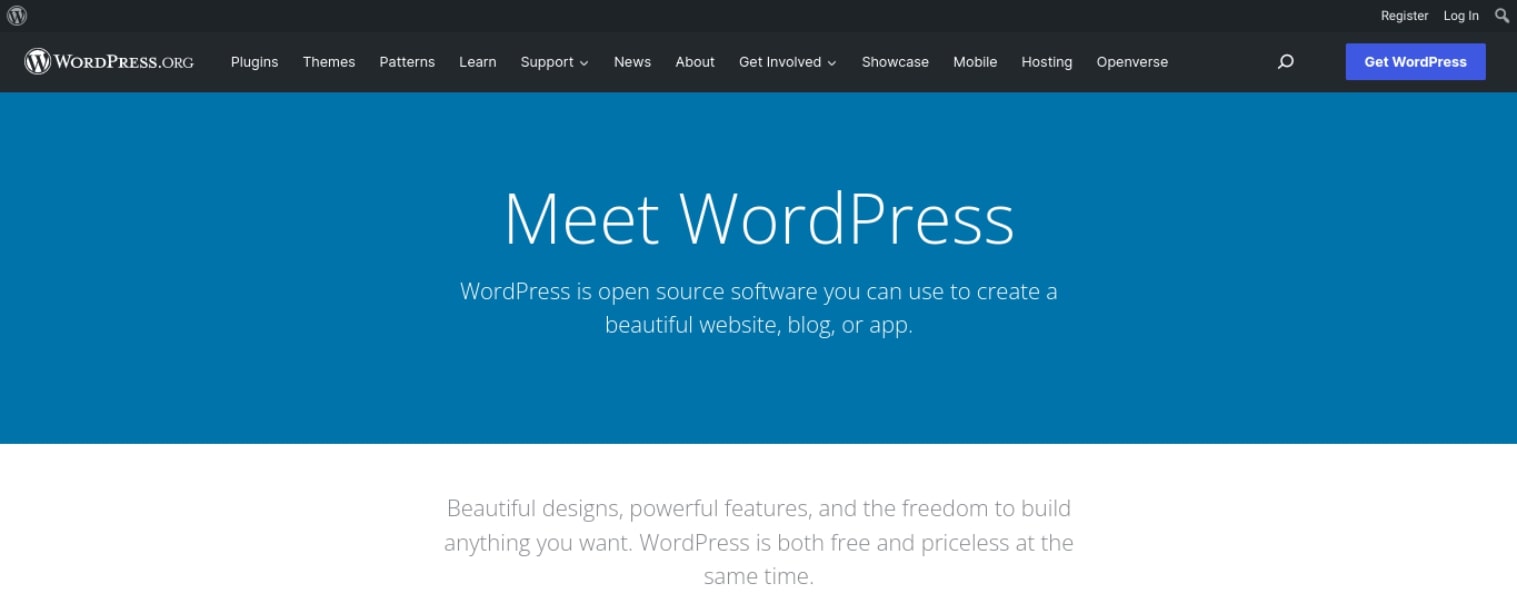
WordPress.org website homepage

WordPress was founded in 2003 by Mike Little and Matt Mullenweg. It began as a blogging platform. Over the years, it has evolved to become one of the biggest open-source projects on the internet. It’s built on PHP and MySQL and is licensed under the General Public License (GPLv2).

WordPress.com vs. WordPress.org

It’s important to note the difference between WordPress.com and WordPress.org. Let’s start with WordPress.com. This is a commercial, for-profit company owned by Automattic, Inc.:

WordPress.com website homepage

Meanwhile, WordPress.org is a non-profit organization that maintains the open-source codebase for WordPress. Both platforms offer free and paid hosting plans for individuals and businesses. The main difference is that WordPress.org is self-hosted..

Additionally, WordPress.com offers a limited set of features compared to WordPress.org. For example, you cannot choose your own domain name on WordPress.com – you must use a subdomain (e.g., “mysite.wordpress.com”) unless you opt for a premium plan. With WordPress.org, you can host your site on any web hosting provider of your choice and use a custom domain name (e.g., “www.mysite.com”).

Finally, WordPress.com is much more restrictive in terms of what you can do with your site. For instance, you can’t run any advertisements on your WordPress.com site unless you upgrade to the Business plan (which costs $300 per year). On WordPress.org, you can run ads on your site regardless of which hosting plan you choose.

Note that for this post, we’ll be looking at statistics for WordPress.org.

What Makes WordPress So Popular

There are many reasons why WordPress is such a popular CMS. To start, it is incredibly user-friendly and easy to use. Even if you are not familiar with code or web design, you can still create a beautiful website with different features.

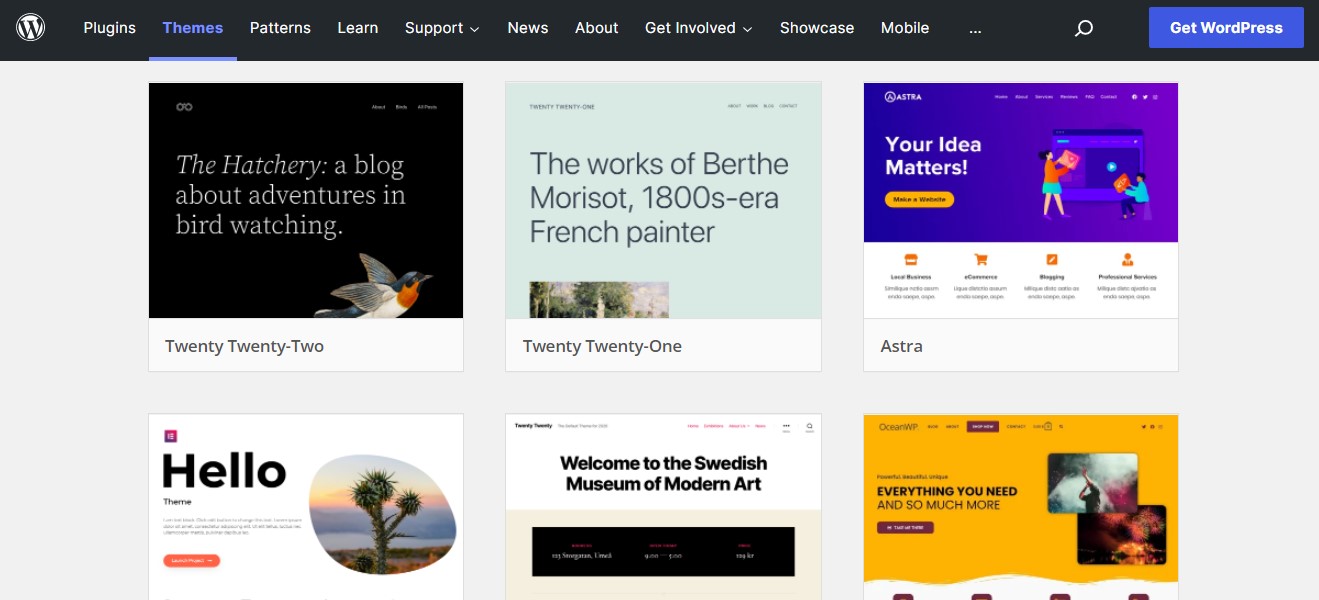
You can use WordPress to create any type of website you can imagine, from a simple blog to a fully functioning e-commerce store. There are also thousands of free themes and plugins available that enable you to easily customize your website and make it look exactly the way you want it to:

WordPress themes

WordPress is also free to download and use. It is open-source software, meaning there are no licensing fees to use it. That said, you do need to purchase a domain name and hosting plan to take your site live. However, there are many options available out there, many of which are relatively inexpensive.

Another reason WordPress is popular is that it is very secure. WordPress websites are regularly updated with the latest security patches, making them much less likely to be hacked than other platforms.

Additionally, WordPress websites are easy to maintain. Once your site is up and running, you won’t need to do much in order to keep it going, especially if you use a managed WordPress hosting provider. Plus, WordPress automatically handles most of the maintenance for you, including updates.

Finally, there is a large community of WordPress users who are always willing to help out if you need assistance. From online tutorials and videos to support forums and documentation, there is always plenty of support available to help you troubleshoot issues and learn the ins and outs of the CMS.

WordPress Market Share Statistics 2022-2023

According to W3Techs, WordPress is currently used by 64.1% of all the websites with a known CMS. This means that WordPress powers 42.9% of all websites.

So how does WordPress’ market share compare to other CMSs on the web? Below are the CMSs that come behind WordPress in terms of market share:

As you can see, WordPress is the CMS with the biggest market share. Now, let’s break down WordPress usage by versions and subcategories.

Get Content Delivered Straight to Your Inbox

Subscribe to our blog and receive great content just like this delivered straight to your inbox.

WordPress Versions and Subcategories

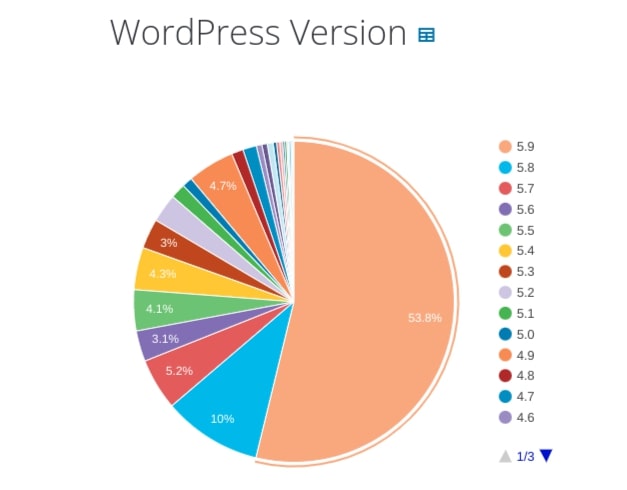
The most popular version of WordPress is 5. This is used by 92.5% of WordPress users and is followed by:

  • Version 4 (7.1%)
  • Version 3 (0.4%)
  • Version 2 (>0.1%)
  • Version 1 (>0.1%)

More specifically, the majority of WordPress users (53.8%) use WordPress 5.9, followed by 5.8 (10%) and 5.7 (5.2%):

WordPress version usage

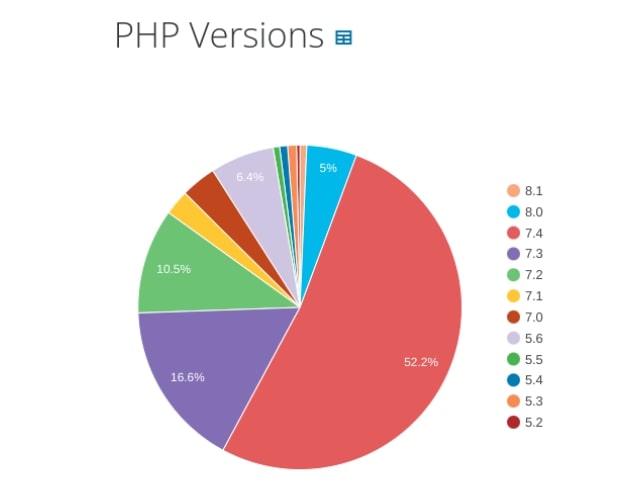
In addition to using the latest versions of WordPress, the CMS also recommends staying up to date on PHP versions. The majority of WordPress sites (91%) are using 7.0 or higher:

PHP version update and usage across the web

WordPress usage statistics can also be examined by subcategories. A large portion of WordPress site owners use the e-commerce plugin WooCommerce, as well as popular page builders such as Elementor and WPBakery.

Let’s look at the percentages of WordPress users that use these subcategories of the CMS:

  • WooCommerce (20.3%)
  • Elementor (17.1%)
  • WPBakery (14.4%)
  • Beaver Builder (1.0%)

These powerful plugins are part of what makes WordPress so useful, even for beginners. They can help you turn your site into a full e-commerce shop and simplify the process of designing and building pages.

WordPress Historical Trends and Usage

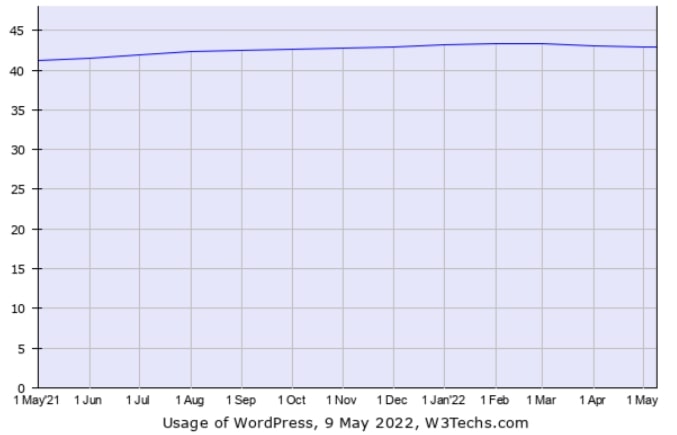
Looking at historical trends, WordPress usage has remained relatively steady over the past year, increasing from 41.2% in May 2021 to 42.9% in May 2022:

WordPress usage as of May 2022

Since 2019, the CMS has grown from being used by 32.7% of the top 10 million most-visited sites globally to 42.9%. This marks significantly greater growth than any other CMS.

According to data from BuiltWith, there are over 30,000,000 live websites currently using WordPress:

Alt text: WordPress usage statistics.

The countries with the most WordPress websites include:

  • United States (8,858,380)
  • United Kingdom (769,864)
  • India (375,206)
  • Japan (344,831)
  • Russia (344,656)
  • Germany (342,829)
  • Canada (291,522)

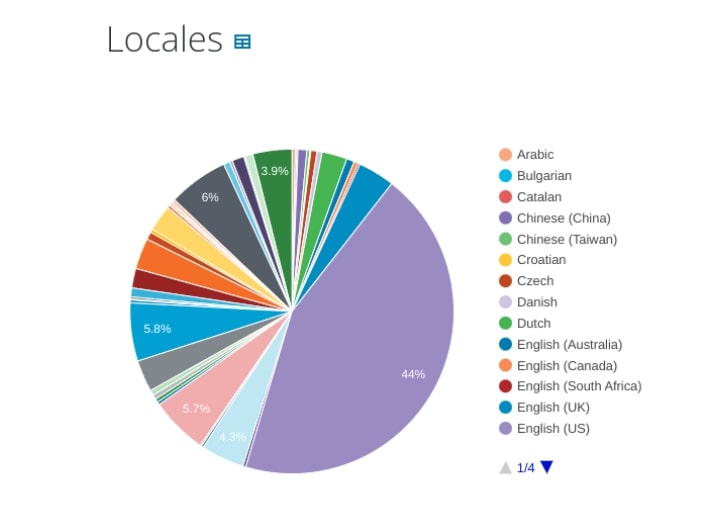
The top locales for WordPress are English (44%), Spanish (6%), and Japanese (5.8%):

WordPress market share by location

Of the top one million sites, WordPress accounts for 35.41%. It also powers 33.53% of the top 100,000 websites and 33.54% of the top 10,000.

Market Position and Popular Sites

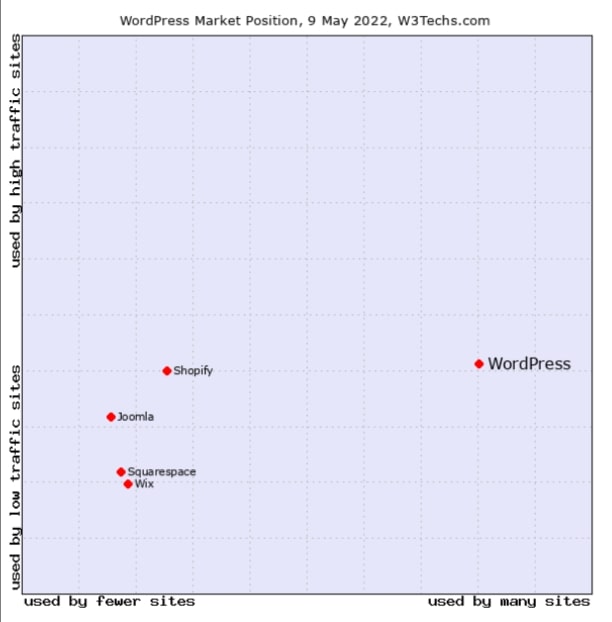
W3Techs data shows that, compared to other CMSs, WordPress’ market position in terms of popularity and traffic is used by many more sites, including those that receive high levels of traffic:

WordPress market position

Platforms such as Joomla, Shopify, and Squarespace are used by fewer sites. They also tend to be more common for low-traffic sites compared to WordPress.

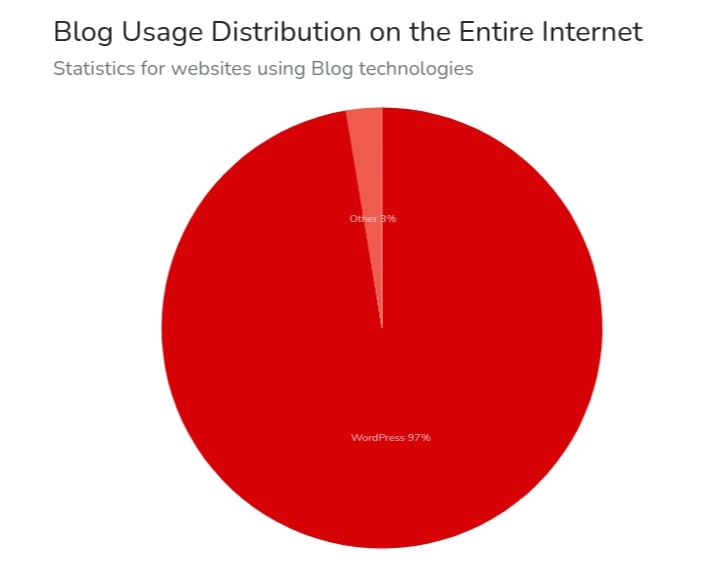
WordPress originally started as a blogging platform. Therefore, it’s unsurprising that many site owners still turn to the CMS as their go-to blogging solution. This becomes more evident when you look at the numbers. In fact, a whopping 97% of blogs are built using WordPress:

WordPress usage for blog websites

There are several well-known websites currently using WordPress. These include:

There are also some websites that only just recently started using WordPress. In addition to Alibaba.com, this includes Dell.com, Bloomberg.com, and Newegg.com.

What to Expect for the Future of WordPress

Given WordPress’ widespread popularity and versatility, it’s fair to expect its market share and growth to increase over the next few years. WooCommerce, acquired by Automattic in 2015, has helped give WordPress a competitive edge.

According to BuiltWith, WooCommerce Checkout powers nearly one-third of all e-commerce websites. As more businesses move online, it’s likely that an increasing number of site owners will turn to WordPress as a user-friendly, e-commerce solution.

Contributing to its growth is WordPress’ recent pivot to Full-Site Editing (FSE), which has made it easier than ever to build and customize websites on this platform. The Gutenberg block editor has been making significant strides in becoming a more intuitive site-building platform for developers, designers, and beginners.

In just 20 years from its first inception, WordPress has demonstrated exponential growth that is far greater than its competitors. As it continues to gain popularity, we can expect to see more small businesses and large organizations using it to build their websites. We can also expect to see more people becoming involved in the WordPress community.

Learn What WordPress Can Do For You

As a website owner, choosing a reliable and powerful CMS is imperative. As one of the most widely used and flexible options on the market, WordPress is a solution worth considering.

As we discussed in this article, WordPress currently holds the majority of CMS market share, powering nearly 43% of all websites. From simple blogs to sophisticated e-commerce sites, it is a robust platform to help site owners of all experience levels create a beautiful, functional website.

Are you ready to see what WordPress can do for you? Then, check out our WordPress managed hosting services to learn how our solutions can help you get started with your new site in no time!

Do More with DreamPress

DreamPress Plus and Pro users get access to Jetpack Professional (and 200+ premium themes) at no added cost!

Managed WordPress Hosting - DreamPress

The post WordPress Market Share: 2022-2023 & Beyond appeared first on Website Guides, Tips & Knowledge.


source https://www.dreamhost.com/blog/wordpress-market-share/

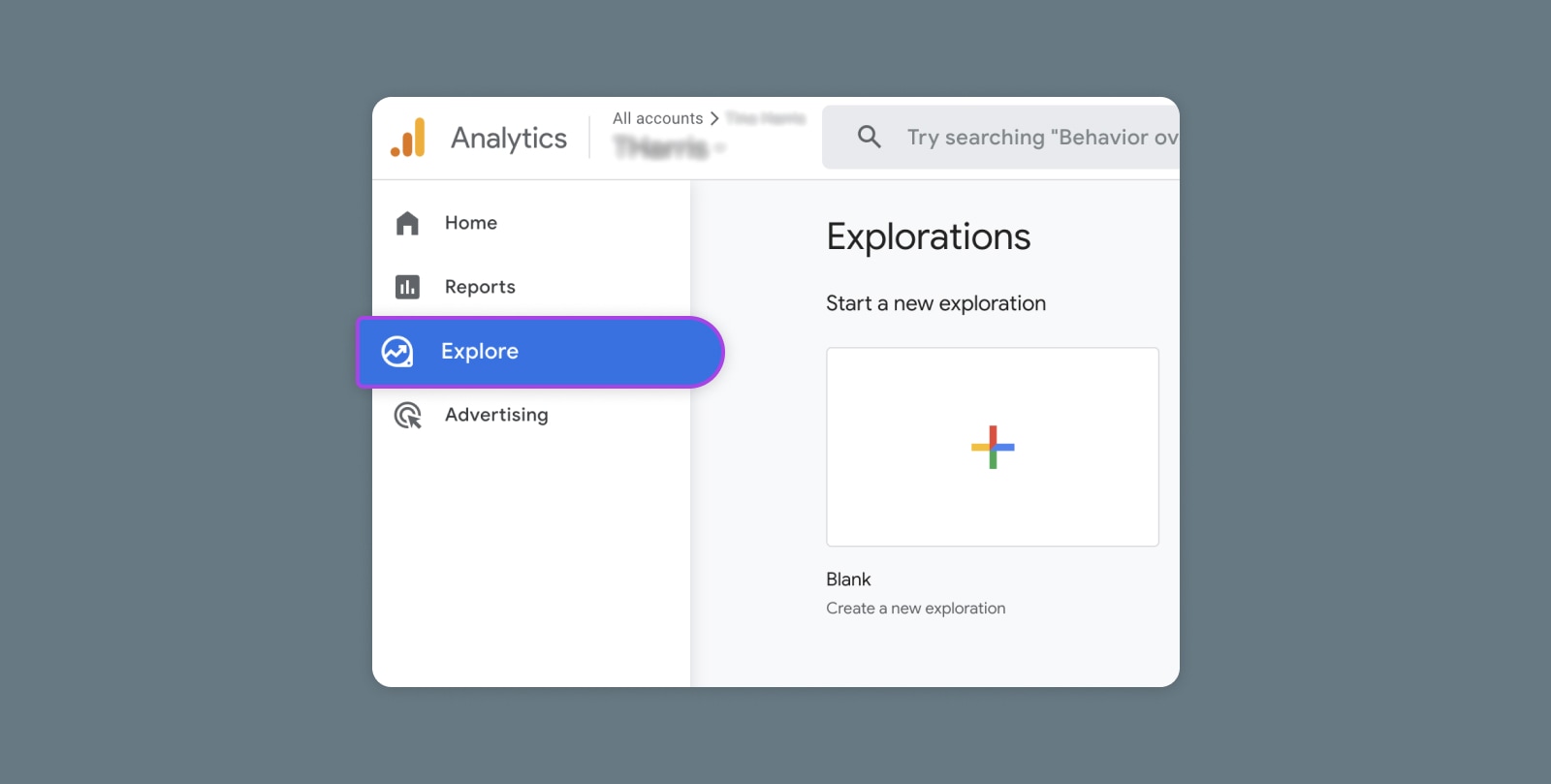
Creating and Mastering GA4 Explorations

In the switch from Universal Analytics (UA) to Google Analytics 4 (GA4) — which will go fully into effect July 2023 — a lot of things have...