Monday, 19 July 2021

11 Ways Your Online Store Can Compete with Mega-Retailers (And Win)

It’s hard to grasp the sheer scale of mega-retailers such as Amazon. In 2020, Amazon alone took in almost 38% of US online sales (the next closest competitors were Walmart with 5.8% and Ebay with 4.5%). Even more staggering? Amazon’s net sales totaled $96.15 billion in Q3 2020. It’s safe to say that Amazon’s success is unparalleled.

Launching an e-commerce store that can compete with those numbers is, erm, difficult.

Fortunately, your online store doesn’t have to beat the likes of Amazon or eBay to be successful. What it needs to do is find a share of the market for itself and learn how to thrive within that retail niche. That way, you’ll be able to scale your store and increase its earnings organically over time.

In this article, we’re going to talk about 11 strategies you can implement to compete with e-commerce giants such as Amazon. We’re not saying you’ll end up making more money than Jeff Bezos, but every extra dollar helps, so let’s get to it!

1. Focus on Niche Products and Services

Wherever it is that you live, chances are there are a handful of online megastores where you can buy almost anything you want. Those types of stores excel at casting a wide net to catch as many buyers as possible. The problem is that they often can’t compete with specialized sites when it comes to offering more niche items.

For example, while a big box store might have hundreds of generic mugs for sale, you could offer to create custom designs, thereby filling a more specific niche.

Personalization options are a way to differentiate products.  

The main takeaway here is that if you’re starting out, the smart move is not to try and compete at every level. What you need to do is have a specific buyer persona in mind and focus on those buyers, offering the products and services they want. In many cases, filling a particular retail niche may even enable you to command higher prices, so it’s a win-win scenario.

2. Offer Subscription-Based Services

Offering subscriptions is an excellent strategy because it allows you to create consistent, recurring income. Plenty of big-box stores offer subscriptions. Amazon, for example, offers the incredibly popular Prime service.

Amazon Prime is the world’s most famous subscription service.

Even more niche stores, such as Humble Bundle, understand the power of subscriptions. On top of offering cheap video games, this store enables users to pay a set price each month for more stuff.

Humble Bundle offers a set price for access to hundreds of games.

Just because you run an online store doesn’t mean that all your income has to come from product sales. You can also offer subscriptions for monthly freebies, discounts in your store, access to exclusive deals, and more. Keep in mind, though — whatever angle you decide to take with subscriptions, it should synergize with your store’s products.

Competing Online Just Got Easier

Join our monthly newsletter for tips and tricks to build your dream website!

3. Provide Better and/or Cheaper Shipping Options

Competing with massive online stores when it comes to shipping can be difficult. They move such large volumes of products that they can get access to discounts and perks that small online stores can’t hope to match.

What you can do to compete is offer better-quality shipping options for your particular region. In most cases, smaller stores will focus on specific cities or just one country. That means you have the edge over more global stores, since you may be able to offer faster shipping times and a more personalized experience throughout the process.

In some cases, you might even have access to cheap shipping options you haven’t considered. For example, there are a lot of local startups focused around product deliveries. Partnering with them may enable you to offer ultra-fast low-cost shipping, depending on where your customers are located.

4. Excel When It Comes to Customer Service

The level of customer service you offer can make or break your store. People might be willing to take a chance and buy from a retailer they don’t know, but if you treat them poorly, you can be sure they won’t come back.

Some of the most common service-related mistakes small retailers make include:

  • Taking too long to answer customer questions
  • Offering cookie-cutter answers to customers
  • Giving inaccurate shipping estimates or sending packages late

Just to drive home how vital the customer experience is, keep in mind that happy clients are more likely to send new business your way. Likewise, retaining customers is much cheaper than collecting new leads.

In other words, a little more time spent on ensuring better service can pay off for years to come.

5. Optimize Your Online Store in Every Way You Can

The difference between one and three seconds may seem insignificant, but it’s not — particularly if you run an online retail store. Studies show that if your website takes more than a few seconds to load, people start getting impatient. Amazon alone estimates that a one-second delay in its loading times could cost up to $1.6 billion in lost sales over the course of a year.

In other words, your website needs to be fast. There are a lot of factors that can hurt its performance, such as:

  1. Using a hosting plan that doesn’t offer enough resources.
  2. Failing to optimize your images.
  3. Adding too many scripts to your pages.
  4. Not using browser caching.

Reasons two through four fall under the category of poor website optimization.

But it doesn’t matter how much effort you sink into optimization if your web host isn’t up to par. What we recommend is that you measure your site’s loading times, try to optimize them, and consider moving to a new host if you’re still not seeing the results you want.

Shared Hosting That Powers Your Purpose

We'll make sure your website is fast, secure, and always up so you can compete online.

6. Use Social Media to Promote Your Store and Its Products

The largest online retailers can spend millions on advertising each day. At the same time, so many people are familiar with them that word of mouth alone is often enough to get them plenty of sales.

“Mom-and-pop” online stores, on the other hand, need to be much savvier when it comes to marketing. Since you can’t compete in terms of budget, the easiest way to get attention to your store is via social media. This involves:

  1. Being active on several social media platforms.
  2. Knowing how to engage with your audience and reach new users.
  3. Connecting with influencers who can promote your products.
  4. Using non-traditional forms of content, such as infographics, for higher engagement.

The main takeaway is that small businesses need to make more of an effort to get online conversions. However, if you know which platforms to focus on and you have a good grasp of social media, these approaches should yield excellent results. Also, keep in mind that it might be worthwhile to hire a social media professional if you’re not as savvy in this area, as it’s essential to your store’s success.

7. Work on Your Email Marketing Strategy

There’s a reason almost every single website and online store wants your email address. They understand that it’s a powerful tool to drive sales and increase engagement. The average person checks their email 15 times a day, and nearly 60% of users say that the messages they get influence their purchases.

More importantly, email marketing is incredibly scalable, even for a small store. The more addresses you collect, the more sales you can drive via campaigns. What’s more, most email marketing platforms enable you to send an almost unlimited number of messages for a low price.

That’s not to say that you should spam your subscribers, however. In fact, you should only contact them when you have something of value to offer, such as product discounts, important news, and so on.

Amazon sends targeted email deals.

If you’re already using email marketing but you want to get more out of it, then it may be time to review your strategy.

8. Consider Streamlining Your Product Catalog

It stands to reason that the more products you offer, the more sales you’re likely to get. The problem is that managing a huge catalog of items can be much more complicated than you’d imagine. For each product, you have to consider sourcing, storage, shipping costs, marketing materials, and more.

For massive online stores, that isn’t a problem. They’re all about volume, and they can throw all the resources they want at the above tasks. However, the more strapped you are for money and personnel, the more that overextension can hurt you.

Fortunately, it’s entirely possible to run a successful online store that offers a limited catalog of products. SlimFold, for example, built an entire e-commerce experience around a handful of unique wallets.

Alt text: SlimFold has a streamlined product offering.

Offering a limited catalog ties in perfectly with targeting a specific niche of users. As long as you know there’s demand for the products and services you offer, you can limit them to give a feeling of exclusivity and test higher price points.

9. Offer Multiple Payment Options

When it comes to online purchases, most people rely on credit cards. However, there are a lot of payment processors you can use, including PayPal, Stripe, Amazon Pay, and many others.

You’ve probably noticed that a lot of the major online retailers offer several payment options during their checkout processes. This enables the shopper to pick whichever choice they feel most comfortable with, so the store doesn’t lose out on any potential purchases.
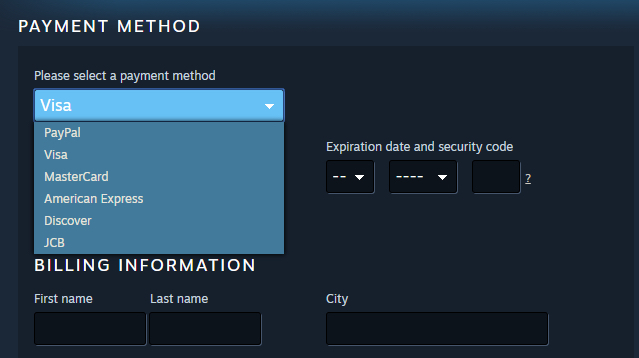
Large retailers offer many payment options.

For smaller online stores, dealing with a lot of payment gateways can be a hassle. It means that your earnings will come in via multiple channels, you’ll have to set up accounts for each one, and you’ll need to make sure you’re in compliance with various policies.

However, despite those downsides, offering multiple payment options is still the way to go for most online stores. At the very least, you should enable users to pay via PayPal and the most popular credit cards — just to cover your bases.

10. Study the Competition Within Your Niche

So far, we’ve focused mostly on how to compete with a big box retailer. However, it’s crucial that you don’t lose track of other smaller stores within your niche since they’re also competitors.

Studying your direct competitors so you can provide a better experience than they do is incredibly important. After all, smaller retailers can be much easier to overtake than e-commerce giants. You can compete with these competitors in a number of ways, such as:

These are similar to some of the tactics we’ve discussed so far. Only this time, you’re competing against another David instead of Goliath.

11. Offer Only the Best-Quality Products

Since you can’t generally compete with mega-retailers in terms of inventory, pricing, or shipment, you need to focus on quality. We’ve already talked about providing top-notch customer service, but making sure the products you offer are as good as they seem is also essential.

These days, online megastores such as Amazon are getting overrun with cheap product knockoffs. That’s causing a real headache for the consumer, who doesn’t understand why they’re getting low-quality items from a retailer they know and trust.

This opens up the opportunity for smaller online stores to attract those customers. In many cases, people who want high-quality items will turn to more specialized online stores. If you can guarantee that your products are the real deal, and you offer a solid return policy, this can be one of your best ways to get more sales.

Slay the Retail Giant

When it comes to an e-commerce business, you need to be realistic about your expectations. Competing with mega-retailers when it comes to inventory or pricing is just about impossible. However, there are plenty of small business owners who thrive, despite all the competition they face.

The key is to understand that although you can’t compete in some categories, there are plenty of areas where smaller companies can get a real edge. For example, smaller operations can provide much more personalized customer service or focus on product quality in a way that a big online retailer can’t.

What do you think is the best way for online stores to compete with giants like Amazon or Walmart? Share your thoughts and ideas with us in the DreamHost Facebook Group and let’s discuss!

The post 11 Ways Your Online Store Can Compete with Mega-Retailers (And Win) appeared first on Website Guides, Tips & Knowledge.


source https://www.dreamhost.com/blog/ways-online-store-can-compete-megaretailers/

Wednesday, 14 July 2021

11 Secrets to Making a Successful Website

Whether you’re a writer looking to reach a wider audience, a boutique manufacturer needing to boost sales, or you’re someone who just wants to make money online — you’re going to need a website. And not just any website — a great website.

Unfortunately, the World Wide Web has been saturated with sites for some years now.

Standing out. Making your mark. It’s not easy.

But here at DreamHost, we know a fair bit about websites and what makes them work — so here are our 11 secrets to making a successful website.

  1. Defined goals
  2. A good domain name
  3. Quality web hosting
  4. A clear description
  5. A top-notch CMS
  6. A great e-commerce platform
  7. Engaging web design
  8. SEO optimization
  9. High-quality content
  10. Using Google Analytics
  11. A site maintenance plan

1. Define your goals

Before you do anything else, you need to decide what you want to achieve from this website.

  • Is it going to be an e-commerce website that you use to sell products?
  • Are you looking to promote a service?
  • Do you want to make money via affiliate links?
  • Are you simply after a platform to share your thoughts and ideas?

It can be hard to change the direction of an established website. Make sure you know what type of website you want to create and what you need to get out of it.

2. Choose a good domain

Picking a good domain name is easier said than done. It’s also seriously important since it’s tricky to change it once you’ve started establishing your site and brand. (Yes, you can migrate to a new domain, but that comes with all sorts of complications.)

So what is a good domain? What does a good domain look like?

  • It is your brand name or includes your brand name.
  • It’s memorable.
  • It’s easy to spell.
  • It’s short (ideally under 14 characters; but the shorter, the better).
  • It’s free of numbers, hyphens, or other unusual characters.
  • It has a recognized, trustworthy extension (.com is the ideal).

It can also be a good idea to choose an SEO-friendly domain that includes one of your most important keywords.

3. Get secure, quality web hosting with good tech support

It can be tempting to skimp on web hosting and choose the cheapest service you can find. Don’t do this.

A cheap web host can cost you in other ways: excessive downtime, slow site speeds, limited or non-existent support.

It’s not worth it.

If you’re serious about making your website a success, invest in quality web hosting you can rely on. You won’t go wrong with DreamHost web hosting.

4. Include a clear description of your business

This is something a lot of companies get wrong. They know their industry and their business, inside and out. That’s great. But it often means they forget how to describe it to people that don’t.

Ideally, you should be able to sum up what you do in a couple of sentences. This summary should be displayed prominently on your homepage. And anyone should be able to read it and understand it.

If you have any doubts, ask someone who knows nothing about what you do what they think. Better yet, enlist the help of a professional copywriter.

5. Use a top-notch content management system

A content management system (CMS) is where you’ll manage your website’s pages and content. The right one can make this quick, easy, and fun. The wrong one can be the source of endless headaches and can even limit what you’re able to do.

Good content management systems allow you to build pages and posts on a site with no prior knowledge of coding. They cut down the barrier to entry and enable anyone to create their own site.

But how do you know which is the right one for you?

The following questions will help you decide:

  • Do I want a basic website with no frills?
  • Do I want to be able to build the website in the future to have more features?
  • What’s my budget?
  • Will I want to add the ability for a website visitor to buy products in the future?
  • Am I happy to pay ongoing costs, or do I just want to pay a one-off fee?
  • Do I need to integrate with other parts of my business (such as a lead generation tool or a payment platform)?
  • Is it SEO-friendly?
  • Will it scale with my business?
  • Can I use a website builder to make the design process easier?

Depending on what you want to use the CMS for, you may have other questions, but these basic ones should set you off on finding the right content management system for your needs.

6. Choose a great e-commerce platform

If you know that you’ll want to sell products on your site, you need to know what e-commerce platform you need to choose. You can choose from many platforms, but not all of them are built to scale or fit for your purposes. As with most things in life, you get what you pay for.

If you’re running a business website, you need to make sure that the platform you choose is reliable and sturdy. You don’t want to deal with customer complaints because you chose a platform that can’t deliver.

Before selecting a platform, ask yourself the following:

  • Is it SEO-friendly? While there are many cheap and easy-to-set-up e-commerce platforms, not all of them are particularly SEO-friendly.
  • Is it mobile-friendly? We live in a mobile-first world, and if that platform is even a little bit clunky, you’re going to be losing out on revenue.
  • Is it a trusted and secure platform? One of the most important considerations for customers is that their details will be safe when purchasing. Your platform needs to be fully secure, and it needs to communicate that to potential customers.
  • Will it scale? We all have high hopes for our businesses, and while not all succeed, a fair few do. When choosing an e-commerce platform, ensure that it will scale with your online business.
  • How do the systems work? One of the critical areas to investigate is how well the platform deals with product and order management. You need it to be swift so that you aren’t wasting time on the back end, and you can get on with delivering the best service to your customers.

Your Online Store Deserves WooCommerce Hosting

Sell anything, anywhere, anytime on the world's biggest e-commerce platform.

7. Create a beautiful, engaging, accessible website design

When you imagine a design that matches usability, one company usually springs to mind: Apple. They have managed to combine both of these into a wildly successful business.

Users appreciate good design, and when it’s combined with solid usability, you have a winner. A site that people want to revisit. A site that people want to buy from.

Google has always said that you need to create websites with the end-user in mind — and it’s more true today than it’s ever been.

Here are a few tips for creating sites that ooze design quality.

  • Know your target audience and design accordingly — what features would they want, and how design-savvy are they?
  • Don’t skimp on cost. With design, you get what you pay for. Don’t try to cut corners. Use a professional, experienced designer (like team of pros at DreamHost).
  • Look at the competition. Find some sites in your niche that perform well and study them. Google will rank sites based on niches, and design is crucial. If your competitors’ websites are winning with simplistic colors and designs, take notice. Then make yours better.

8. Optimize for search engines

One of the simplest, fastest ways to help make your site successful is to optimize it for search engines. While search engines might be smart — and every day they get better at understanding the meaning and context of web pages, their content, and users’ intent — they still need us to help them along.

In most cases, the first step to optimizing for search engines is keyword research. This will help you identify the sort of keywords you should be targeting through optimization.

Popular keyword research tools include:

If you want to take a more sophisticated approach to keyword research, try Semrush. It’s a great tool for advanced digital marketers, and it’s accessible to people with less experience too. We love it so much, we’ve set up a free 14-day PRO trial for our readers!

SEMrush

Semrush’s keyword research section works similarly to most other keyword research tools; however, in addition to keyword suggestions, search volume, and difficulty scores, you also get global volume data, keyword variations, and questions linked to your starting keyword. You also get insights into the current state of the SERPs.

How to Choose Which Keywords to Target

The right keywords to target can generally be determined by three things:

  1. Search volume
  2. Difficulty/competitiveness
  3. Relevance

Ideally, you want to target keywords that lots of people are searching for (how many searches you can realistically expect this to be will depend on your industry), that have low competition (which increases the odds that you’ll be able to rank), and that, of course, are relevant to your site!

How to Optimize for Target Keywords

The main places for including your target keywords are:

The title tag

This forms part of the snippet of information that appears in the search results. For example, this is the title tag for the DreamHost homepage:

<H> tags

H tags are header tags. You might know them as H1s, H2s, H3s, and so on. They are used to help organize the information on a page, particularly in terms of hierarchy.

While search engines use all the text on a page for ranking, H tags have extra weight behind them — particularly the H1 tag. Include keywords in them where you can (but never, ever be spammy about it!).

On-page content

Search engines use all of a page’s content when determining its subject matter and what it should rank for. It goes without saying that keywords should be included here. Just be tactical about how you do it.

Use words and phrases naturally. Use permutations where possible. Consider entities. And most importantly of all, write for users, not search engines.

If you need more help with optimizing your website, consider adding SEO toolkit to your hosting plan for $4.99/month. It’ll help you improve your search engine rankings and drive more customers to your site with its suite of DIY tools, helpful analytics, and a step-by-step SEO plan.

9. Create high-quality content

It’s hardly a secret that websites with high-quality content have a better chance of performing well than those with poor-quality content.

Great content should be informative, well written, and easy to understand. It should be formatted in a way that guides the user through the copy.

But “create high-quality content” sounds somewhat subjective, doesn’t it?

It’s not quite as subjective as you might think. Here are some ways you can ensure you’re writing high-quality content for your niche.

  • Invest in good writers — as with many points in this guide, cutting corners won’t help your website succeed in the long run. Our SEO marketing service can help.
  • Have experts write your content — Google has been working towards making sure only the best and most accurate content reaches the top of the search results. Middle-of-the-road content isn’t going to cut it for much longer.
  • Conduct deep research — you need to find out what your customers want, not what you think they want. Many websites miss this point entirely. If you don’t satisfy your users’ needs, you can’t really call your content high-quality.

It’s not just about the words — you need to make your content sing. Make sure it appeals to different users. If it’s right for your target audience, then introduce videos, images, infographics, and charts.

10. Track your progress with analytics

It’s tricky, if not impossible, to know whether your site is a success if you’re not tracking your progress. While many tools allow you to track your website and even spy on the status of others, there is arguably no better website tracking tool than Google’s own Analytics.

To get started with Google Analytics, you will need to:

And that’s pretty much it. You can create filtered views of the data to help you hone in on specific data elements, but the above is all you need to do for Google to start gathering extremely detailed data that will enable you to assess the performance of your site and adapt your strategy accordingly.

11. Set up a site maintenance plan

What do you do once your site’s up and running? Should you sit back, relax, and let the visits/leads/money roll in?

No.

Depending on your goals, you may be able to slow down. But you can’t just forget about your website. Things will go wrong.

Instead, implement a maintenance plan, like what we offer as part of our DreamCare service. Your maintenance plan should include a list of periodic must-dos and when you will do them. The most important will likely be:

  • Running security scans
  • Backing up your site’s data
  • Checking Webmaster Tools, primarily for any glaring errors that have gone unnoticed

Another thing we’d advise is to run Hotjar or another tool that monitors user behavior. While you can use its findings to gain a deep understanding of your website’s user experience (UX), you can also use it periodically to pinpoint specific issues or points of contention.

Get Our Best Tips to Boost Website Traffic

Whether you need help optimizing a landing page, crafting the ideal social media strategy, or creating buyer personas, we can help! Subscribe to our monthly digest so you never miss an article.

Your New Website Is Waiting

As you can see, creating a successful website isn’t quick, and it isn’t particularly easy — but knowing the secrets to a successful website will help.

Get started with these key takeaways.

  1. Define your goals. Decide exactly what you want your website to achieve.
  2. Choose a good domain name that’s relevant, memorable, short, and has a trustworthy extension.
  3. Invest in quality web hosting that’s secure, with great tech support.
  4. Describe your business clearly on your homepage, and anywhere else it’s relevant.
  5. Use a quality content management system: one that’s robust and easy to use.
  6. Choose a good e-commerce platform that can grow with your business.
  7. Create a beautiful website design that’s one step above your competitors.
  8. Optimize for search engines. Ensure they understand what your site’s about and the terms it should rank for.
  9. Create high-quality content; substandard content doesn’t rank.
  10.  Track your progress, starting with Google Analytics.
  11.  Create a site maintenance plan, including backing up data and checking Search Console.

Ready to get started with your website? If you’re starting from scratch, we can help with our Pro Services. Our expert team can design, build, manage and market your website — everything you need to launch yourself or your brand online. Learn more about what DreamHost can do for you here.

The post 11 Secrets to Making a Successful Website appeared first on Website Guides, Tips & Knowledge.


source https://www.dreamhost.com/blog/secrets-to-successful-website/

Friday, 9 July 2021

Web Accessibility Guide for Designers (6 Key Tips)

As a website designer, you play a significant role in a website’s accessibility and inclusiveness.  Many design elements, from typography to media, can create barriers for those with disabilities. With so many items that need to be addressed, it may feel like an impossible task.

Fortunately, there’s a lot of guidance available for designing a website that’s accessible to all. By giving careful attention to a few key areas, you should be able to include accessibility in your design process without breaking stride.

In this guide, we’ll introduce you to the concept of web accessibility and its importance. Then we’ll cover six key areas to keep in mind when designing an accessible website. Let’s get started!

An Introduction to Web Accessibility

Web accessibility means that all aspects of a website are usable by people with disabilities. Without it, much of the information on the internet would be inaccessible to a large percentage of the population. For online business owners, this would also equate to losing out on potential sales.

As of 2019, nearly 60% of the United States population with disabilities lived in a home with internet access. That translates to a lot of people who rely on accessible design to use the web fully. People with disabilities also tend to adopt technology at lower rates, meaning they may not have an option for which device to use when accessing a website.

The World Wide Web Consortium (W3C) developed the Web Accessibility Content Guidelines (WACG) to provide a set of standards to developers, designers, and others responsible for creating and maintaining content on the web.

The accessibility guidelines are organized into four principles, sometimes referred to by the acronym POUR:

  1. Perceivable: Website components must be presented in a way that users can perceive, regardless of disability.
  2. Operable: Navigation and operation must not require input actions that a user cannot perform.
  3. Understandable: Users must understand how to use and navigate a website and the content on it.
  4. Robust: Content needs to be compatible with current and future assistive technology.

These principles can seem overwhelming and even somewhat vague. However, there are concrete steps you can take to ensure that your website is accessible to everyone.

Get an Inclusive Design You’re Proud Of

Our designers will create a gorgeous website for your brand with usability guidelines and ADA compliance in mind. No accessibility problems here!

Web Accessibility Guide for Designers (6 Key Tips)

Having touched on how vital web accessibility is, let’s look at six areas to consider when designing an accessible website.

1. Make Visual Design Elements Readable

Typography is a fun area to showcase your creative flair, but the primary purpose of your website’s text is to convey information. There are a few guidelines to be mindful of when working with typography.

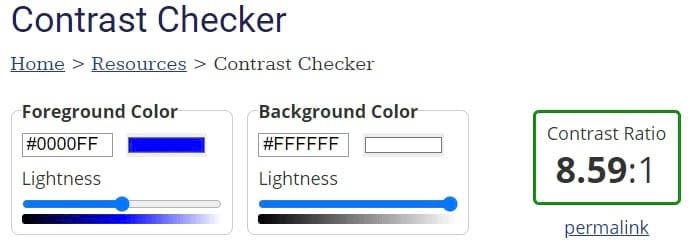
First, you’ll want to think about the contrast between the text and the background. Contrast is expressed as a ratio, and per WCAG guidelines, the minimum contrast is 4.5:1 for normal text and 3:1 for large text.

There are several tools you can use to test color combinations. WebAIM’s Contrast Checker is one of these.

WebAIM’s contrast checker tool.

Line height and letter spacing also come into play where accessibility is concerned. To keep text readable, W3C provides the following guidance:

  • Line height must be at least 1.5 times the font size.
  • Spacing between paragraphs should be two times the font size.
  • Spacing between letters must be at least .12 times the font size.
  • Word space should be at least .16 times the font size.

Graphs are another way to present a lot of information in an easily understood format. However, if you’re only differentiating the elements by color, you could be shortchanging many people. In fact, there are about 3 million colorblind people worldwide who could be struggling with your content.

To be certain visual elements are understandable, consider using patterns as well as color in your graphs. When selecting designs, we recommend choosing ones that are different enough from each other. For example, lines or dots are easily discerned, whereas lines of varying thickness may not be.

2. Organize Content for Easy Understanding

No matter what type of website you’re designing, chances are there is a lot of text. You can improve accessibility by structuring content in a way that’s easy to skim and understand.

First, most users will appreciate you breaking your text up into short paragraphs. People often aren’t reading deeply on the web, and shorter sections are easier to scan through.

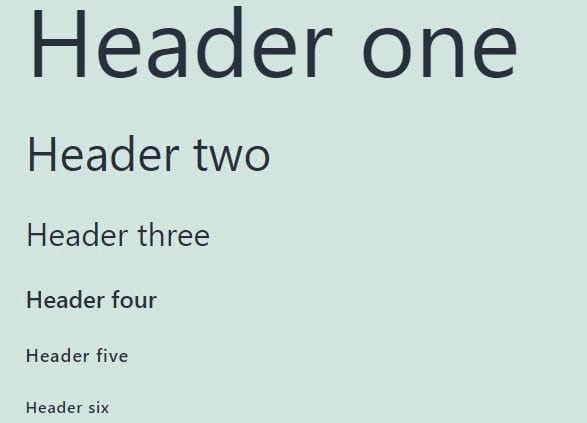
Headings are also crucial to scannability. Each heading should accurately describe the content beneath it and follow a logical hierarchy. This means using larger headings first and progressively smaller ones as you cover more specific information.

Using appropriate markup for your headings can make it easier for screen readers to read and navigate your content. In HyperText Markup Language (HTML), you’ll use tags <h1> down to <h6> to create hierarchical headings to break up your text.

Headings arranged hierarchically from one to six.

When adding links to your content, be sure the anchor text is descriptive enough that readers will know where clicking on it will take them. Also, it’s smart to mention if the link will open in a new window. A window opening unexpectedly can cause issues for screen readers and confuse the user.

You should also let your users skip through the content without using a scroll wheel or repeatedly pressing an arrow key. This can be as simple as including a table of contents at the start of a blog post. You can also have a button that skips right to the main content of the page.

A ‘skip to main content’ button.

Next, we’ll explore some ways you can make interacting with your website easier.

3. Keep User Interface (UI) Elements Intuitive and Device-Independent

User Interface (UI) elements are anything on a website that visitors need to interact with to navigate, and they play a major role in the overall User Experience (UX). UI elements can include scrollbars, dropdown menus, and notifications.

For a website to be considered accessible, people using different devices need to be able to interact with these UI elements successfully. This means that device-independent design is crucial.

For example, some people are only able to use keyboards. To make it possible for them to navigate a webpage, you can include focus indicators to highlight buttons, links, and text fields when a user tabs through a page.

Anything on your website that can be interacted with should have a corresponding focus indicator. The appearance can vary from one browser to another, but they typically show up as a blue or white outline depending on the background color.

A focus indicator on the Google search page.

When adding focus indicators, you’ll need to define tab order. This order should be similar to how you read: top to bottom and left to right. You can test this by tabbing through your site.

Try to keep navigation and other menus in a consistent order throughout the website. These elements should also appear in roughly the same locations on each page because it makes them easier to memorize and quicker to use.

Touch targets are the areas a user taps when using a touchscreen device. When defining touch targets, you’ll want to be sure they’re large enough to be easily tapped by anyone. For example, people with neuromuscular disorders may lack the fine motor control needed to interact with a tiny target.

However, you also don’t want to create targets so large that they overlap with nearby elements. Tapping one button when you were aiming for another is enough to frustrate anybody.

Some users rely heavily on keyboard shortcuts. While you can define shortcuts for your website, it may not be the best course of action. Keyboard shortcuts are not standardized across the web, and any you create may conflict with the device someone is using. If you decide to add custom shortcuts, be sure to make this clear and provide guidance for using them.

There are some types of interactions that aren’t available on every device. For example, while pinch-to-zoom is convenient for mobile phones, it’s impossible on any computer without a touchscreen. Be sure content isn’t locked behind actions your users may not be able to perform. Provide multiple avenues to your information.

UX is a highly involved area of web design with a lot of moving parts. Therefore, you might consider adding a section to your style guide to help maintain consistency for all UI elements across your website.

4. Make Input Controls User-Friendly

Input controls are a subset of UI elements intended to accept input from a user. Examples include text fields, checkboxes, and radio buttons.

Forms can be tricky to design with accessibility in mind, but there are some guidelines to follow. You can start by labeling each field of your form. You might also include some example text in the field itself.

A lead generation form with labels and example text.

When laying out forms, we suggest using a vertical structure and placing each field on its own line. This makes navigating the form easier for keyboard-only users. On a related note, ensure that focus indicators are placed throughout the form.

You might break long forms into multiple sections as they can be overwhelming. You could also add a progress bar for people to know where they are in the process; this is likely to be appreciated by your users.

Finally, be sure to provide error messages that are clear and easy to understand. If possible, don’t clear the entire form when an error is made. It’s a good idea to include instructions for how to fix the mistake as well.

5. Include Multiple Ways to Enjoy Media

Media can add a lot to a website, but there are accessibility issues to be mindful of. Fortunately, you can ensure that any media you use is enjoyed by everyone.

First, some types of media are best avoided altogether. Flashing animation or pop-ups can potentially trigger seizures in some people. You may also want to skip scrolling text or animated content that can’t be paused. It can be difficult or even impossible for some users to absorb.

If you feel the need to include scrolling or animation, there are ways to make these elements more accessible. Be sure text moves slowly enough that visitors can read it easily. In addition, make it possible for users to pause the content and be clear about how to do so.

When you create video content for your website, you can include closed captioning for the deaf and hard of hearing. You should also add a text transcript of the video’s content for those using a screen reader.

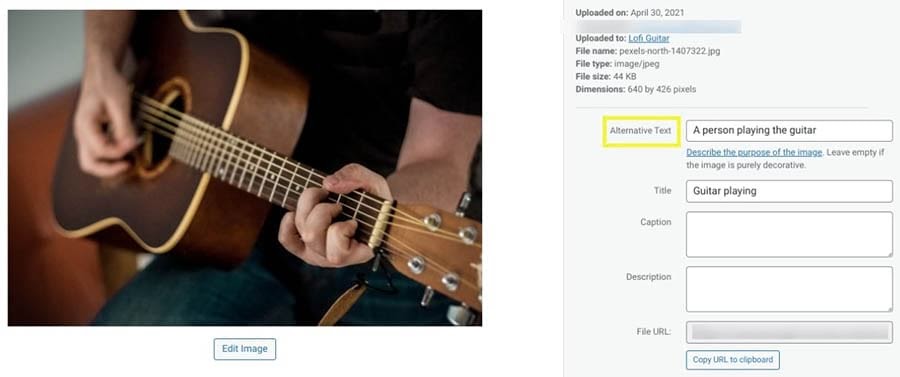
Visitors who use screen readers can sometimes have a difficult time with images on a site as well. To make it possible for these people to see what is happening in a picture, you can include alt text.

Adding alt text to an image of a person playing guitar.

Alt text is a description intended to show up when an image fails to load. However, screen readers also speak this text, so those with visual impairments don’t miss out.

When you’re writing alt text, you’ll want to be as descriptive as possible. You can base your description on what is featured in the image and the context of the surrounding content. Also, there’s no need to include the words “Picture of…” at the start of your alt text, as the screen reader will add that automatically.

6. Perform User Research and Testing

User research and testing probably aren’t as exciting to you as the design process, but they’re crucial for nailing accessibility. User research is best done early in the process to get a handle on who your users are and what they expect from you. You can do testing throughout the design process to help keep you heading in the right direction.

Thorough research ensures that none of your users will fall through the cracks and will help you develop a plan for designing your website. You might use focus groups or surveys to determine what users need from your website and how they intend to use it.

You’ll likely want to do some testing throughout the site-building process. You might try A/B testing at the wireframing stage when there’s still time to pivot. Once your site goes live, you could observe people using your website and ask for their thoughts as they accomplish specific tasks.

During research and testing, it’s best to gather a diverse group of participants. Including those of all abilities gives you a better chance of designing a site that works for everyone.

You can also perform testing yourself, such as trying to navigate your website using only your keyboard. For other elements of accessibility, you might want to try a plugin such as WP Accessibility.

The WP Accessibility plugin.

This plugin is free to use. It can help you correct a variety of accessibility issues.

DreamHost Takes Inclusivity Seriously

We regularly report on diversity, accessibility, and representation in the tech industry. Subscribe to our monthly newsletter so you never miss an article.

Let’s Make Accessibility Standard

Focusing on accessibility during the design process can result in a website that’s accessible to everyone. While it may seem like a lot to keep track of, the payoff is well worth the extra effort.

Keep the following in mind when you’re designing your website:

  1. Make visual design elements readable.
  2. Organize web content for easy understanding.
  3. Keep User Interface (UI) elements intuitive and device-independent.
  4. Make input controls user-friendly.
  5. Include multiple ways to enjoy media.
  6. Perform user research and accessibility testing.

Building an accessible website is a lot easier with the right web host in your corner. DreamHost’s Shared Unlimited hosting can ensure that you get off to a great start with a fast and reliable website!

The post Web Accessibility Guide for Designers (6 Key Tips) appeared first on Website Guides, Tips & Knowledge.


source https://www.dreamhost.com/blog/web-accessibility-guide-for-designers/
Wednesday, 7 July 2021

How to Fix the “Briefly Unavailable for Scheduled Maintenance” Error in WordPress

Is your website stuck in maintenance mode? During updates, WordPress displays a temporary notice on your site that reads: “Briefly unavailable for scheduled maintenance. Check back in a minute”. However, this message may sometimes remain visible after a few minutes, thus preventing visitors from accessing your site.

Thankfully, fixing this error doesn’t require technical expertise. The maintenance mode issue is one of the easiest WordPress problems to resolve — and prevent.

In this article, we’ll look at the main causes of the WordPress maintenance mode error. We’ll also show you a quick fix for this issue and share some tips to help you avoid the same problem in the future. Let’s get started!

Skip the Stress, Delegate to Us

Avoid troubleshooting when you sign up for DreamPress. Our friendly WordPress experts are available 24/7 to help solve website problems — big or small.

What the Maintenance Mode Error Is (And What Causes It)

When updating core software, themes, or plugins, WordPress puts your site in maintenance mode. It does this by creating a temporary .maintenance file in the root folder of your site.

Anyone who visits your site during the update process will see the following message:

The “Briefly unavailable for scheduled maintenance” message in WordPress

Typically this notice is only up for a few seconds. Once the updates are done, WordPress automatically deletes the .maintenance file, and the message disappears from your site.

However, an error may prevent your site from completing updates. When this happens, the maintenance notice stays up on your site, making it inaccessible.

There are several reasons your site might be stuck in maintenance mode:

  • You may have closed the browser window in the middle of an update.
  • You may have tried updating a lot of plugins at the same time.
  • The update script may have timed out due to a slow hosting server response or a low memory problem.

To resolve this issue, you may need to increase your site’s PHP memory limit. However, we’ll also be looking at two other simple fixes for this maintenance mode error.

How to Fix the “Briefly Unavailable For Scheduled Maintenance” Error in WordPress

Fortunately, there’s a very quick way to fix the WordPress maintenance error in WordPress. All you have to do is delete the .maintenance file from your site’s root directory.

First, you’ll need to connect to your site using a Secure File Transfer Protocol (SFTP) client such as FileZilla. Alternatively, you can access your site by logging into your web hosting account and using the file manager.

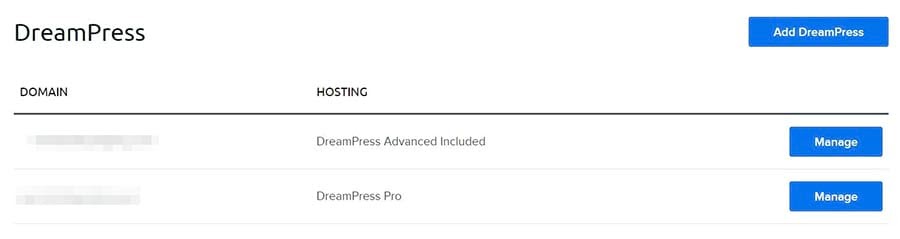
If you have a DreamHost account, you can navigate to WordPress > Managed WordPress in the sidebar, find your domain, and select Manage.

Accessing the file manager in your DreamHost account

On the next page, click on the Manage Files button in the Details section. In the file manager, open the folder with your domain name.

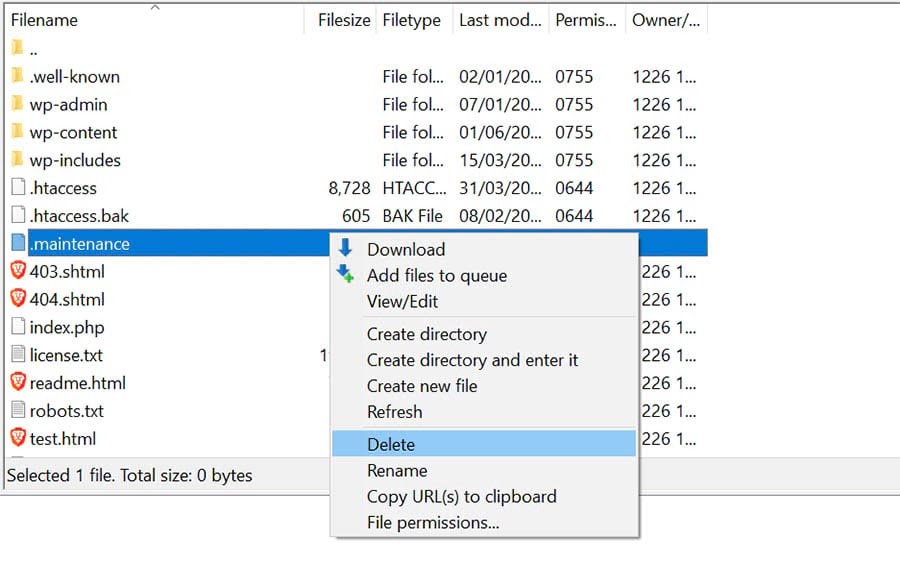
In your site’s root directory, open the public_html folder, locate the .maintenance file, and delete it.

Deleting the .maintenance file in your site’s directory


If you’re using an SFTP client and can’t see the file in the directory, it may be hidden. To find it, go to the menu and click on Server > Force showing hidden files.

Showing hidden files in FileZilla

Your site should now be out of maintenance mode. If you’re still getting the error message, you may need to update the wp-activate.php file.

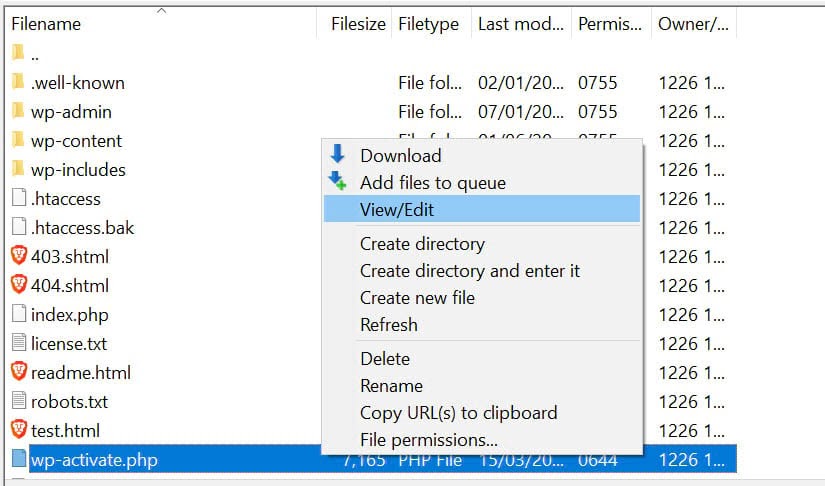
To do this, go back to your site’s root directory and find the wp-activate.php file.

Editing the wp-activate.php file in your site’s directory

If you’re connected to your site via your hosting account, you may be able to open and edit the file within the file manager. Alternatively, you can download it to your computer.

Open the wp-activate.php file and locate the following line of code:

define ('WP_INSTALLING', true)

Next, change the value “true” to “false” so that the code looks like this:

define ('WP_INSTALLING', false)

Save your changes and close the file. If you’ve been using the file manager in your hosting account, you don’t need to do anything else. If you’ve edited the wp-activate.php file on your computer, you’ll need to upload it to your site’s root directory.

Once you’ve completed the above steps, return to your site and refresh it. You should now be out of maintenance mode.

How to Prevent the Maintenance Mode Error

When your site gets stuck in maintenance mode, people are unable to view your content. Thus, if you fail to notice the problem straightaway, you may lose potential conversions.

Fortunately, there are several steps you can take to prevent this error in the future:

  • You can update your plugins and themes one at a time. While updating plugins in bulk saves you a bit of time, it can lead to conflicts and errors during the process.
  • You can upgrade your hosting plan. It’s a good idea to choose a managed WordPress hosting plan for enhanced site performance and fewer technical issues.
  • You can check the compatibility of your themes and plugins with your current version of WordPress. For this, you may want to set up a staging site so you can test new themes and plugins on an offline platform before making your changes live.

Moreover, you may want to avoid closing your browser until all updates are complete.

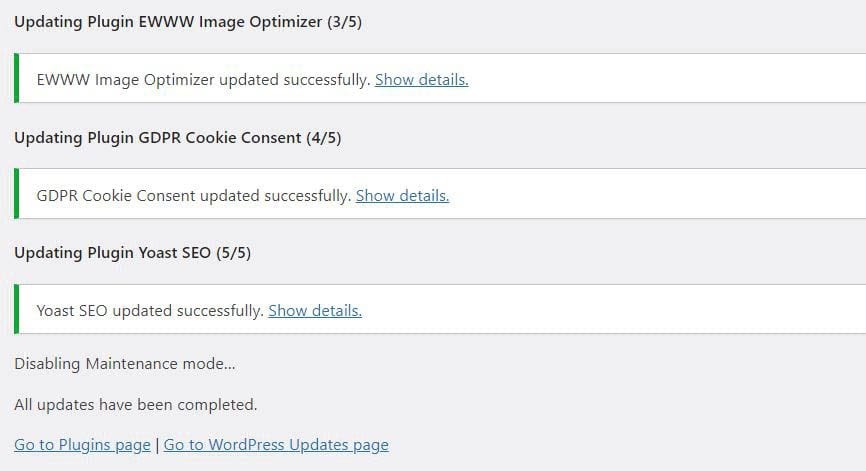
Updating plugins in WordPress

If you exit the browser before then, WordPress won’t be able to update and remove the .maintenance file. You’ll know that updates are ready once you see the “All updates have been completed” status, as shown in the screenshot above.

We also recommend that you check your site when running updates. This way, if the maintenance error does crop up again, you’ll be able to spot it and get it fixed immediately.

How to Customize the Maintenance Mode Notice

You can also avoid the default WordPress maintenance notice by using a plugin. This will enable you to manually put your site in maintenance mode before running any updates. You’ll also be able to customize the message.

One popular tool you can use is the SeedProd plugin. After installing and activating the plugin, navigate to SeedProd > Pages in your admin dashboard. Then click on Set up a Maintenance Mode Page.

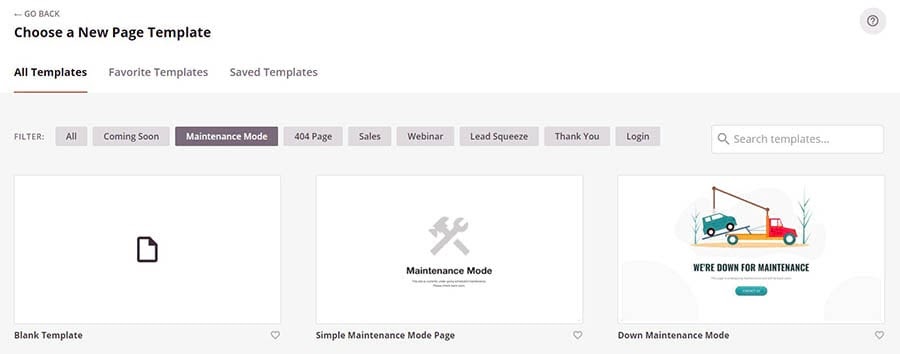
Creating a maintenance mode page using the SeedProd plugin

Next, you can choose a template and customize it to your liking. Note that some templates and features are only available in the premium version of the plugin.

Selecting a template for the maintenance mode page in SeedProd

Every time you need to run updates, you can head to SeedProd > Pages and simply activate your maintenance mode page. This will replace the default WordPress maintenance message.

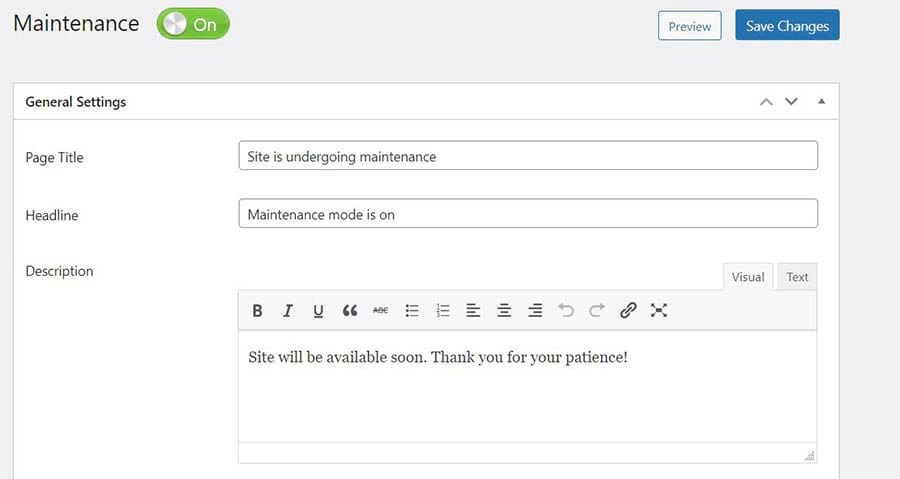
Another option you may want to consider is the Maintenance plugin. Install and activate the plugin, then click on Maintenance in your dashboard and edit the text you want to be displayed on your maintenance page.

Customizing your maintenance mode notice using the Maintenance plugin

You can also choose a premium pre-built theme. The plugin also lets you select pages and posts that you want to exclude from maintenance mode. Once you’re done, click on the blue Save Changes button.

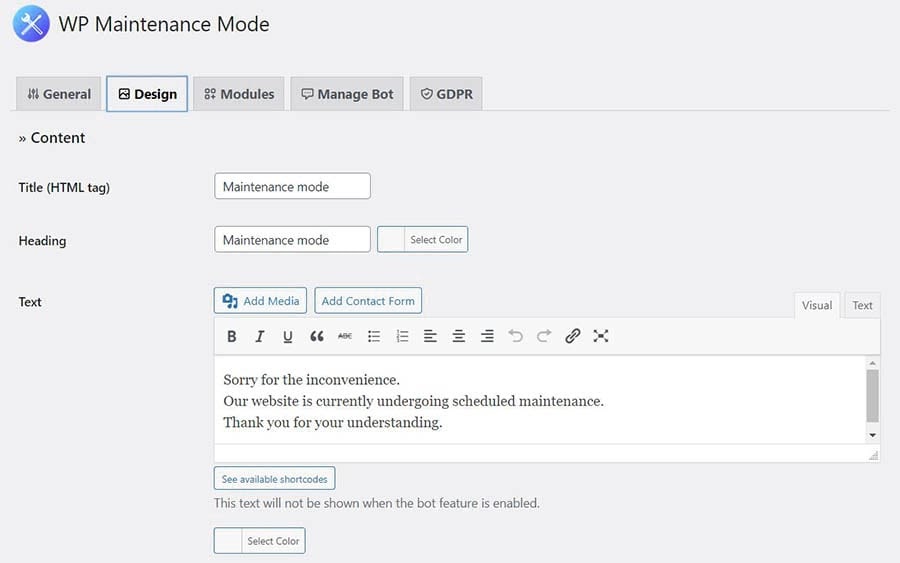
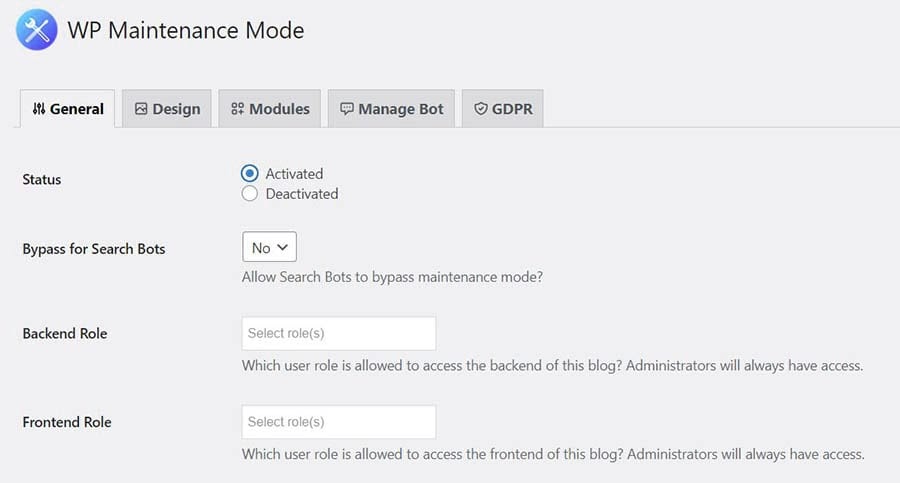
Similarly, the WP Maintenance Mode plugin lets you create your own maintenance page. After activating the plugin, navigate to Settings in your dashboard and select WP Maintenance Mode.

To customize the content of your page, click on the Design tab.

Editing your maintenance mode text in the WP Maintenance Mode plugin

When you’re done, click on Save settings at the bottom of the page. To activate maintenance mode, go to the General tab and select the Activated option.

Activating the maintenance page using the WP Maintenance Mode plugin

You can also use these maintenance mode plugins for other purposes. For example, you can activate them while making some major changes to your content or working on a particular page or section on your website.

WordPress Error Resources

Now that you know how to tackle the “Briefly Unavailable for Scheduled Maintenance” message, you can learn how to solve and prevent other issues on your site. We’ve put together several tutorials to help you troubleshoot the most common WordPress errors:

Are you looking for more information about running a WordPress site? Check out our WordPress Tutorials, a collection of guides designed to help you navigate the WordPress dashboard like an expert.

Take Your WordPress Website to the Next Level

Whether you need help navigating the WordPress directory, fixing incorrect credentials, or choosing the right WordPress plugin, we can help! Subscribe to our monthly digest so you never miss an article.

Fix the Briefly Unavailable For Scheduled Maintenance Error

WordPress puts up a notice on your site during updates to let visitors know it’s currently under maintenance. This message is only visible for a few seconds, but an error during the updating process may result in your site getting stuck in WordPress maintenance mode.

To fix the maintenance mode error, you simply need to delete the .maintenance file in your site’s root directory. You can also prevent this problem from cropping up again by running updates one at a time, ensuring that your plugins are compatible with the latest WordPress version, or upgrading to a better hosting plan.

Are you looking for an advanced hosting solution for your WordPress site? Our DreamPress plans offer high-performance WordPress hosting with 24/7 expert support. This means that we take care of all your technical issues, so you can focus on growing your business.

The post How to Fix the “Briefly Unavailable for Scheduled Maintenance” Error in WordPress appeared first on Website Guides, Tips & Knowledge.


source https://www.dreamhost.com/blog/how-to-fix-wordpress-error-unavailable-scheduled-maintenance/

Thursday, 1 July 2021

Bogotá Marketer Inspires Local Entrepreneurs with Focus on Brand and Sustainability

Inspiration is Susan Rodriguez’s favorite word.

Inspiration is also what struck her while working for a big-name branding agency in Bogotá, Colombia. She loved her work as a manager, guiding the strategic vision to bring marketing services to clients throughout the country looking to grow businesses and increase profits.

The only problem? The big agencies Rodriguez spent her career working for only took clients with big budgets — at least $4,000. Which got her thinking: Is there room in the market for a different approach?

“Many businesses were left out for not having this type of budget,” says Rodriguez. “So, I decided to bet on creating a business model that would be effective for small to medium enterprises.”

She took that inspiration and ran with it, launching her own small business that specializes in giving fellow small business owners the chance they need to grow by offering networking, social media, and marketing services, combined with financial planning to sustain that growth. Channeling her favorite word and her favorite industry, Rodriguez named her business Inspiramark — short for inspiration marketing.

“I am convinced that implementing comprehensive marketing strategies will allow any brand to increase its positioning,” she says.

Rodriguez believes in dreams, working to make them come true for herself and her clients. Using a simple DreamHost shared hosting plan, Inspiramark meets its revenue goals quarter after quarter, employs six people, and positions new Bogotá brands for real, long-term growth.

You’ve got to admit — that’s pretty inspiring.

Want to Meet More Awesome Site Owners?

Subscribe to the DreamHost Digest for inside scoops, expert tips, and exclusive deals.

Growing and Sustaining Dreams

Rodriguez grew up in Bogotá, Colombia’s capital, in a family that always valued education.

“Fortunately, I was able to graduate from college and I’ve had different learning opportunities thanks to my parents who have supported me throughout all this time,” she says. “They’ve been a great support” throughout her career, as has her husband, Jair Pineda, who works with Rodriguez as Inspiramark’s CFO.

Susan Rodriguez and her husband, Jair Pineda.

In August 2018, Rodriguez made the leap from agency marketing work to owning her own business.

“Our mission is to inspire brands that dare to believe growth is possible,” she says, “and make those dreams come true.”

Drawing on her education and background, Rodriguez built Inspiramark to provide marketing strategies to increase brand exposure. She believed strongly that, no matter a business’s budget, entrepreneurs deserved a fair shot — and that depended on how well they attracted new customers through smart marketing. Soon it became clear to Rodriguez that, along with marketing and PR, the scrappy small-business owners she worked with could also benefit from help with their finances.

“We noticed that high impact entrepreneurs have big financial problems that we had the chance to tackle,” she says. Growth and profitability are the main outcomes she offers her clients, and adding on financial planning services, Rodriguez says, makes sure that these new brands can be sustainable over time.

“Our main focus is marketing strategies based on the clients’ financial plans,” she says. “Therefore, we always ensure that implemented strategies are profitable and sustainable.” Along with financial advice, Inpiramark offers communication and sales training.

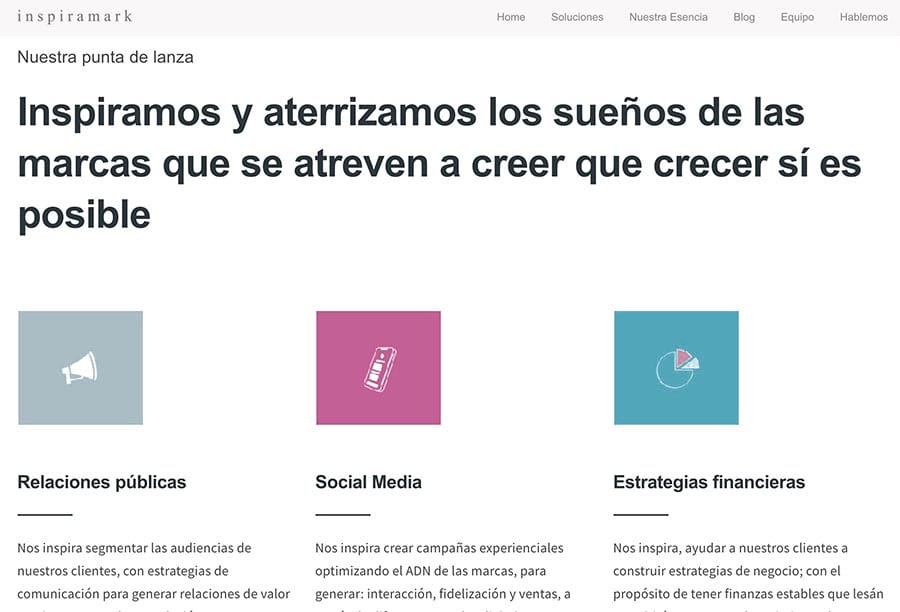
Inspiramark homepage

In Rodriguez’s work with her clients, brand exposure and long-term sustainability is the goal. Inspiramark’s specialty is working with entrepreneurs and small/midsize businesses — “those are decisive, have a clear vision of their business and want to grow,” Rodriguez says. “They are aware that investing in marketing allows them to be ahead of the curve to get more recognition and that good financial management will push them to increase their sales and be sustainable.”

Going Viral

Susan and her team at an event.

For Rodriquez, creating the perfect marketing plan is everything.

“Marketing wise, what I am most passionate about is having the opportunity to create, to think of different strategies to reach our client’s targeted audience,” she says.

Rodriquez was surprised to find plenty of work for Inspiramark creating marketing strategies in the music business — definitely not a straightforward industry, she says.

“Working in the music industry has been one of the most spectacular challenges,” she says. “Within this industry you have to be disruptive, non-traditional.”

Take, for example, one of her current clients — a record label called M Records. She’s focused the marketing strategy around pushing artists’ new releases, primarily through social media and navigating relationships with distributors. Along with creating press kits and unconventional graphics, Rodriquez has seen promotional TikTok videos for the label’s artists go viral, and she’s helped them connect with Spotify and Deezer Latin America. Another helpful strategy, she says, is launching teaser campaigns on social media and interacting directly with fans through private chats.

It’s all in the name of increasing brand exposure and telling the business’s story in a way that connects with audiences emotionally.

“The best marketing strategies are the ones that build loyalty and connect to the audience’s heart,” she says. “They help their potential customers recognize them as a brand. When implementing Inbound Marketing strategies using content that tells stories, we generate more sales and it almost always happens that they are motivated by an emotional purchase.”

Taking the Lead

Susan Rodriguez on the Inspiramark homepage

“I think inspiration should be implicit in all areas of life,” says Rodriguez. “Especially when it comes to leading.”

Inspiramark, she says, needs to take the lead for its clients by “being an example of what we offer,” she says. She wants her business to provide inspiration and leadership for other small and midsize businesses, especially her clients. She’s found this means that, in addition to investing time and resources heavily in those clients and their brands, she’s got to do the same for Inspiramark.

“On different occasions Inspiramark became our last priority as a brand, and while we kept very well the social networks or the positioning of our clients, our brand was left behind and this cannot happen,” she says. “Our brand needs to also be our priority.”

Another lesson she’s learned in running Inspiramark: Keep marketing. Even when her team is stretched meeting the needs of current clients, they’ve got to keep eyes on growth and the future — again, just like the brands they work with.

“Our work often consumes us,” she says. “But we can never stop looking for businesses. We learned that we cannot trust that the clients we have now will be around forever. The business seeding process can often take three months. So we can’t stop.”

She’s found three reliable ways to always keep potential clients in the pipeline. The first ( and most reliable) is referrals. “What’s worked the most for me,” says Rodriguez, “is customer referrals, or people I’ve met over the years reaching out to me and we start working together.”

Connections made through LinkedIn bring in business too: “I currently have almost 9 thousand contacts and about 70% come from marketing or communications managers,” she adds. Using these tools, combined with targeted Instagram marketing campaigns, Rodriguez has managed to keep herself very busy at Inspiramark.

In fact, it’s grown from just Rodriguez and her husband to employing a talented team that includes social media managers, writers, and a public relations specialist. Finding the right people to help, she says, has been a big part of her success in building and growing Inspiramark. Some of these employees, Rodriguez says, grew their skills right along with the business.

“A perfect combination of experience and good attitude is sometimes difficult to find,” she says.
“So, we have chosen to train some people we see have great potential. It hasn’t been easy, but we can now see wonderful results.”

Making connections with people has been one of the most enjoyable parts of running her business, Rodriguez says. She’s had the chance to network with journalists, social media influencers, unions, government workers, and more. She uses these networks to help her clients make important connections — and she just honestly likes knowing more people.

“I really enjoy socializing and meeting people, over the years you can build important alliances,” she says.

Finding a Home Online

The most important tool for any business — especially one specializing in telling digital stories and building brands online — is their very own home on the internet. Inspiramark’s website is simple and to the point, making it as clear as possible what they can offer to potential clients.

“I like that our website is easy to navigate and the information is concrete,” says Rodriguez. “It still needs some improvement, but I think it is functional. My hope is that whomever visits the site fully understands the most crucial information about us — what we do and how we can help them.”

Inspiramark.com puts these crucial details right at the top, with large text announcing what Inspiramark can do for small and mid-size businesses.

“This is a very simple website; it doesn’t require much work,” says Rodriguez. The credit for the simple functionality and maintenance, she adds, goes to her host. She chose to work with DreamHost when she started her business because she appreciated the simplicity and clarity in DreamHost’s own branding.

“The provided hosting information seemed clear to me: DreamHost would be able to support what I was looking for in terms of accessibility and communication,” she says.

DreamHost Homepage

Her shared hosting plan and the WordPress website she built on it have been reliable since day one, leaving Rodriguez and her team free to focus on the work they love. “I’ve liked the fact that I haven’t had any issues with my hosting,” she says. “As of this moment, I only have a shared hosting plan, and that has been more than enough.”

We Support Your Dream

Whatever your online goals, we’ll be right there with you, making sure your site is fast, secure, and always up. Plans start at $2.59/mo.

Following the Numbers

Rodriguez is a people person — necessary in her line of work — and she’s a numbers person. When it comes to growing her own business, and advising her clients in growing theirs, she’s all about the numbers.

“It has always been clear to us that numbers are the basis for any decisions we make,” she says.“Every quarter we make projections of expenses and sales in order to set goals to reach. We almost always reach them.”

Right now, she’s working hard on reaching her current numbers-based goal: doubling Inspiramark’s billing income by the third quarter this year. “This will allow us to grow our work team and hire more people that would help me with the operations,” she says. As founder and CEO of Inspiramark, her focus is always on the future, looking for new clients to serve and new ways to serve them.

“The most common feedback we get from clients is that we have helped them change their business perspective,” Rodriguez says. “We’ve shown them everything must be focused on profitability and sustainability.” Many have thanked her for helping them write, stick to, and update a business plan.

She’s got plenty to keep her busy at work — and doesn’t really slow down at home either. With her husband and cousin she’s developing a brand of pajamas that they plan to launch this summer.

Another place she keeps busy? The kitchen: “Something I love doing is cooking, it’s satisfying. Being able to cook for someone I care for and appreciate is a delight and I’m constantly looking for new recipes I can try out.”

For Rodriguez, there’s no shortage of inspiration.

The post Bogotá Marketer Inspires Local Entrepreneurs with Focus on Brand and Sustainability appeared first on Website Guides, Tips & Knowledge.


source https://www.dreamhost.com/blog/customer-spotlight-inspiramark/

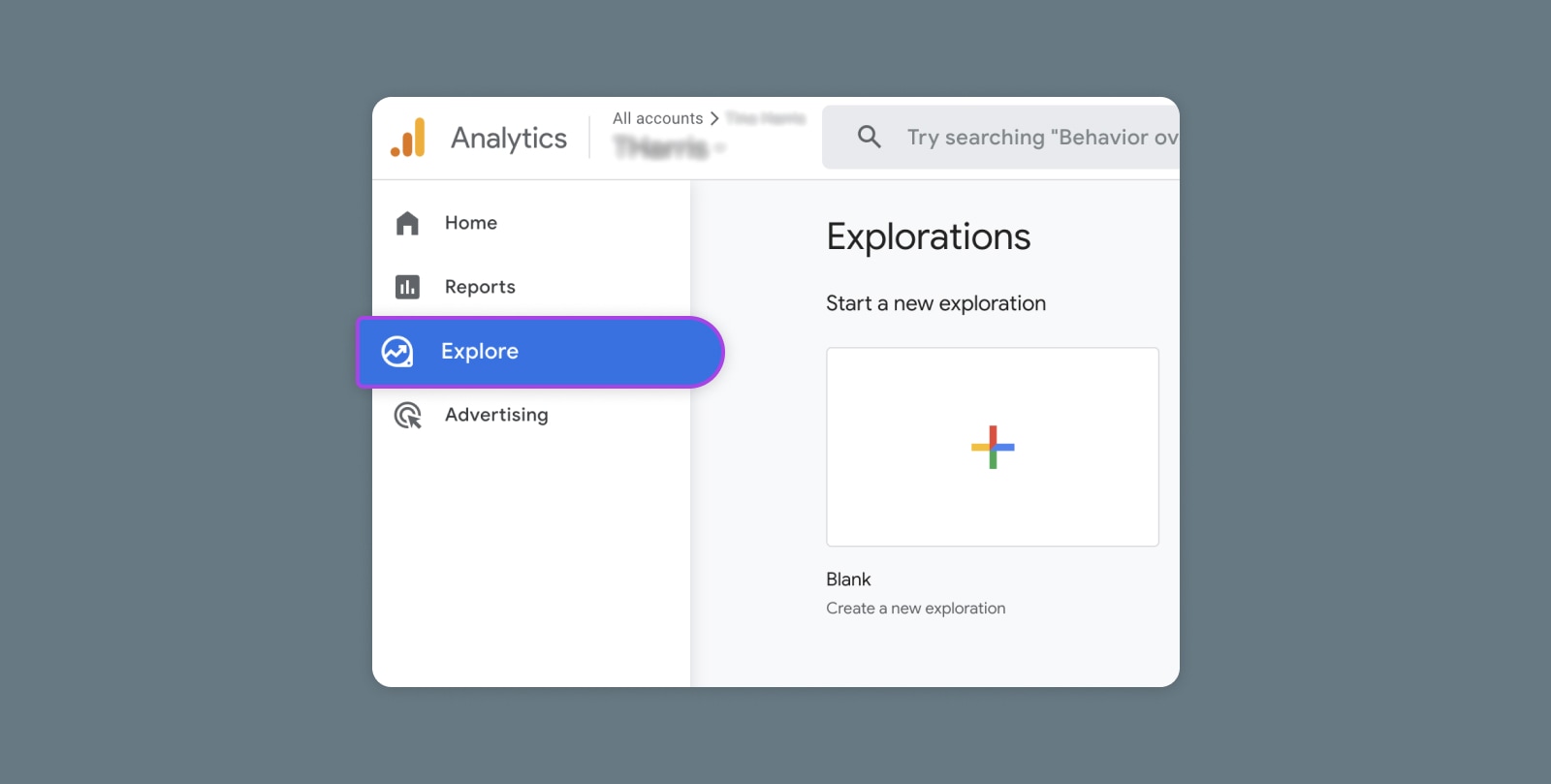
Creating and Mastering GA4 Explorations

In the switch from Universal Analytics (UA) to Google Analytics 4 (GA4) — which will go fully into effect July 2023 — a lot of things have...