Web design can sometimes feel like a bit of alchemy, especially for the uninitiated. Although beginners can usuallyrecognize what makes a good website, concocting the perfect elixir from scratch rarely happens.
As web designers toilover bubbling liquids, complex instruments, and the ever-tedious conversions between RGB colors and hex codes, they all hope to find the magical combination that strikes the ultimate balance between innovation, creativity, and business prowess. Success means a lifetime of pride and riches, while failure subjects the mad scientist to a lifetime of frustration and perpetual experiments.
Unlocking a robust design for your new or existing website can seem like a magical process of transformation, creation, and combination. Professional themes and templates abound for nearly every business objective and creative endeavor — but there always seems to be something missing that makes the alloy not quite as strong as you envision it needs to be.
The design of your website, much like the mysterious recipe for gold, is a complicated, mysterious, sometimes infuriating process — that is worth getting exactly right.
Modern website design is more than just visual elements and aesthetics; it alsoaffects your SEOand rankings, powers your audience’s perceptions of your brand, and influences your visitors’ behaviors. Your site’s design and layout affect your entire web presence.
Whether you’re starting from scratch,redesigning your perpetual fixer-upper, or evaluating an endlessstream of templates, there are a few key recipes to follow and ingredients to use. Here, we’ll cover the base elements that, when used in the appropriate manner and measurement, can turn your online business and design dreams into gold.
First, Take Care of the Tech Stuff — Or Have Your Host Do It For You
You thought web design was all about choosing the right color palette and imagery, right? Well, you’re not wrong, per se. We’re just taking a more comprehensive look at using design to improve and influence your users’ experience on your site.
The world’s best design won’t matter if your visitors can’t see your site or don’t stick around long enough to convert. No matter your audience, internet consumers are a somewhat impatient bunch — roughly 30 percent of them expect a site to load in one second or less, while almost half count on a website to appear within two seconds. Any millisecond beyond that increases your odds of losing that reader or shopper for good.
The same can be said for sites that don’t load at all. Data center outages can cost businesses an average of $9,000 per minute its website is unavailable, according to thePonemon Institute. Nearly three-quarters of visitors will abandon a site if it takes more than five seconds to load.
Signing up with a reliable web hosting provider alleviates all those pain points without any hassle or headaches. For example,DreamHostuses high-performance solid-state drives in our servers, which are at least 200% faster than traditional hard disk drives.Uptime guaranteesare another vital measurement to consider when evaluating reliability. DreamHost is one of the few providers that promise your site will be online 100% of the time — we’ll even reimburse you for an entire day’s worth of hosting for every hour your site is unavailable.
If all of that is not enough to convince you, consider checking out monthly hosting plans that let you sample the type of performance, reliability, and customer service you can encounter. (By the way, that’s another area DreamHost excels in, according to the folks atHostingAdvice.com).
Website Design Elements, Simplified
Build a beautiful site with confidence when you use our drag-and-drop website builder.
Now we can get into the fun stuff like colors, typography,call-to-action buttons, white space, and navigation! Every designer, web developer, and site owner may take a different approach to build a website, but there’s astandard checklistof items and concepts that should be accounted for.
Of course, while there aregenerally accepted design principles, the beauty of web design is that it’s an art form — not a science. Good design stands out from the crowd, but be sure the risks you take are calculated and reversible if they don’t pan out how you’d like.
Now, time to turn the page on that sketchbook and start designing! Here are six important design elements you’ll want to make sure you get right.
1. Overall Layout and Visual Appearance
Your site’s overall look is, of course, a crucial component of web design. We’re using these broad terms to cover a range of reactions you want your website visitor to have. First impressions are critical, so you want to wow your target audience as soon as the web page loads. Users take only50 milliseconds to form an opinionof your website or business, and that will determine whether they’ll stay or leave.
That means your design should align with a handful of soothing adjectives: it should be simple, familiar, intuitive, clean, and accessible. Use plenty of whitespace (or padding and margins) to give the elements of your site room to breathe, and use grid-based designs to keep design items organized and orderly.
Strong photography, icons, or graphics provide supplementary information to your text but make sure the images complement each other and the brand you’re looking to represent.
Each piece of your website should be placed according to the visual hierarchy you want to assign it. Whether you aim forF-Patterns or Z-Patterns, you can direct visitors’ eyes and behaviors based on your design. Both patterns emphasize the top horizontal area of your site, or where most designers place the brand’s logo, navigation, and sometimes a search box. All three elements inspire brand recognition and user interaction.
Finally, the elements you were probably expecting the most once you started reading. Your color palette and fonts will directly inform your visitors’ opinions of your site and are what most novice designers start with. Trust us, the groundwork you’ve done so far will set you up for greater success than Roy G. Biv alone.
As for choosing a color scheme, paying attention to your brand or industry perspectives — along with your target audience demographics — will make this a somewhat painless process. Always be looking for ways to narrow your scope from the roughly7 million discernable huesthe eye can detect.
Lawyers and accountants, for example, would typically be best served with a deep blue or green to signal professionalism, while a photographer may want to rely on black and white to truly showcase the vibrancy of his or her images. Beyond your brand’s industry, pay attention to your readers’ expectations: Parents of newborns will appreciate soft pinks and blues and yellows, while K-6 children expect bright primary colors. Teens and young adults are bold, while grownups and grandparents are a bit more refined and mature.
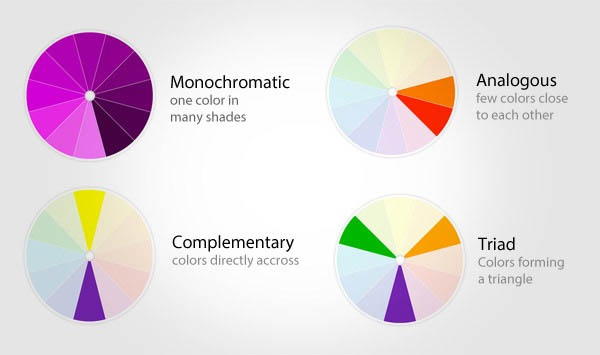
Once you choose your dominant color, consider what type of color palette you want. Suppose you want your audience to zero in on a particular piece of content or a button or elicit a specific type of interaction. In that case, you’ll want a complementary color from the other side of the color wheel. We spent anentire blog post exploring color choices, so head on over there for more help.
3. Typography
The same industry and demographics principles can generally be said for thetypography(or fonts) you choose to communicate your message. More formal roles, like those lawyers and accountants, will likely want to stick with distinguished serif fonts (which have the extra bits hanging off at the end of letters), while we envision the photographer would use a very light and airy sans serif (no extra bits) typeface.
As with the site’s overall design and layout, you’ll want to balance normalcy with freshness. Design aficionados will spot Arial or Times New Roman right away. Look for something a little different — but whatever you do,don’t even consider Comic Sans.
Your text should be easily readable, which generally means body copy should be at least 16 pixels. Using a complementary font is ideal for headings or accents, but don’t go beyond three typefaces or unnecessary sizing adjustments.
Of course, you’ll want to make sure there’s plenty of contrast between your text and the site’s background colors, which generally means a light color paired with a dark tone — avoid that piercing red-font-on-green-background eyesore.
We doubled our blog’s traffic with WordPress
We'll show you how to do it. Join 150,000+ others who get our monthly newsletter with insider WordPress tips!
Your site’s navigation is not a space in which to be creative. First off, don’t fall into the trap of overly animated hover effects and complex, multi-tiered subnavs. Navigational elements — which can exist in a site’s header, body, and footer — simply serve to direct your visitors to the information they desire as quickly as possible.
Right at the top of the page, site owners will be confronted with a majorly polarizing design decision:to hamburger or not to hamburger? The hamburger menu, represented by three parallel, horizontal lines, provides an economical way to save space by hiding your navigation off-site. However, it obscures vital information and interactions from your visitors and tends to have lower click rates.
Strong navigation extends beyond the main menu in your header. For long, scroll-heavy, or one-page designs, for example, you may want to include directional arrows that help direct users through each section. Most sites will also benefit by adding a sticky “Back to Top” button that quickly delivers visitors back to the top of the page (here are some research-based suggestions from theNielsen Norman Groupon how to best implement this navigational element).
Finally, don’t ignore the footer navigation menu. Users tend to scroll farther than you might expect, and some brands even witnessed up to50% more conversions with an optimized footer.If a reader has stuck around long enough to make it to the end of your homepage or landing page, they’ll need somewhere else to go or something else to do, such as sign up for email updates from your business.
Just as interior designers don’t stop once the walls are painted, you’re not done once you’ve got the layout, color scheme, typefaces, and pretty elements of your choice picked out. Time to bring in the sofa and hang family pictures on the wall — by paying attention to how your messaging interacts with your design.
Your site visitors and potential customers want information quickly — is your brand trustworthy? Experienced? Capable of delivering top-notch products and services? Given people’s short attention spans and lightning-fast first impressions, communicating clearly is critical. Information should be easy to read and digest.
Look closely at each word: Do you really need it? Efficiency is key, as extra words can stand in the way and dull your brand’s primary selling points. Use headings and display text to organize sections and quickly let your readers know what information you’re providing. Instead of using long, rambling sentences, break up long lists into ordered or unordered lists. Just think short and sweet!
As far ascontent strategygoes, don’t forget to look beyond your blog or homepage. Make sure your “About” and “Contact” pages take the appropriate tone and convey the right information. For example, a lifestyle blogger will want to share her personal and family journey, while a real estate agent will likely be more focused on professional results.
To better serve visitors who access your site on a phone or tablet, Google introduced amobile-first indexto rank sites in search results nearly six years ago. And in May 2021, the search engine is rolling outCore Web Vitals, a set of metrics to measure how well your site delivers a quality user experience. The better your site performs for users (including on mobile devices), the more likely Google will give you a rankings boost.
Long story short, mobile-friendly websites aren’t just a nice, hip feature anymore —they’re a necessity.
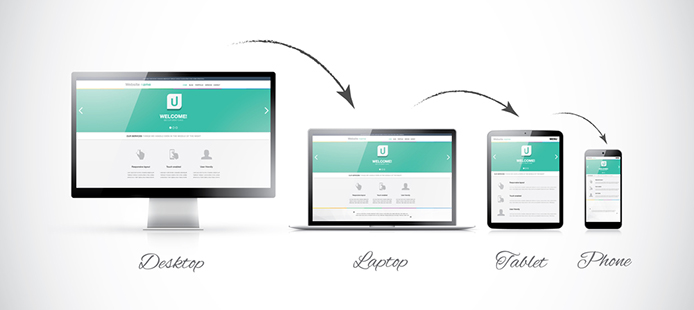
MostWordPress themes or templatesyou buy from a developer already come prepared for mobile traffic. If you’redesigning your own custom lookorhiring a web designer, however, you’ll need to make sure you’re covered by one of two main options: a responsive template that adapts to various screen sizes or a mobile-only look that is activated when a non-desktop device tries to access your site.
At DreamHost, we make it easy for DIYers to launch a website fast with our drag-and-dropWP Website Builder. But if you’re looking for a polished, custom WordPress website that’s 100% unique to your brand, consider ourCustom Website Design service.
Here’s how the process works: You’ll start with a 1-on-1 call with your project manager to guide you through the requirements form where we collect content and define your goals. Then we’ll gather your existing logo and key branding materials into a simple, one-page reference sheet to ensure your website design matches your brand.
Next, our pro designers will create a custom prototype of your new website for you to easily offer feedback. Once you’ve approved, we’ll code it into a high-performance WordPress website. We make sure you’re satisfied with the final product by including revisions from the get-go; you’ll get two rounds of design revisions and two rounds of code revisions for every page on your site.
Your finished website will be SEO-ready, mobile-responsive, and loaded with features — custom blog, content forms, analytics, and e-commerce functionality. For an additional fee, we’ll even upload products to your online store for you.
Search Engine Optimization (SEO)is a vital part of any website owner or digital marketer’s work. This is unlikely to change in the new year, but that doesn’t mean you can just rely on old strategies. In fact, as browsing habits change, you’ll need to keep your SEO techniques up to date.
The way people use search engines such as Google changes constantly. For example, over the past few years, “mobile-first” has become an essential mantra for improving bothaccessibilityand page rankings. While nobody can tell for sure what the future holds, itispossible to get a good idea of what you should focus on for the next year.
In this article, we’ll discuss why SEO will continue to be a critical consideration in the upcoming year. We’ll also discuss some of the trends that may come to dominate your SEO strategy in 2021. Let’s get started!
Search Engine Optimization Made Easy
We take the guesswork (and actual work) out of growing your website traffic with SEO.
The Current State of Search Engine Optimization (SEO)
In case you’re new to the concept,Search Engine Optimization (SEO)refers to a series of techniques for helping your site rank higher in search results. It’s an integral aspect of everyday work for most developers and content creators and looks poised to remain so for years to come.
However, while it might seem like SEO practices are evergreen, this is far from the case. In reality, what ranks well depends on the search engines’ algorithms, whichare continually changing.
Just one example: Google will begin to measure Core Web Vitals, a series of signals that focus on user experience, in 2021 to rank sites (we wrote an entire guide about the implications of theCore Web Vital minimum thresholdif you’d like to read more).
The ever-changing nature of SEO naturally means you can’t keep relying on the same optimization techniques over time and expect good results. As such, you’ll want to stay up-to-date with the changing world of SEO. This tutorial will help you keep your site optimized well into 2021 (and beyond).
SEO Trends: 12 Tips for Ranking Higher in 2021
To help you get a head-start on optimizing your content, we’re now going to take a look at some of the SEO trends that will be worth paying attention to in 2021. We’ll also give you some tips on adapting your content and strategy to take advantage of those trends. Let’s jump right in!
1. Prepare Your Site for Voice Search
Voice searchhas already nestled comfortably into many people’s lives. Perhaps you use Apple’s Siri, Amazon’s Echo, or Google’s Assistant, just to name three examples. As this technology becomes more prevalent, you’ll need to consider how voice search will affect your SEO efforts.=
The main difference between typical SEO strategies andoptimizing for voice searchinvolves using more “natural phrasing.” After all, text searches usually involve stilted, compressed phrases like “best blog hosting 2019.” However, if you were to use your voice to search for the same information, you’d probably say something like: “What is the best hosting for blogs this year?”
Do you notice how the second phrase is both more naturalandconsiderably longer? This means you’ll also want to consider optimizing your content forlong-tail keywordsto a greater degree. Since the ultimate goal is to use keywords people are likely to search for, this might actually make your job easier, as you won’t need to jam cumbersome key phrases into your content.
2. Use Schema to Markup Your HTML
Schema is structured datathat can help web browsers and search engines gain a deeper understanding of your page’s content. Consequently,adding this markupcan improve how your website displays (and ultimately ranks) in Search Engine Results Pages (SERP).
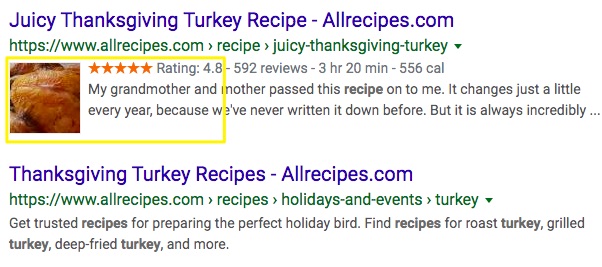
It’s recommended thatSchema markup be usedto benefit content such as creative works, events, recipes, organizations, people, and products. For example, a search result using Schema will display richer information than one without.
As you can see in the example, one of the results displays ratings, images, and more. You can manually add this kind of markup to your posts, or you can use one of themany tools availableto test and improve your Schema data. Fortunately, if you’re not prepared to tinker with the HTML of your posts, you canemploy a dedicated pluginto help you take advantage of this SEO functionality.
Additionally, you can review Google’s ownstructured data guidelines, as well asnumerous reportsoffered in their webmaster tools. Ultimately, Schema is a vital addition to your website if you want search engines to read your products’ details rather than view your content as non-descript text.
Optimizing your site for performanceis something we’ve discussed in several previous posts. However, the importance of this step bears repeating. Loading times will undoubtedly remain a huge consideration in 2021, especially when improving your site’s rankings.
The issue of load times came to the forefront in 2018, when Google announced it would begin factoring inpage speed for mobile devices. This was due to thegrowing popularity of mobile browsing. Since then, keeping load times short has been a primary concern for all website owners.
The term Artificial Intelligence (AI) has a distinctly futuristic ring to it. So it’s no surprise that it’s going to play a major role in how SEO changes in the near future. We’re (unfortunately) not talking about hiring a robot to handle your SEO strategy, but that’s not as far from reality as you might expect.
Google already uses AI extensively, thanks to itsRankBrain system. This is a bot that uses machine learning to continuously improve Google’s search results. It finds patterns and context in millions of pages, which the search engine can then use toreturn more relevant resultsfor specific queries.
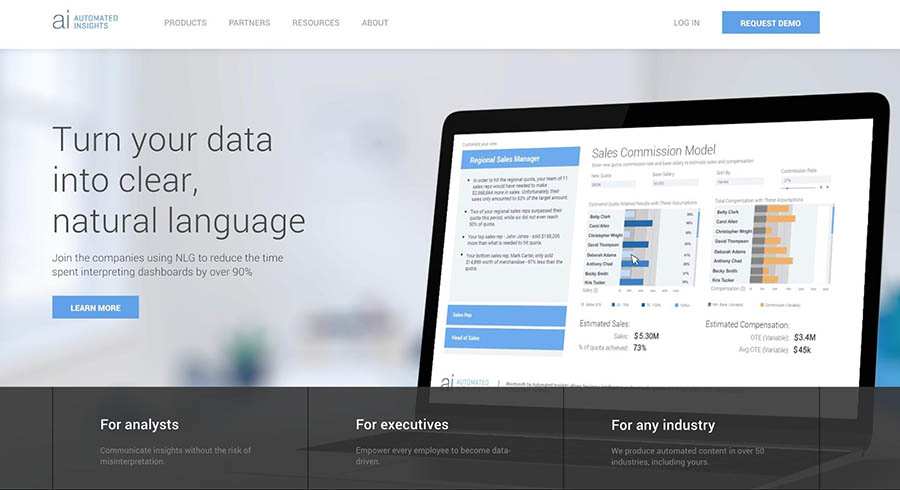
This solution helps you turn unorganized data, such as site analytics, into a clear narrative. In turn, that can help you spot patterns more quickly and start making improvements.
Another tool that can help you when creating content isWordLift.
ThisWordPress pluginuses machine learning to help you optimize your content. It does that by offering suggestions for the actual content, adding structured metadata, and suggesting relevant links.
We suspect that this is only scratching the surface of what AI-based tools will be able to do in the future. As such, getting familiar with this technology now can give you a vital head start.
Google’s mobile-first indexmeans that the search engine now ranks pages based on their versions designed for mobile devices. As such, even if your site performs flawlessly on a desktop, but it’s hard to use and sluggish when viewed on a smartphone, your SEO rankings will likely suffer.
For this reason,optimizing your site for mobilesis no longer optional. In reality, you’ll need to spend even more time making sure your mobile site is fast and usable. This is also calledmaking your website responsive, since the goal is for it to work well regardless of the screen size or device type used to view it.
You’ll also need to consider how your site will actually workon different screens. For example, if you’ve designed your navigation for desktop browsing, is it still intuitive and simple to use on mobile devices? If your site contains additional elements,such as pop-ups, you’ll also need to ensure that they don’t interfere with the mobile user experience.
Thankfully, this is not as difficult as it might seem. For instance, the vast majority ofWordPress themesand plugins are built with responsive design in mind. However, to avoid any issues, you should still make sure to test your site on multiple devices thoroughly.
It often seems like people are getting less patient by the day. They want to find the information they need much more quickly, for instance, which is why Google has placed a greater focus onpersonalized results.
Most notably, Google gathers information about each individual user to return the most relevant results. Another example can be found in Google’s “answer boxes.”
Google’s service is also personalized by offering searchers contextual resultsbased on previous searchesor even the user’s location. If you try searching for “Where is the nearest coffee shop?”, you’ll be shown options that are close by.
This may seem like a tricky trend to leverage to your own advantage, but it’s far from impossible. You can increase your odds ofappearing in answer boxesby merely providing clear and organized information on your site. Using lists and distinct headings to summarize each page’s contents will also help Google parse and index the information, making it easier to get your site featured in the coveted “position 0.”
7. Create an Optimized Knowledge Base
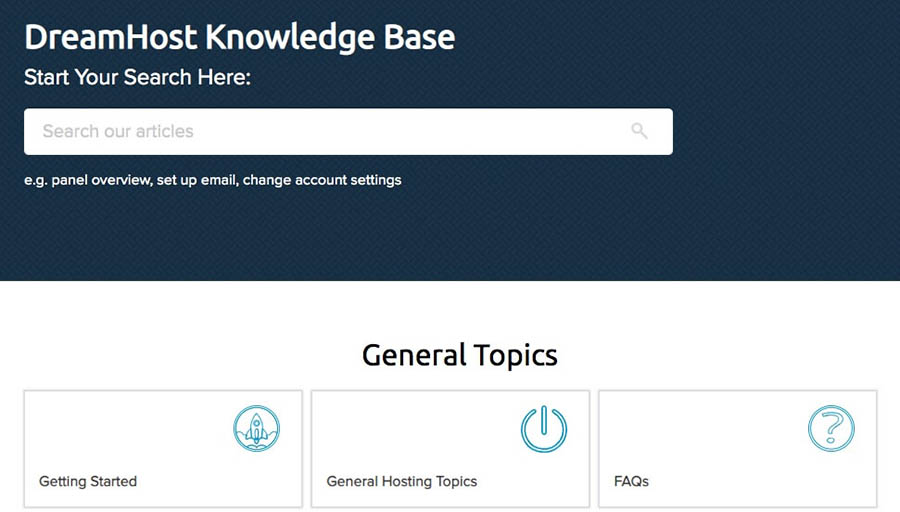
One area of SEO you might have overlooked is yourknowledge base. As part of your customer service strategy, you want users to have access to support and common service questions on a 24/7 basis. This is where a robustknowledge basecan be quite useful. However, you may not have considered the SEO benefits of a knowledge base.
A knowledge base can offer a plethora ofquality content possibilities, all of which can help you improve your SEO ranking. This includes creating specific content full of valuable keywords. Additionally, you can fine-tune your knowledge base experience to keep customers loyal and happy.
Keeping your customers satisfied can truly be a make-or-break point for many businesses. Research indicates92% of customerswill switch to another company after three or fewer bad customer service experiences. This means you have a golden opportunity to knock out two birds with one stone — provide rich contentandexcellent customer service at the same time.
Since you want users to be able to find the articles they need, knowledge base content also tends to follow SEO best practices. You can also ramp up your knowledge base efforts with theuse of plugins.
One thing to keep in mind: Since visitors to a knowledge base are not really looking to be entertained, you can just get down to business and cover the topic using highly optimized keywords.
8. Extend Your SEO Strategy to Your Social Media Channels
Having a strong social media presence is a significant aspect of online marketing. Naturally, this also applies to your SEO strategy. Whilesocial media shares aren’t currentlyadirectranking factor, there does seem to be a correlation between social signals and rankings.
How this works is complicated, to say the least, and we won’t get too deep into the details here. Suffice it to say that the more your content is shared,the more trafficyour site will likely get through search engines. This also helps youbuild backlinksandbrand awareness, since more people will see and talk about your site.
As such, it’s vital that you factor in yoursocial media presencewhen considering SEO. Focus on a few essential platforms and maintain a consistent strategy for sharing content and interacting with your followers. This will help you acrossallareas of your marketing.
So far, we’ve consistently referred almost exclusively to Google when considering SEO. This is no accident, considering that it remains themost popular search engineby far. Still, it may not be a good idea to focus solely on Google’s ranking algorithms when putting together your SEO strategy.
Amazon’s search engine, for example, is becoming one of the most significant on the web. As it turns out,over half of shoppersturn to Amazon when searching for products rather than to Google. Another example comes in the form of YouTube, which remains the world’ssecond-largest search engine.
What this means for you is that relying solely on Google may not be feasible from now on. For example, if you want your products to be more visible, you’ll need toconsider Amazonto a much larger degree. If you have a lot of video and other non-text content, on the other hand, YouTube and similar platforms should be high on your list of targets.
10. Understand How Blockchain Affects SEO
If you’ve never heard of “blockchain” before, you’re not alone. While the concept is too complex to do full justice here, we can break it down in simplified terms. In essence, a blockchain is a list of records that cannot be modified after the fact. Every item — or block — in the chain is recorded and preserved as-is forever.
This technology canaffect SEObecause using blockchain changes the relationship between advertisers and website owners. With blockchains, you can guarantee that every click is valid, meaning that the days of bot visitors are over. This will lead to improvedverified data, meaning that sites won’t be able to get away with artificially improving their rankings using automated clicks.
At this point, your best move is simply tolearn more about blockchainand how it can affect your site and business. This is a complex and nuanced topic, so being prepared is key. You may even wish to hire an expert to help you if you’re interested in implementing blockchain yourself.
11. Improve Your Technical SEO
SEO is often thought of as a concern exclusive to content creators and marketers. However, the reality is that it’s also something developers need to think about. The process of “technical SEO” refers to making sure your site is compatible with the standards set by search engines.
Two major aspects of technical SEO that we’ve already touched on include page speed and mobile-friendliness. However,another crucial considerationis site security. For instance, Google now requires sites to bedelivered using HTTPSin order to be labeled as “secure” in the Chrome browser.
These are just a few of the elements that fall under the technical SEO umbrella. While we don’t have time to go through everything, here are afew additional aspectsyou’ll want to consider:
Site architecture.By designing your site in a logical way, you’ll make it easier for crawlers to catalog and index your pages, which improves your rankings.
Rich snippets.This type of markup adds extra information to your pages, making them stand out more in search results.
Duplicate content.Search engines penalize sites that feature the same content in more than one location. As such, you’ll want to ensure that you don’t repeat or re-use the same text.
As we mentioned, this is by no means a comprehensive list. However, it should be enough to get you started, whether or not you have an interest in development.
For our final tip, we should acknowledge that SEO isn’t just about text. It’s also vital to look atSEO as it pertains to videocontent. This is increasingly important as video is becoming more prevalent by the day.
To give you an example: In 2018, nearlyhalf of all internet userswatched at least an hour of online video every week. Site owners have started to take heed of this trend, and you can do the same. An easy way to start? Include videos on your site. Search engines consider the quality of your content and the length of time users stick around as ranking factors. By using video, you can improve both metrics.
If you’re wondering how to up your SEO game, we’ve got good news: There are lots ofexcellent SEO toolsto help you improve your rankings on popular search engines. Here are three options we recommend — at varying price points — to help you achieve your online goals.
1. SEO Toolkit
SEO Toolkitmakes it easy for DreamHost users to become their own SEO pros at an affordable price.
With more than 100 automated checks and verifications, SEO Toolkit audits your site to identify potential issues. Then, it creates a personalized SEO plan along with a list of simple tasks you can tackle to start seeing search engine ranking improvements.
Another plus?SEO Toolkitis a budget-friendly tool, costing only $4.99 per month. New DreamHost users can add SEO Toolkit when signing up for a hosting plan. Existing customers can enable SEO Toolkit directly in their panel.
2. Semrush
Semrushis a 20-in-1 SEO suite with the largest keyword database on the market — a mind-blowing20 billionkeywords! This giant database makes it easy to figure out which keyword phrase will give you the biggest bang for your buck, find highly-searched related terms, and generate new ideas for yourcontent marketing efforts.
What’s more, this SEO tool gives you a look under the hood of your competition’s text and media ads, so you can optimize your strategy.
While you can get up to 10 results for free per day, the best way to unlock Semrush’s features is to sign up for a Pro account ($99/month for an annual plan). The good news? We’ve worked out a special14-day trial with Semrushso you can see if it is a good fit for your site before splashing out any cash!
3. SEO Marketing Service
If you’ve learned anything from this article, it’s probably that SEO is a complex, multi-disciplinary marketing activity. And even if you want more traffic, it can be hard to take the time to focus on SEO when you’re busy running a blog or small business.
The good news is you don’t have to go it alone! OurSEO Marketing servicebrings together a team of SEO professionals to handle all the nitty-gritty tasks that go into getting a site to rank well.
In addition to creating and publishing new content for your site each month, our team will develop a keyword strategy and continuously optimize your existing website to improve your Google ranking on relevant search results over time. Plus, we’ll compile a monthly report for you to track ranking improvements and traffic growth.
We offer three plans — Startup, Business, and Enterprise — starting at just $399 per month.
An SEO Expert in Your Inbox
Whether you need help with local SEO, crafting the ideal digital marketing strategy, or understanding search intent, we can help! Subscribe to our monthly digest so you never miss an article.
Search Engine Optimization (SEO) is not a static pursuit. As the internet changes, so do the parameters that determine how well your site ranks in search engines. This means you need to stay up-to-speed with the latest SEO trends in order to ensure continued success for years to come.
Are you ready to optimize your website for 2021? Consider DreamPress, our managed WordPress hosting solution. With automatic updates and strong security defenses, DreamPress takes server management off your hands so you can focus on what really matters: getting more traffic.Learn more about plan options today.
So you have a website. You’ve listed all your products and included details of your services. But nothing much is happening. No one is visiting and, consequently, no one is buying.
What’s missing?
Traffic.
Simply having a websiteisn’t enough. You need to tell people about your site, and you need them to be able to find it.
Here are 19 tried-and-tested ways of increasing website traffic that will help you do just that.
Don’t feel like reading all 19 tactics? That’s OK, we won’t be offended! Just use the links below and skip to a section of interest.
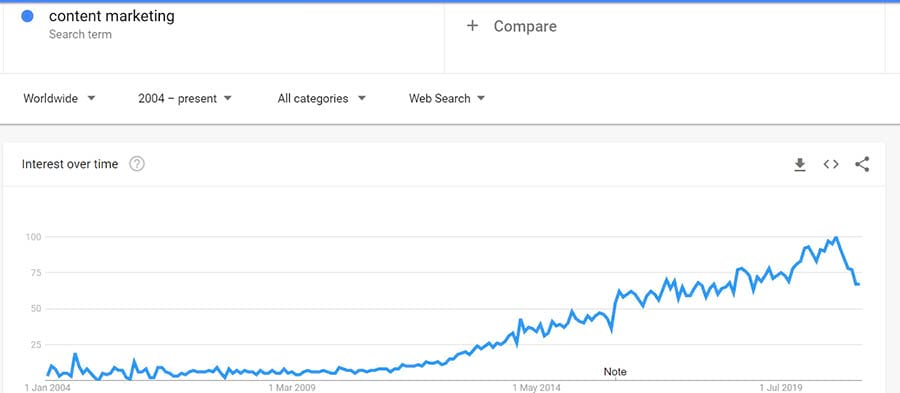
Some digital marketers might have you believe thatcontent marketingis a new phenomenon. Even by looking at Google Trends for the last 16 or 17 years, you might be tricked into thinking content marketing is something recent.
In reality, content marketing has been around for many years. One of the first documented instances of a business usingcontent marketing comes from 1895(yes, that long ago!).
Then, in 1900, Michelin (the tire company) produced theirfirst Michelin Guide. While it included tips on changing your tires and where to refuel your car, it also featured a list of places that hungry travelers could eat. And it was a massive success. It’s a great example of a business targeting their audience with content that they would find helpful without overselling their products.
Content marketing is essentially the process of identifying your target market’s pain points and creating content that helps your target audience address them.
Remember: It’s not all about you and your business, and it’s not solely about your products. It’s about helping your current or potential customers.
1. Answer Niche-Specific Questions
No matter where in the buying cycle your potential customers are, they’re going to have questions that need answering. These could be top of the funnel (like “what is content marketing?”) or further down the funnel (like “which content marketing tools are best for content planning?”)
By answering these questions, you are putting your business in front of potential customers, regardless of where they are in the buying cycle.
So how do you go about finding the questions that potential customers are asking?
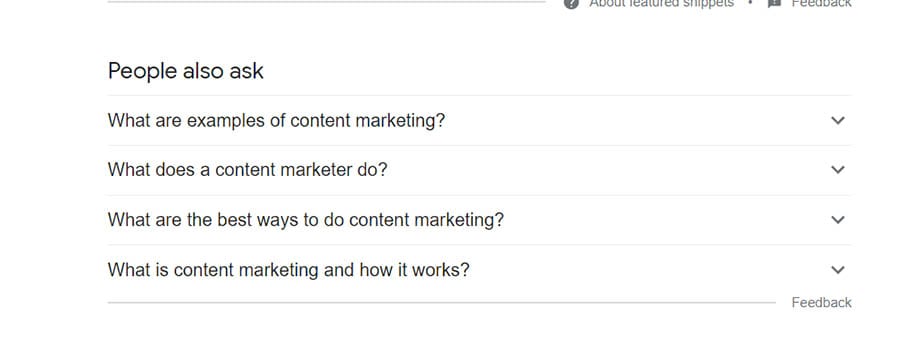
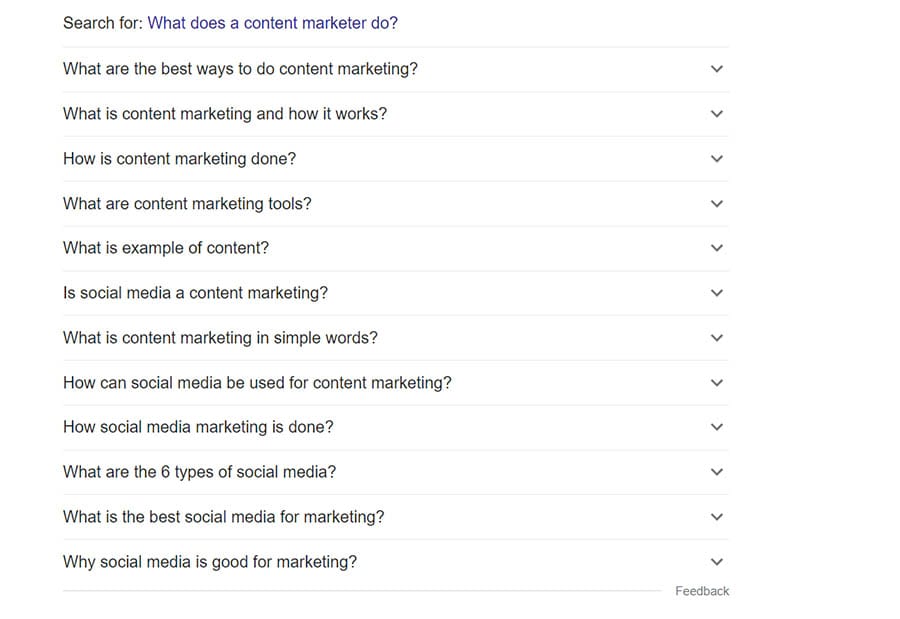
Your first port of call should be Google. Simply searching for your topic will start to give you ideas. Look at the questions in the image below. Google is giving you the kind of questions you need to answer, right there in the search results.
These arePeople Also Ask boxes(or PAA boxes). Getting your content to appear in them is a surefire way to drive website traffic. You’ll also notice that you get more and more questions to answer when you start clicking these search results. Handy, eh?
All you need to do is start collecting this information and using it to inform your FAQ and Q&A content.
And don’t worry, there are plenty of ways to automate collecting this data.
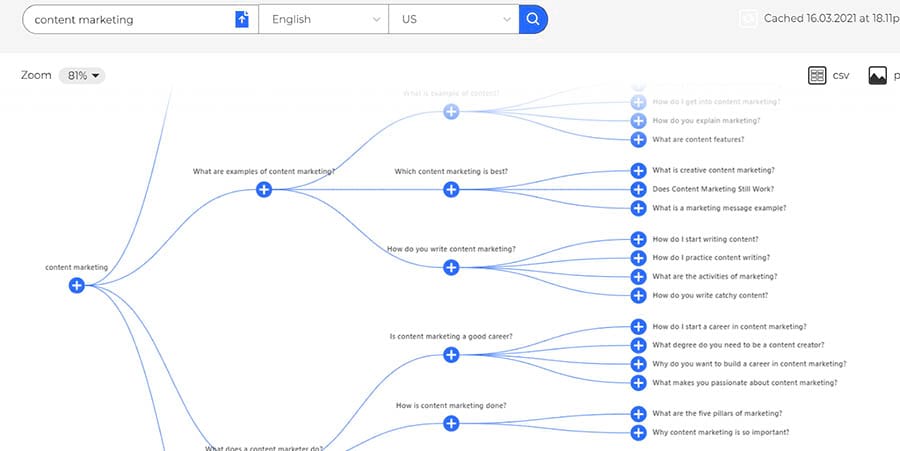
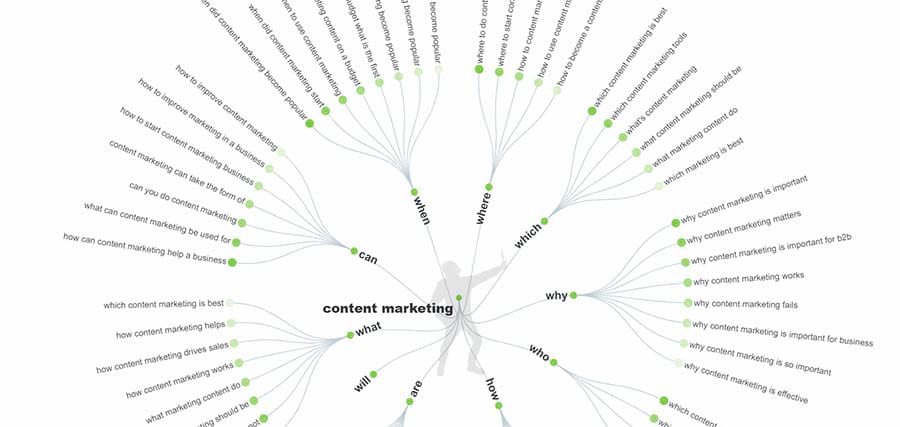
If you want to collect the data straight from the search results, you can use a plugin likeSEO Minion. If you want to take it a little further, you can use a freemium tool likeAlsoAskedorAnswerthepublic.
2. Produce Evergreen Content
Now let’s get this straight: We aren’t against seasonal content. If you sell a seasonal product or service, it makes sense for you to create seasonal content. But if you want to drive traffic to your site all year round, you need to create evergreen content.
But what isevergreen content?
It’s pretty much what it says on the tin — it’s content that can drive traffic to your site all year round. There are fewer troughs and peaks, resulting in more reliable and consistent traffic.
There are many types of evergreen content (and most of the topics and ideas can be found in the tools mentioned just below), but here are some of the most consistently successful formats.
How-to guides
Q&As and FAQs
Step-by-step processes or tutorials
Ultimate guides
Product reviews and round-ups
Training guides
One way to make sure this type of evergreen content continues to be successful is regularly updating it. Periodically review the content and make sure that the advice is up-to-date and relevant. That way, you’ll keep sending on-topic traffic to your site year after year. It’s the gift that keeps on giving!
It’s worth noting that with this tactic, you’re more likely to get links and exposure onothersites that help drive traffic to your site over time — unless, of course, you can attach your visuals to the kind of content people are actively searching for.
What type of visual content can you create? You probably need to be thinking along the lines of:
Visualizing data that is relevant to your niche.
Infographics that help people understand complex topics quickly.
Photographs that you can license via Creative Commons resulting in your business getting cited on other sites.
4. Create Expert Roundups
Another tried-and-tested way to drive traffic to your site is by creating expert round-ups within your niche. It can be relatively easy to get people in your industry to share their thoughts on a particular topic — at the end of the day, we’re all trying to promote our business.
The great thing about expert roundups is that both sides benefit. You get content. Content that can drive traffic when it’s shared by its participants. And participants benefit from the exposure that they get by being featured on your site.
You can easily find experts within your industry using tools likeAhrefs,Buzzsumo, andBuzzstream Discovery— all of which are mentioned later in this article.
You can then reach out to the experts and ask them for an opinion on an evergreen topic.
It’s a win-win-win content marketing tactic.
5. Always Be Repurposing
No matter what kind of traffic-driving content you create, you need to ensure you make the most of it. Don’t just use the content once. Use it across different channels and get more bang for your buck.
A presentation can be recorded and uploaded to YouTube or a podcasting service.
The same presentation can be transcribed using a service likeotter.aiand can become a blog post with a bit of tweaking.
Visual content for guides and blog posts can be repurposed for social media.
Blog posts can be periodically sent out to an email marketing list.
Take internal processes and turn them into whitepapers.
Combine blog posts with new content for whitepapers and eBooks.
Curate your teams’ tweets for tips and tools roundups.
The list is almost endless. And the more places your content appears, the more chances you have to drive traffic back to your site.
6. Update Stagnant Content
What about the content you’ve created in the past? Is it losing traffic? Did it peak before seeing a slow decline?
Don’t ignore it — you can give it the kiss of life with a little bit of love — and that’s much quicker to do and cheaper to produce than another piece of content.
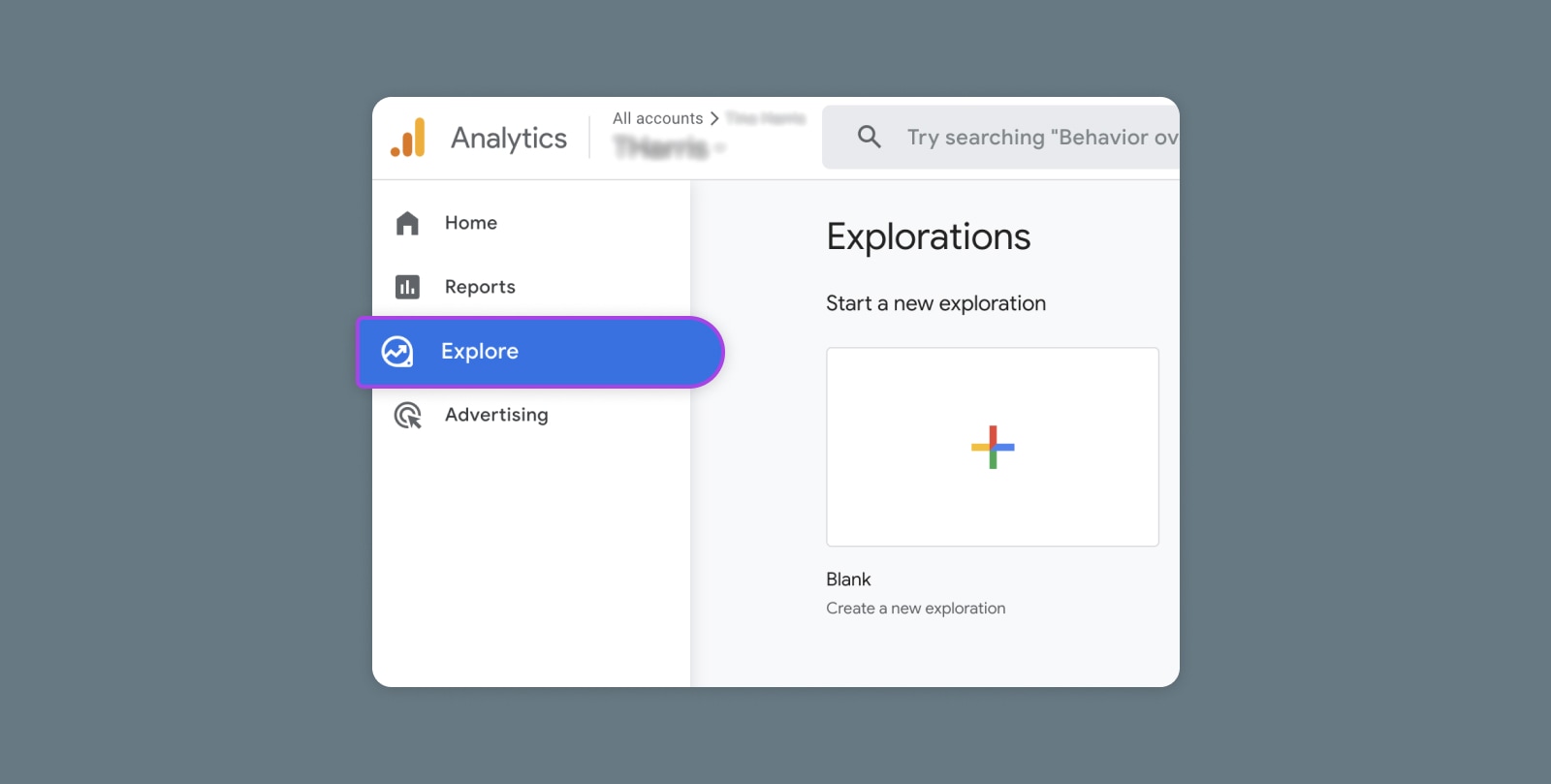
There are loads of ways to identify stagnant content — the most obvious place to start is Google Analytics or Google Search Console. If the piece has performed well in the past, it stands to reason that it can perform well again.
A few tools have popped up recently that analyze this data for you. And anything that takes out some of the manual labor is a big benefit in our book. Two of the most popular areReviveand the content decay feature inClickFlow.
Not all content marketing is about creating something new. You need to keep an eye on what you’ve created before. Sometimes it pays to look backward as well as forwards.
Do you remember the old Kevin Costner film “Field of Dreams”? The one in which he delivered the classic line: “If you build it, he will come”?
Sure, you can create amazing, quality content. That doesn’t mean people will flock to read it, share it, and link to it. That very rarely happens. Many great pieces of content marketing have been resigned to the bin because the team behind them assumed that the people would just come.
So how do you attract page views? Quite simply, via promotion. You need to be promoting.
Here are some surefire ways to get eyeballs on your content. And when those eyeballs are on your content, that’s when you get the social shares and the links that you need for it to be successful.
7. Always Be Outreaching
Outreach is vital. You need to get your content in front of the right people. They are the ones that share your content; they are the ones that link to your content; they are the ones that can help amplify your content.
But how do you get started with outreach?
It begins with a list. You build a list of sites and journalists relevant to both your niche and the content you’ve created. And when we say list, we aren’t talking about 10 or 15 people. Outreach is challenging, and response rates are low. You need to build lists with 100s of sites and journalists to get a good ROI for your outreach efforts.
8. Crunch Data to Find Similar Content
So what are the best tools for finding these sites and journalists? Let’s take a look at a few of the most popular options.
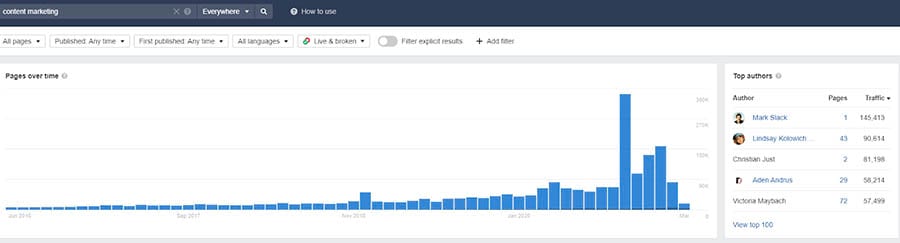
With Ahrefs, you can find sites and journalists according to topic. With just a few clicks and some refining of the search results, you can grab the data for hundreds of relevant sites. This saves hours of manual work.
The data it grabs for you includes (but isn’t limited to):
The pages that similar content appears on (and by default, the site).
Top authors.
The domain rating (essential if you’re looking to build links).
The number of domains that link to the piece of content.
Estimated traffic.
Who tweeted the content.
You’ll get an overview of the topic, similar to what you see here:
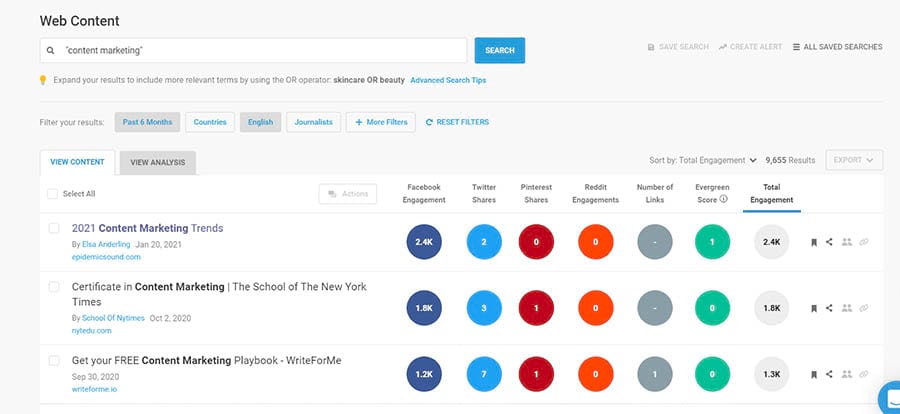
Buzzsumo is one of the most loved tools for finding people who write about topics you cover.
Alongside handy content research tools, Buzzsumo has a topic feature that allows you to build outreach lists at scale. The data you can see includes:
Trending and popular content for your chosen topic.
Social stats around those articles (including Facebook, Twitter, Pinterest, and Reddit stats).
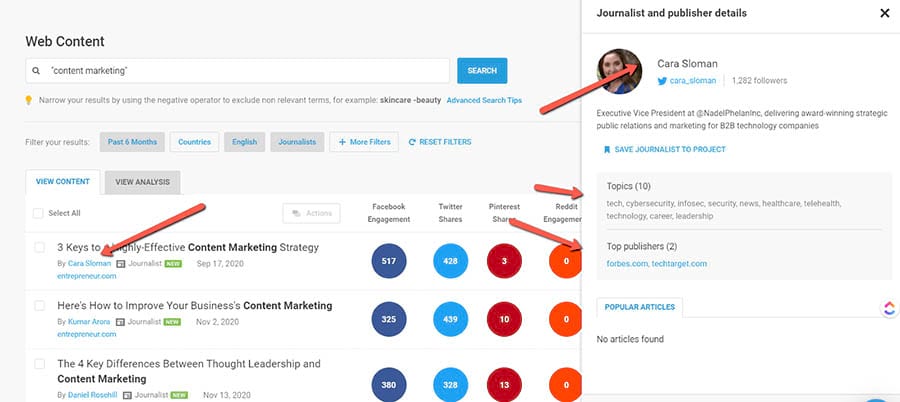
Another more recent feature allows you to find journalists that cover the type of content you’ve created.
Clicking their name enables you to gather the data required to reach out to them.
So that’s all well and good, but then you need to keep all that data in a centralized place, so you can track your efforts. When you’re working to a strict budget, a shared Google Sheet is enough. If you have a team, you’ll be better off with purpose-built software likePitchboxorBuzzstream.
These tools will allow you to upload the lists you’ve created so you can qualify the results and reach out to the people you want to get in front of.
Ensuring you track as much as possible is critical both for outreach and ensuring people see your content. If nobody sees it, it’s never going to be successful.
Didn’t Google once say that we “should stick a fork” in guest posting? Wasn’t it “done” quite a few years ago?
Well, yes, but that doesn’t mean that you shouldn’t consider it as a tool for helping to promote your content — it’s still a viable tactic when done right.
So what do you need to do?
Essentially, you need to try and guest post ongoodsites. Butwhat’s a good site? Well, we’re glad you asked.
Here are a few things to look out for when choosing a site you might want to guest post on.
Does the site have a decent amount of traffic?
Does it write mainly about your niche (you’ll want to stay away from general “we-cover-everything” type sites).
Does it have respected or expert writers on its staff or guest post roster?
Does the site have a lot of pages indexed by Google?
Does the site have high social engagement metrics?
Does the site match your target audience?
At the end of the day, when trying to identify and create a guest blogging strategy, you need to go for quality over quantity. Google is good at spotting patterns, and if it thinks you’re trying to game the system, you could find yourself in trouble with the search engine powers-that-be.
10. Reach Out to Influencers
Influencers have been a hot topicfor a few years now, with many getting a lot of love from some of the world’s biggest brands. But influencer marketing isn’t just for high-flyers — small brands can get in on it too.
And influencer marketing can work in pretty much every niche. You just have to know where to look. For example, you probably wouldn’t use an Instagram influencer to drive traffic to an attorney’s website — it just isn’t a fit.
So how do you go about finding influencers that fit your business and your website’s content? Well, there are a number of tools that can help:KlearandUpfluenceare two places you can get started.
But it’s not just about social media. Bloggers are also influencers, and they can be very effective when it comes to driving traffic and brand awareness. Social media is time-sensitive, whereas blog content can send a steady stream of traffic for much longer, sustained periods.
There are plenty of tools that allow you to search for and engage with these influencers. Here are some of the most popular:
But these aren’t going to help much unless you already have a steady stream of traffic.
So what can you do to get people onto your email list if they’re not visiting your site?
Get involved in events.Sponsor them. Talk at them. Host them.
Run a competition. Many sites run competitions on behalf of other companies, which in turn provide the prizes. Most will ask for email addresses as part of the entry conditions.
Promote your newsletter in your email signature.
Create ads on social media that incentivize sign-ups — for example, with a product discount or the promise (and delivery) of great content in exchange for an email address.
Participating in online communities can not only drive traffic to your site, but it can also help establish your business as an expert in its niche.
There are many ways you can do this, but in our experience, the ones that can drive the most traffic are the following:
Quoraisthesite for answering potential customers’ questions. Also, Quora pages often rank well in Google, giving you more visibility than you might get via your own site.
As with any community, you have to make sure that the questions you answer and the advice you give are impartial. Never push your products or services, or you will get flagged, and your answers (aka your hard work) may get removed.
Redditis an internet behemoth and, according to Similarweb, receives around 1.5 billion visits per month. If you can find subreddits to fit your niche, Reddit can drive a lot of traffic.
A word of caution, though: Never, ever self-promote. Your posts will be removed very quickly if you do. If you participate in discussions around your topic and provide valuable insight, you may find you can share your content further down the line and get great results when you do. But always proceed with caution.
It’s also worth familiarizing yourself with each subreddit’s rules that you participate in, as they are all different.
13. Be Helpful on Forums
Many marketers look down on forums as a means of increasing traffic, largely because they’ve long been used as an “easy” link-building tool. But forums aren’t all spam. They can be (and often are) used as a legitimate means of driving traffic.
Since most popular forums have a good few years under their belt, they usually have many active members. They’re not forums, really. They’re communities that come together around a passion for a particular topic.
While forums can look outdated, that doesn’t mean they don’t have an audience, andanyengaged audience is worth tapping into.
If you can find the right forums and be genuinely helpful in your contributions, you can consistently drive traffic to your site. There’s a few things to remember, though:
Don’t post links to your content too often — this could be seen as spammy
Give detailed answers to questions, which demonstrate that you’re a go-to industry expert
Share high-quality posts regularly
So how do you find these forums? The obvious place to look is Google. A quick search usually reveals some good options. There are also tools likeFindaforumthat can help you narrow down forums within your niche.
To find out how much traffic each of the forums you pick attracts, you can use a tool likeSimilarweb. This will give you an approximate idea as to how many visitors they receive every month.
14. Add a Community to Your Site
If you’re in a niche that people get really passionate about, you could consider adding a community to your website.
This could be a standard forum or more in the vein of a curated community likeProduct Hunt. Whatever you choose, you have to make sure that it’s the right choice for your audience. As these communities grow, they attract more people, and as it’s part of your site, they will connect with your brand.
In addition, the content that your community creates can drive additional traffic by being found in the search results and via social. Passionate people can help drive traffic.
A word of warning, though: Communities can be time-consuming to manage, and you have to make sure that content gets moderated. You might also want to consider incentivizing interaction, at least until your community gains traction. One great way to do this is to award participants points in aloyalty scheme.
Boost Organic Traffic with SEO
We couldn’t write an article on how to drive traffic to your website without talking aboutsearch engine optimization(or SEO, for short). It’s a long-term tactic with big rewards. But what is it? And why should you care?
Search engine optimization consists of a wide range of tactics and practices designed to help websites rank higher in the organic SERPs.
SERPs stands for Search Engine Results Pages. Organic refers to the natural or “free” section of the SERPs. In other words, it’s the portion of search engines that youdon’tpay to appear in (and who wouldn’t love that?!)
We’re not going to be able to teach you everything you need to know about SEO in this article. SEOs (the people who practice SEO or do it day-to-day as their job) spend years honing their craft and hours keeping up to date with the latest industry trends. So instead, we’re going to cover some need-to-know SEO essentials.
15. Focus on Keywords
Keyword researchis the process used to identify keywords that will help drive more traffic to a site. We typically determine a keyword’s “value” using three metrics:
Relevancy
Search volume
Competition
Let’s say you’re working on a website that sells women’s shoes.Relevant keywordsmight include:
Women’s sandals
Women’s strappy sandals
Flat women’s shoes
Women’s shoes 3-inch heel
Women’s ankle boots
And although these might surface when carrying out keyword research for women’s shoes, relevant keywords would definitely not include:
Men’s shoes
Children’s shoes
Women’s tops
So you’d ignore these or filter them out of your research. Other things to consider when it comes to relevancy might include brand terms (you don’t want to be optimizing your site for a competitor’s name!) or terms that are too general.
Search volumeis the number of people typing a particular keyword into search engines (or saying it over voice search.) This is important because more search volume = greater potential to drive traffic to your site. However, search volume alone isn’t enough to determine whether a keyword is the right choice for you. You also need to consider the competition.
Also known askeyword difficulty, keyword competition is a score, usually of between 0 and 100, that tells you how tough a keyword is to target (or in other words, whether you have a hope in Peoria of ranking for the keyword in question.)
This isn’t as simple, though, as “high competition, you won’t rank” or “low competition, you will rank.” You also need to consider the strength of the site in question.
A brand new site is going to have few, if any, incoming links. This means it’ll have minimal Domain Authority and will struggle to rank for keywords with any real competition. On the other hand, a site with a DA of, say, 90+ could feasibly go after pretty much any keyword.
16. Get a Keyword Research Tool
Countless SEO toolscan assist you with keyword research (and you’d be pretty hard-pressed to carry out keyword research without a tool). The trick is choosing a tool that works for you (and is within your budget.)
For years the go-to keyword research tool wasGoogle’s Keyword Planner. Unfortunately, Google didn’t seem to like this. The tool’s been chopped and changed to the point that it’s largely useless unless you’re researching keywords specifically to advertise on Google — a shame because it’s free.
If you’re looking for the best-in-the-biz keyword researching tool, we recommendSemrush! Its database includes more thantwo billionkeyword opportunities. On top of that, it also provides you with information on relevant keywords, related ads, product listings, and a lot more. The good news? We’ve worked out aspecial 14-day trial with Semrushso you can see if this tool is a good fit for your site!
After completing keyword research, it’s time to optimize the site, specifically things like title tags and <h> tags and the content (the body of the page) itself.
On-page optimization is important because including the keywords you want to rank for within your <h> tags and on-page content can, well, help you rank for them. Your meta title also serves as a call-to-action within the SERPs, enticing people to click through to your site instead of a competitor’s (or it will if you write a good one!) Don’t go overboard on the keyword front, though. Write for clicks first and keywords second.
Another key component of optimization is yourmeta descriptions. Unlike title tags, <h> tags, and your body content, meta descriptions don’t affect rankings. They do, however, affect clicks (potentially more so than title tags).
Meta descriptions provide a short summary of a page. In many cases, they also act as sales pitches. Use them to sum up a page’s contents and, where possible, its unique selling proposition (USP).
When complete, your title tag and meta description (known together as a search snippet) should look something like this:
18. Make Technical Improvements
Some of the biggest barriers to performance in organic search and, consequently, clicks are technical. Websites with glaring technical errors will struggle to rank. In extreme cases, they might not rank at all.
Just check outGoogle’s Core Web Vitals project, which promises higher rankings for sites that offer a speedy user experience (UX) to their visitors.
So how do you go about identifying onsite technical issues? It generally starts with a website crawler. There are quite a few around nowadays, but when it comes to cost and usability, we have two firm favorites:Screaming FrogandSitebulb.
Website crawlers — or auditing tools as they’re also known — will crawl your website, following links and extracting data. They do this in much the same way as a search engine crawler.
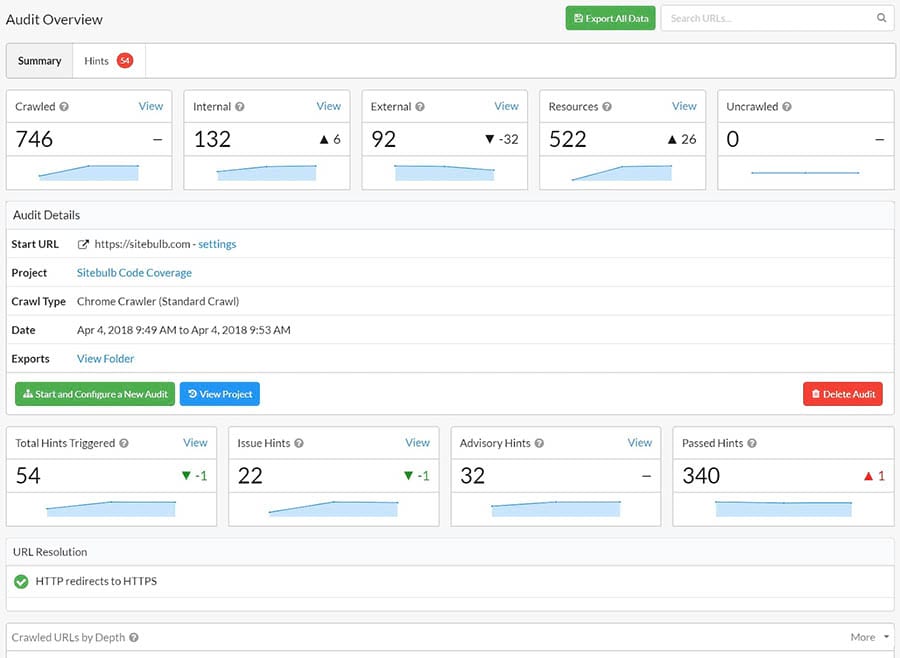
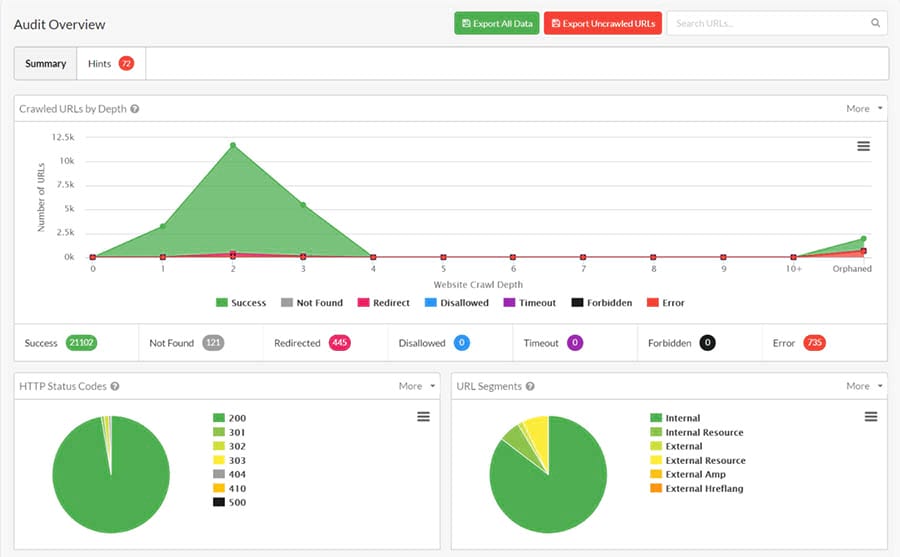
Unlike search engine crawlers, though, auditing tools are working foryou. They tell you what can be improved on your site or what’s just plain wrong with it. Whether this is duplicate content, orphaned pages, accessibility issues, structured data problems, and a whole host of other issues.
Here’s an example of information covered in just the summary section of Sitebulb. As you can probably tell, there’s a lot to sink your teeth into.
But what do you do with this information?
Well, that depends on your level of technical SEO and web development knowledge. You need the first to understand the data the auditing tools provide, and the latter to implement fixes.
(Some) site crawlers have come a long way. They don’t just tell you what the issue is. They explain the context and how to fix it. But they can’t hold your hand. Nor can they understand the nuances in each site’s issues. A human needs to dig through and analyze that data.
If you don’t feel confident in your own ability to understand and implement technical SEO improvements, you can start to learn with the following resources:
Organic social media(that’s when you post to social media without paying) now offers very little ROI for businesses. Things used to be different, but shocker, social media platforms figured out that they make more money by reducing organic visibility to near zero and charging businesses to be seen instead.
Although organic social media might be a lame duck, paid social media costs are still — most of the time — surprisingly reasonable.
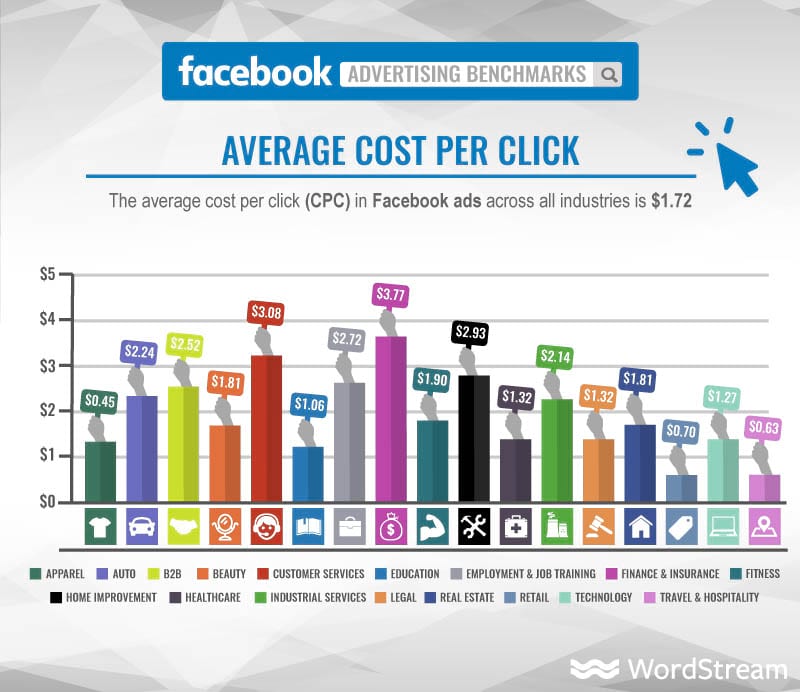
According todata collated by WordStream, the average CPC (cost per click) on Facebook across all industries is $1.72. Of course, this cost varies significantly from industry to industry. Fashion and clothing brands pay the least, at approximately $0.45 a click. Finance and insurance (probably unsurprisingly) pay the most — around $3.77.
So why drive site traffic using social media vs. more traditional paid advertising platforms like Google AdWords?
Well, for one, it’s usually cheaper. Sometimes, quite significantly so.
The average CPC on Google Ads for an insurance company is an eye-watering $18.57. Fashion companies will be paying more than double what they would for a Facebook ad, around $1.19.
Social media advertisingalso allows you to reach potential customers where they’re relaxed and engaged. If they like your brand or product but aren’t ready to buy, they may well ‘like’ your page or profile instead. This gives you a variety of routes to market to them in the future.
Get Social and Grow Your Business with DreamHost
Our experts will help create a powerful social media strategy and level up your execution so you can focus on running your business.
Choosing the Best Tactics for Boosting Website Traffic
So you now have the details of many tried-and-tested traffic-driving tactics, but how do you know which ones are right for you?
There’s no perfect answer to this. You know your business, your current situation and your goals (and if you don’t, check out ourcomplete guide to starting a business).
That said, you can do a few things to help you determine which digital marketing tactics you should be using and what to skip.
Your budget.Some of these tactics are free. Some have a cost attached. It should go without saying that you ought to spendsomemoney if you want to be effective at driving traffic to your site, but your budget will help you decide how and where you ought to be allocating that money.
Your knowledge level.Pick tactics you feel comfortable executing. Most of us, for example, could start blogging about our industry. Keyword research requires some knowledge to get going and ensure you pick the right data, but the barrier to entry is relatively low. Technical SEO is a step (or few) up from that.
Your goals.If you’re looking to drive traffic to increase brand awareness, content marketing is essential. If you only want people to come to your site to make a purchase, pay for targeted traffic on social media. In all cases, SEO should form part of your traffic-boosting strategy.
Ready to Drive Traffic to Your Website?
Now you have these tactics in your toolbox, you should be able to put together a simple strategy for getting more people to your site. Remember, though, that this isn’t a one-off exercise. Nor do you have to try everything at once or use only one tactic at a time.
Try something. See if it works. If it fails, stick at it a little longer but bring something else into your roster. Most importantly, make sure the technical aspects of your site are running smoothly — if you need toupgrade your web hosting, for example,we’ve got plans to suit any budget!
If you do this, it shouldn’t be long before you’re seeing a significant and consistent spike in your website’s traffic. Ride that wave!