Thursday, 17 February 2022

17 Excellent Affiliate Marketing WordPress Themes

When it comes to your website, first impressions really do count. Everything from color palettes to font choices can impact whether a visitor clicks on your affiliate links. But, with so much riding on your site’s design, picking the perfect theme can be intimidating.

Fortunately, it doesn’t have to be a challenge. There are dozens of high-quality themes that are ideal for various affiliate marketing niches. By understanding a few of the stand-out options that are available, you can find your perfect fit.

Start Building Your Affiliate Marketing Website Today

This article will walk you through 17 of the leading affiliate marketing themes for 2022. So let’s dive right in!

1. Zeen

affiliate marketing WordPress themes

We’ll start with a remarkably flexible theme. Zeen can help you create anything from a magazine to an online store – all with highly-customizable features.

Here are just a few options you’ll gain access to:

  • Advanced design features to improve the User Experience (UX)
  • Built-in product swatches for colors, images, and buttons
  • Support for Google voice search

If you’re selling affiliate products, you might be particularly interested in this theme’s various sales features. For example, you can add a prominent ‘add to cart’ function wherever you like. By linking this button to your affiliate partners’ sites, you can provide users with an easy way to purchase products.

Pricing: Zeen costs $39 and comes with six months of support. If you’d like to extend that to 12 months, it will cost an extra $10.13.

2. Astra

Astra is a very popular WordPress theme. With super-light code and countless layout settings, it’s a powerhouse when it comes to fast loading times. However, that’s not all.

Its other powerful features include:

  • A huge library of pre-built websites to choose from
  • Design flexibility thanks to its compatibility with page builders
  • Optimized speeds for all device types

If you’re looking to reduce your site’s bounce rates, Astra might be the best option for you. Faster load times mean you can appeal to even your most impatient visitors. However, you might also choose this theme if you want maximum design freedom.

Pricing: The basic version of Astra is free. However, if you want full functionality, paid options begin at $49. You can also choose from two higher-tier plans with premium features: the Essential Bundle ($169) or the Growth Bundle ($249).

3. Divi

affiliate marketing WordPress themes

Divi is another incredibly flexible option. This theme enables you to control almost every aspect of your site.

You’re free to choose from a huge variety of design options, such as:

  • Subtle shadow features that you can use to highlight certain products
  • Dynamic animations to catch your visitors’ attention
  • Optional advanced code editing within the engine

Additionally, Divi also has a companion program: the Divi Builder. This page builder is optimized to work with the theme for a smoother website creation experience. If you’re looking for an all-in-one solution for seamless site design, we suggest that you consider Divi.

Pricing: Divi pricing begins at $67 per year. This includes the Divi Builder. If you’d prefer only to pay once, you can also get the same features for a lifetime license fee of $187.

4. Neve

Today’s users can access your website from various devices – and mobile is at the top of that list. So Neve prioritizes modern, mobile-friendly designs to help you reach the maximum number of shoppers.

You might also appreciate a few other stand-out features like:

  • Drag-and-drop customization for headers and footers
  • Lightweight code for excellent loading times
  • Global color palette options for centralized redesigns

We recommend Neve if you have a robust social media following. Visitors usually access these platforms from mobile devices. As such, your promotional links should lead them to a well-optimized mobile version of your website.

Pricing: Neve licenses start at $59 per year. However, the Business plan might be better if you’re making many affiliate sales. This plan starts at $149 per year.

5. Zox News

Zox News is a multi-purpose theme. You don’t have to run a news-based website to use it – as long as you’re looking for a dynamic, effective way to advertise your content, this theme is a smart choice.

Other benefits included in this theme are:

  • A free Reviewer Plugin to display reviews and comparison tables alongside your content
  • Featured areas to promote specific formats such as videos
  • Sticky sidebars to improve site navigation

Zox News also provides you with the choice of eight different article layouts. That’s why we recommend it if you want to provide more dynamic content. Users may feel that too many similarly-structured articles become repetitive. This theme’s built-in variety can help you easily add more diverse formatting.

Pricing: You can purchase Zox News for $55. You’ll also receive six months of support at this price point. To extend that to a full year, you can pay an extra $16.13.

Want more affiliate marketing tips in your inbox?

Click below to sign up for more how-to's and tutorials just like this one, delivered to your inbox.

marketing tips

6. Silk

If you’re building a fashion-forward blog meant to show off the latest trends, you might want to consider Silk. However, this theme isn’t just for fashion – as long as you’re seeking a way to showcase your work, Silk can be an excellent fit.

Other stand-out features you may like include:

  • A mega-menu option for ease of navigation
  • Integrated social tools to make sharing your affiliate offers easy
  • A huge selection of top-tier typography tools

If your affiliate sales strategy relies on a more visual approach, this theme can be a smart choice. That’s because Silk is an especially media-friendly theme. Thus, it’s an easy way to share high-quality product photos or videos with your audience.

Pricing: Silk’s pricing starts at €70 per year (about $79). This includes one year of support and updates. If you prefer a one-time fee, you can opt for the lifetime edition.

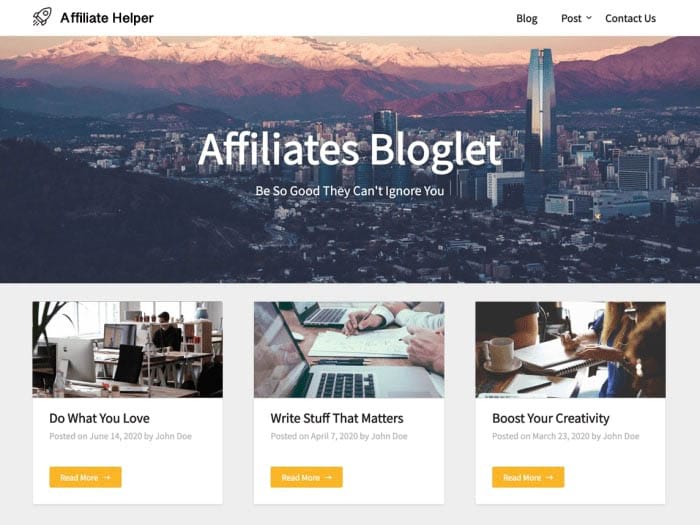
7. Affiliates Bloglet
affiliate marketing WordPress themes

If you run a website focused on written content, we recommend that you consider using the Affiliates Bloglet theme. That’s because it offers a clean interface and responsive design.

As such, your visitors can enjoy a minimalist experience no matter where they visit from, in addition to other features like:

Without busy elements, your blog can take center stage. However, minimalist doesn’t have to mean empty. You can also use the white space around your content. That’s why we recommend Affiliates Bloglet if you’re running ads alongside your affiliate products – there’s plenty of space for them.

Pricing: Affiliates Bloglet is a child theme of Blogrid and thus follows its pricing plans. The premium options start at $29. In addition to Affiliates Bloglet, you’ll also gain access to three other child themes.

8. CouponXL

Many affiliate sites offer deals and coupons as a part of their offers. If this sounds like your strategy, the CouponXL theme might be your perfect fit.

Whether you’re just starting out or an established figure in the affiliate marketing game, this theme can help you with features like:

Consider choosing the CouponXL theme if you want to use cloaked links. This feature helps you hide potentially spammy-looking URLs. That means you can build user trust while still earning affiliate commissions.

Pricing: You can purchase CouponXL for $39. To upgrade the six months of support to 12, you can pay an additional $10.13.

9. Tokoo

When it comes to promoting affiliate links, images can be extremely influential. That’s because they’re an easy way to demonstrate what you’re selling. If you want to take advantage of this strategy, consider using Tokoo.

Other impressive features of this theme include:

  • Responsive menu options for easy navigation
  • Predefined design palettes for a quick start
  • Minimum white space for a sales-focused approach

If you want to mimic the layout of top-tier ecommerce sites, you might want to choose Tokoo. It can help you apply the same attention-grabbing format to your affiliate products. The variety of image formats on offer will also help with this.

Pricing: Tokoo is available for $59. If you’re not ready to commit, you can also use the free trial offer to take it for a spin.

10. Mai Creative Pro

A stunning website can go a long way towards increasing sales. The more you can emphasize your professional skills, the more you can build up your users’ trust. That’s where Mai Creative Pro comes in.

It combines an aesthetically-pleasing design with clean, functional options such as:

  • Highly customizable widget areas
  • Full control over the appearance of your header to match your affiliate branding strategy
  • Custom page templates to help you build a beautiful site quickly

Mai Creative Pro might be the best choice if you’re a beginner. It may be customizable, but it’s also impressively user-friendly. When combined with the wealth of detailed tutorials, it’s a top choice for your first theme.

Pricing: You can purchase Mai Creative Pro for $99. You can also check out its full demo if you’re still on the fence.

11. Herald

Herald was designed to act as an online newspaper. However, that doesn’t mean you’ll be choosing a limited option. With plenty of ways to prioritize content, you can show off your favorite articles and best affiliate links.

You might also appreciate the following features:

  • Nearly 500 variations on your listing layouts
  • Unlimited sidebar and color combinations
  • Built-in social sharing features

If you’re using affiliate marketing as one of many monetization strategies, you might want to consider Herald. This theme makes it easy to add banner ads to your home page, archives, or even single posts – all without having to know a single line of code.

Pricing: Herald’s price comes in at $69. To upgrade from six to 12 months of support, you can pay an additional $21.38.

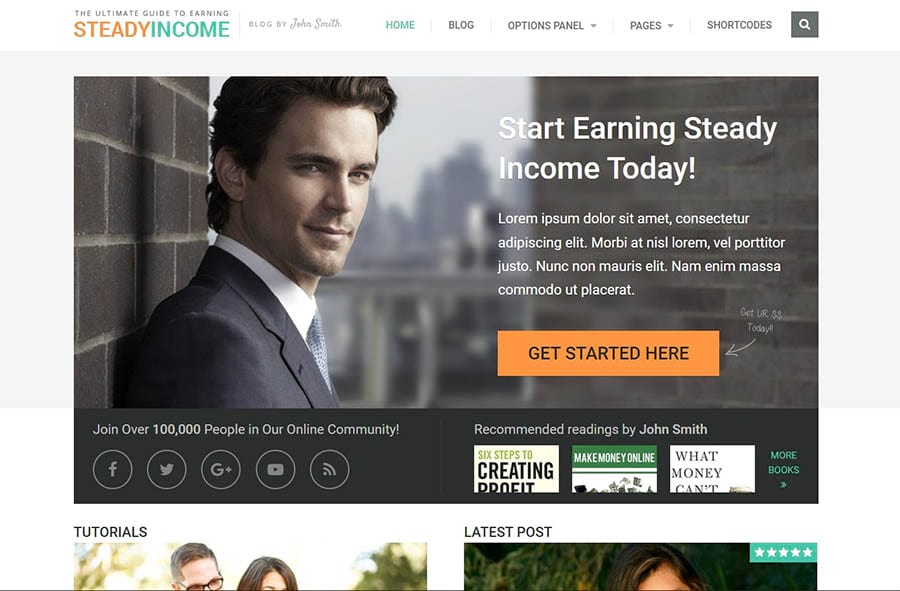
12. SteadyIncome
affiliate marketing WordPress themes

Affiliate marketing can be one of the most effective ways to turn a profit. Getting users to spend time on your site is the crucial first step of this process.

If you’re looking to make a positive impression right away, SteadyIncome can help with features like:

We recommend choosing SteadyIncome if you’re prioritizing new customers over repeat ones. The bold, professional design can help establish trust quickly. This, in turn, can help you make sales more efficiently.

Pricing: SteadyIncome costs $39. This will also get you a year of updates and support for unlimited sites. If you change your mind, you can also benefit from the 30-day money-back guarantee.

13. Consulting Multipurpose Classic Elementor

With plenty of modern content areas, Consulting Multipurpose Classic Elementor is a simple way to showcase professional advice. However, that’s not all it can do. You can also use this theme’s organized format for advertising anything from your brand to the products you’re promoting.

Plus, you’ll get access to other features such as:

  • The option to sort affiliate partners into discrete categories
  • Attractive icons and blurbs for your products
  • Built-in tab formatting to help you highlight particular offers

You might want to consider Consulting Multipurpose if you plan to appeal to a more local audience. Features such as integrated Google Maps can help you emphasize a visual location. However, a more global approach is also possible thanks to an included multilingual plugin.

Pricing: For full functionality on a single site, Consulting Multipurpose will cost $75. There are a variety of premium add-ons as well, such as customization services and an extended support period.

14. Sensational

No matter how well-run your website is, marketing your content is key to boosting affiliate sales. As such, finding ways to show off as much of your work as possible can be essential.

Sensational can be the perfect tool for this challenge, with features like:

  • Plenty of room for content balanced out by lots of white space
  • Subtle professional touches, such as hovering effects and transition slides
  • Unlimited color schemes and backgrounds for countless customization options

You might particularly enjoy Sensational if you prefer a column-based approach. Sensational makes the most of this simple format with four different styles to choose from. That means you can spend less time tweaking designs and more time sharing your links.

Pricing: Sensational is currently available for free. It typically goes for $77, so now might be a smart time to give this theme a try.

15. Marketing Pro

A marketing funnel can be an essential tool for affiliate marketers. You start by offering surface-level information to new users and move them towards more detailed content as they get closer to purchasing. Marketing Pro can support this use with its cohesive design flow.

Other contributing features include:

  • A commanding banner at the top that leads into more sales-oriented formatting below
  • Nine pre-made templates to make redesigning your site easy
  • $72 worth of premium plugins

We recommend Marketing Pro if your affiliate offerings are face-to-face services. For example, you might be promoting a life coaching program. This theme focuses on the buyer’s journey to secure conversions for long-term service plans.

Pricing: You can purchase Marketing Pro for $59. The theme offers an impressive amount of documentation, but to extend direct support to a full year, you can pay an extra $17.63.

16. Netube

Netube is a theme designed for building a video magazine. That means it enables you to showcase several videos at once. The large image spaces mean you can display accurate examples of your work without compromising on quality.

You might also appreciate this theme’s other features, such as:

  • The option to organize content by criteria, such as highest rated or most views
  • Easy opportunities to allow user-generated video uploads
  • A subtle, dark design that allows your videos to stand out

We’ve covered a lot of themes that accommodate written content. Netube stands out as one that prioritizes media instead. If you work with a lot of videos, we highly recommend checking Netube out.

Pricing: Netube is available for $59. This will also give you access to any future updates, so you don’t have to worry about your theme becoming obsolete.

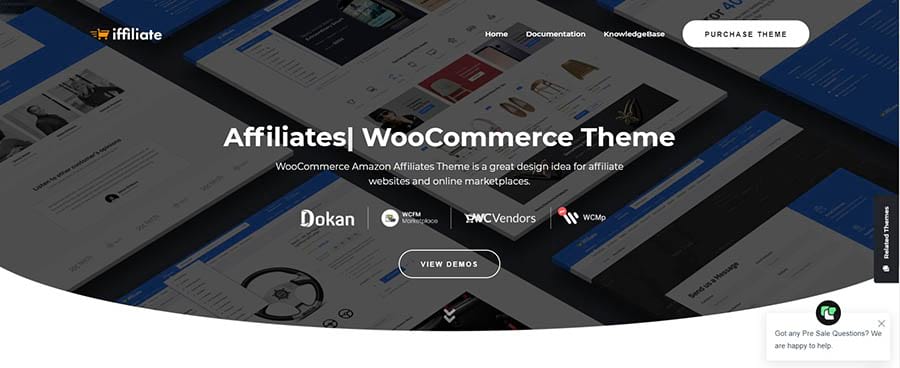
17. iffiliate
affiliate marketing WordPress themes

There are plenty of high-quality themes that can support your affiliate marketing strategy. However, sometimes what you need is a specialized approach to help you focus on your goals. When it comes to promoting your partners’ products, iffiliate is one of the top tools for the job.

It includes features like:

  • A bundled mega menu plugin for better navigation
  • Ajax live search that makes for a more dynamic UX
  • Seamless integration with the Amazon Affiliate program

We’d recommend iffiliate if you’re building a more traditional ecommerce-style site. For example, you can create single-product pages to advertise each partner’s items. You can then replace the checkout links with your affiliate URLs.

Pricing: You can purchase iffiliate for $59. This comes with six months of support, but you can extend this to 12 for an additional $17.63.

The Right Themes Make All the Difference

Let’s face it: being an affiliate marketer can be tough. Fortunately, choosing the right tools can make all the difference. By carefully picking your WordPress theme, you can set your website up for success.

This article walked you through 17 of our favorite themes for affiliate marketing. We’ve considered everything from minimalist designs to media-heavy approaches. We’d recommend checking out the demos for your favorites and testing them fully before settling on your final choice.

If you want to earn more commissions, picking the right theme counts. However, your website also has to perform at its best and provide a top-notch user experience. For that, check out our DreamPress hosting plans!

Do More with DreamPress

DreamPress' automatic updates and strong security defenses take server management off your hands so you can focus on content creation.

shared hosting

The post 17 Excellent Affiliate Marketing WordPress Themes appeared first on Website Guides, Tips & Knowledge.


source https://www.dreamhost.com/blog/affiliate-marketing-wordpress-themes/

Tuesday, 15 February 2022

Generate More Leads with a Strong Google Business Profile

Attracting new customers online is not always an easy task. Finding your audience and ranking higher in search results can be more complicated than you expect. However, with organic search driving 53% of web traffic, maximizing your online presence is crucial if you want to grow your business.

While there are many steps you can take, creating a strong Google Business Profile is one easy way to boost your digital visibility. A fully-optimized listing can help you reach potential clients, scale your business, and generate more quality leads.

This post will discuss what a Google Business Profile is and how an optimized business listing can benefit your web presence. Then we’ll describe five of the tool’s newest features and how they can fuel lead generation. Let’s get started!

What is a Google Business Profile?

A Google Business Profile is an online tool that allows you to take charge of how your company appears on Google. This platform was formerly known as Google My Business (GMB), but in 2021 Google announced that it was updating GMB and rebranding.

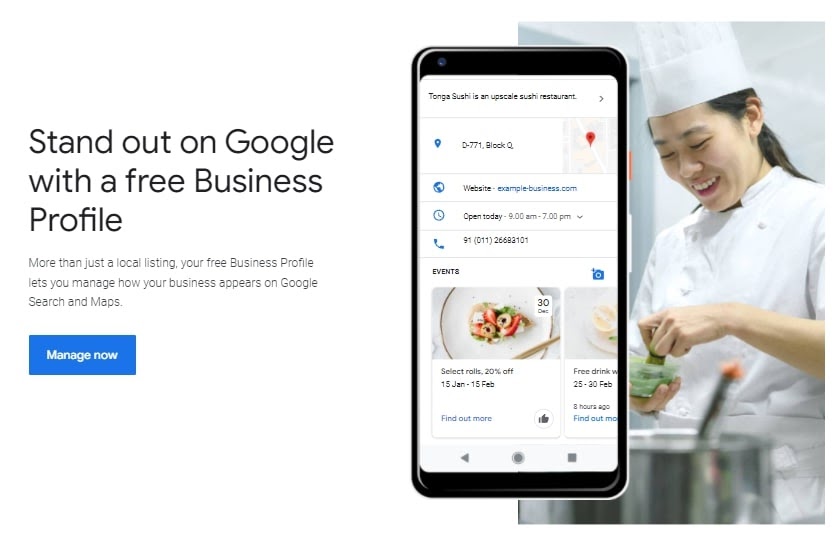
This change is still in progress. Overall, it aims to simplify profile management and make Google Business listings more accessible for small businesses. However, Google Business Profile still helps all business owners to create an online presence and connect with customers:

The Google Business Profile website.

A Google Business Profile allows you to list the name and location of your company on Google Maps and Search. These listings can display further relevant information, such as your hours of operation, phone number, and website. The top Business Profile listings appear when a user types a query into Google Search, Google Maps, or Google Shopping.

All businesses that have a physical location or come in contact with customers can create a listing. Unfortunately, online-only businesses don’t currently qualify. However, if you meet the minimum requirements, it is completely free to create and maintain a listing. This makes it one of the great tools for small businesses with minimal marketing budgets.

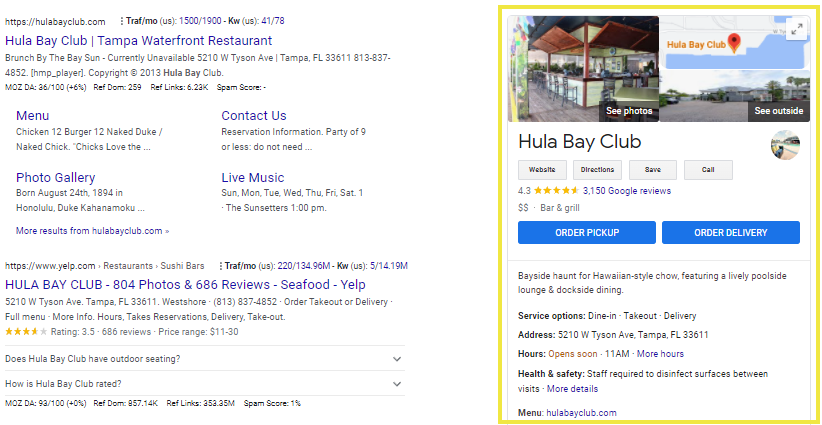
After you sign up for your Business Profile, you can edit it to provide essential information and media in the knowledge panel. This is an automatically-generated information box that appears on Google when you conduct a search. A fully-optimized Google Business Profile will typically look similar to this:

Google knowledge panel with Hula Bay Club Business Profile.

Google Business Profiles’ extensive features help advertise your business and find more customers online. You can also save time and energy by providing important details ahead of time. For instance, if you post your business hours, you’ll likely reduce customer questions about what hours you’ve available.

When creating your listing, it’s wise to include as much information as possible. That way, you’re answering customer questions before they arise.

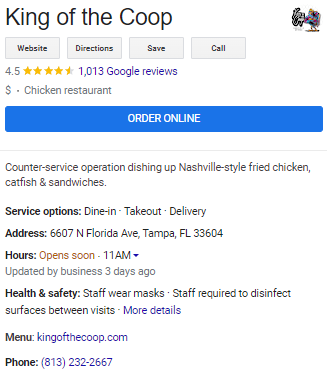
We highly recommend including all the basics, plus anything else that makes your business stand out. You can also provide information for special attributes, such as accessibility, activities, and dining options:

King of the Coop restaurant’s Google Business Profile.

Furthermore, you can upload photos and videos of your business’s location, products, and services. There is also a feature that allows you to accept orders, quotes, and bookings directly from your listing.

Your profile is also a place to interact with potential customers. They can use the Ask a question button or leave reviews about their experiences. The instant messaging feature even lets you chat directly with users to quickly answer questions and assist with any concerns directly from your account. However, you will need to enable this feature before you can use it.

How a Google Business Profile Works

Generate More Leads with a Google Business Profile

A Google Business Profile improves local Search Engine Optimization (SEO) for your business. If your listing is fully-optimized, your business is more likely to appear when customers make a related search using Google Maps, Google Search, or Google Shopping. That alone can generate plenty of new leads.

Since Google holds most of the search engine market share, it’s extremely likely that potential customers will see your Google Business Profile when they search for products and services. For listed businesses, Google’s search rankings are determined by relevance, distance, and quality. Therefore, ensuring that your listing includes the correct business name, location, and phone number is critical. You might also want to encourage customer testimonials in the review section.

Of course, the COVID-19 pandemic changed the way people shop. Many consumers now plan ahead and conduct a Google search to ensure that products are available before leaving their houses. In fact, the number of “Available near me” searches has grown by more than 100% since 2020.

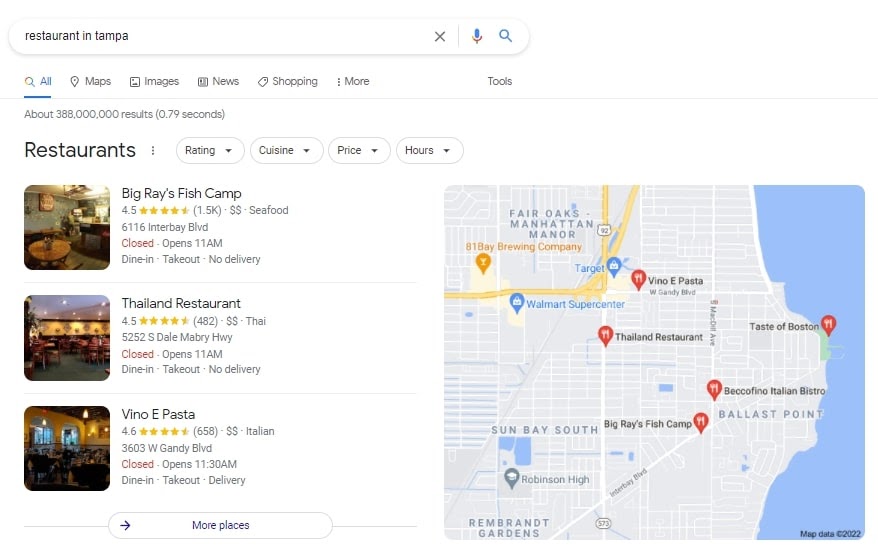
Google Business Profiles appear in the “3-pack” area of local search results. This is comprised of the three business listings Google displays when a user conducts a “near me” or “near [location]” search:

Local 3-pack for “restaurants in Tampa” search.

If your listing is optimized for your Google Business location and you have solid reviews, the 3-pack feature can send leads your way. In fact, customers are 70% more likely to visit a business and 50% more likely to consider purchasing from it if it has a complete Business Profile.

5 New Google Business Profile Listing Features for 2022

Along with general improvements, the updated Google Business Profile account offers several new features. Google should continue rolling out more developments over the coming year. In the meantime, let’s take a closer look at some of the latest updates.

1. Simplified Profile Management

One of the most prominent characteristics of the new Google Business Profile is the way it is managed. Previously, most Google My Business listings had to be created and maintained through your account or the GMB mobile app.

The new Google Business Profile is designed with local businesses in mind. Now, you can verify, edit, and manage your business profile directly in Google Search and Google Maps. Simply search for your company’s name, and you will see an option to claim and verify your Business Profile.

This new feature makes it easier to get your business on Google. Once your profile is verified, you will be able to edit your details by clicking on Edit your business information. From this page, you can list important information, such as your address and business hours. You will also see options for uploading photos and responding to customer reviews.

This simplified management option can also help you edit your profile faster. Since an updated profile signals to Google that your listing is more relevant, you can more easily improve your SEO and improve your chances of appearing in Google local 3-pack.

Moving forward, the website for Google My Business will be renamed Business Profile Manager, and its primary use will be for larger businesses with multiple profiles. Google My Business profile management will be available through Search and Maps. Google also plans to retire the Google My Business app in order to streamline account management.

2. Customer Engagement Options

The new Google Business Profile includes additional ways to engage with customers. Business owners have always had the ability to message customers and respond to reviews through GMB listings.

Now, Google has created a call history feature for businesses in the U.S. and Canada. This will allow you to see a list of calls you’ve initiated, answered, or missed, right from your Google account.

You will also be able to send and receive messages directly from Search (with read receipts). As a result, customers will have a more direct way to reach you. With this tool, you may be able to provide a better customer service experience and convert more prospective visitors into customers.

3. Opportunities to Display Your Inventory

If your business sells products, the new in-stock feature is a great way to display your inventory and advertise to potential customers. This filter allows shoppers to see specific items that are in stock at nearby stores. When users see that products are available, they’ll be more likely to visit your store and make a purchase.

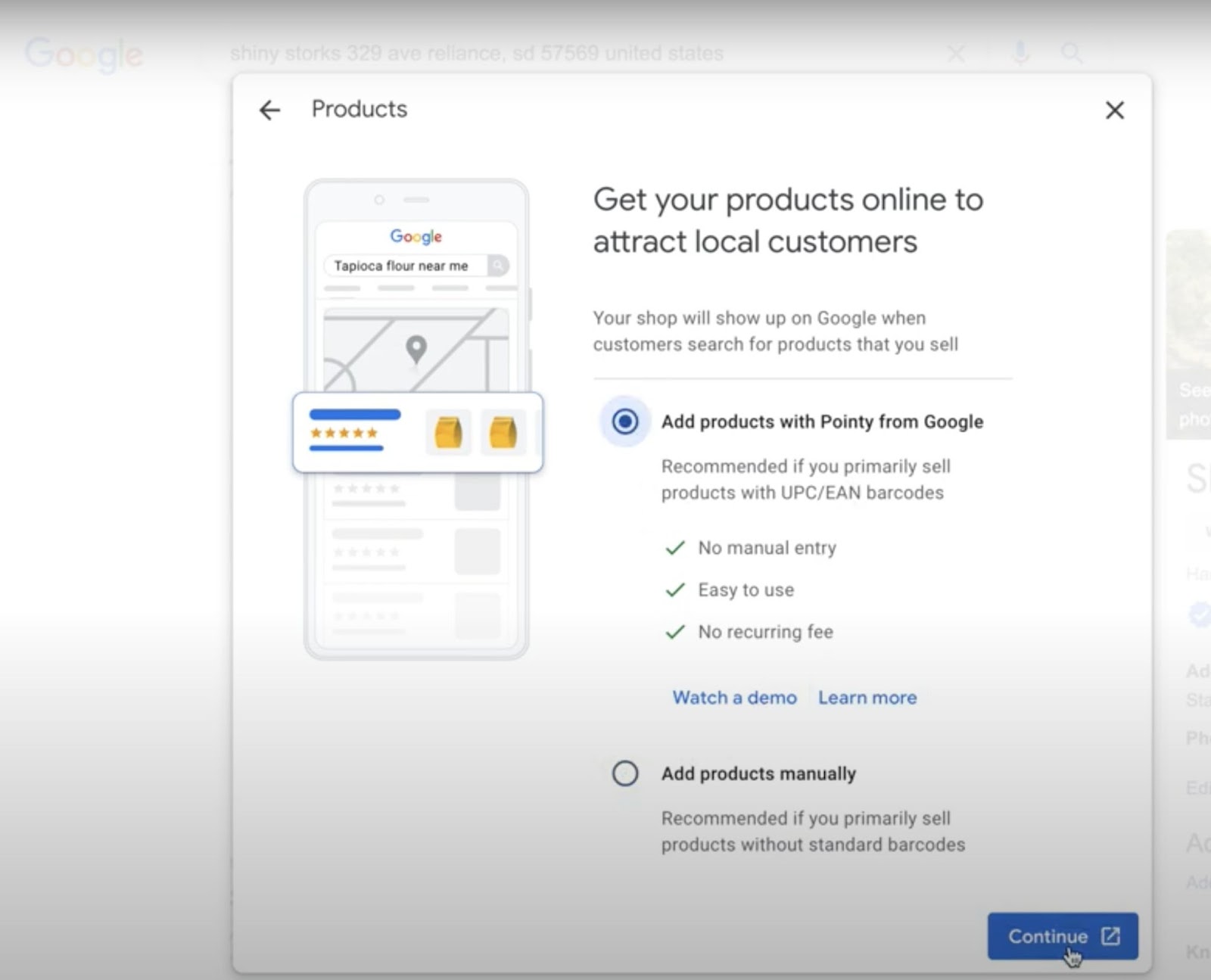
In order to take advantage of this new feature, you’ll need to sign up for Pointy. This is a free tool that connects to your point of sale system and automatically updates your inventory. Pointy uploads a product’s title, image, and description directly to Google, by simply scanning the barcode:

The Pointy inventory tool.

To do this, navigate to your Google Business Profile listing, click on Edit Profile, and then select Products from the drop-down menu. You can either add products with Pointy or upload products manually with Pointy’s Product Editor:

Adding products to Google with Pointy.

Automatic product uploads work best with items that have standard barcodes. If you sell products with non-standard barcodes, adding them manually is likely the best option.

4. Promotional Opportunities with Performance Planner

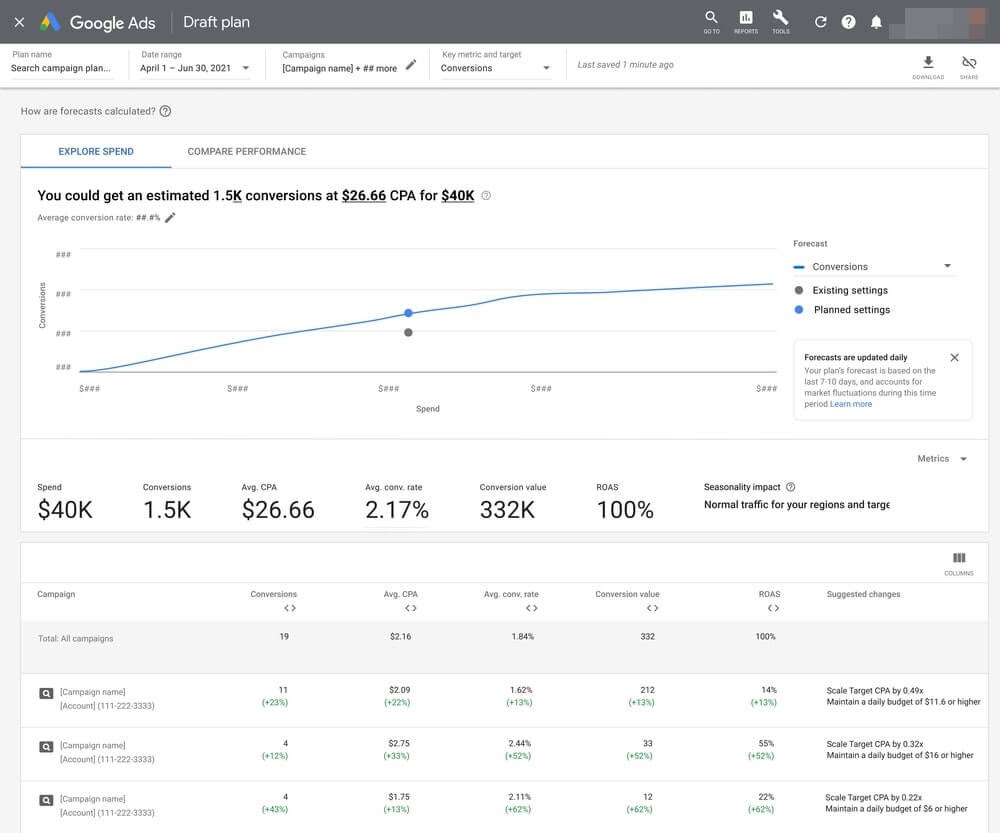
You can also connect your Business Profile account with Google Ads to take advantage of the new Performance Planner. This tool enables you to create advertising plans and illustrates how campaigns affect your key metrics and performance.

Performance Planner analyzes billions of queries each day and simulates relevant ad auctions to collect data and create forecasts. You can manage your budget, see campaign forecasts, explore possible outcomes, and gauge seasonal opportunities directly from the Performance Planner:

The Performance Planner analytics tool.

Once you connect your Business Profile to your Google Ads account, you can use your inventory to create local search campaigns that display your ads in search results. These ads include images and product descriptions based on your inventory. This can help you easily generate leads by putting your relevant product ads in front of more prospective customers.

5. Expanded Attributes

When creating or updating your listing, you’ll want to complete all applicable profile attributes to be sure potential customers understand your business. Attributes are personalized descriptors and identifiers that show what your company offers.

Attributes can vary depending on your Google Business categories. The most common attributes include Accessibility, Amenities, Payments, and Service Options. For example, if your business location is wheelchair-accessible, you can update your Accessibility attribute so customers will be aware.

The Health & Safety attribute is a relatively new option that was added due to the COVID-19 pandemic. This allows you to share important details, such as your mask guidelines and whether you have a temperature check policy in place.

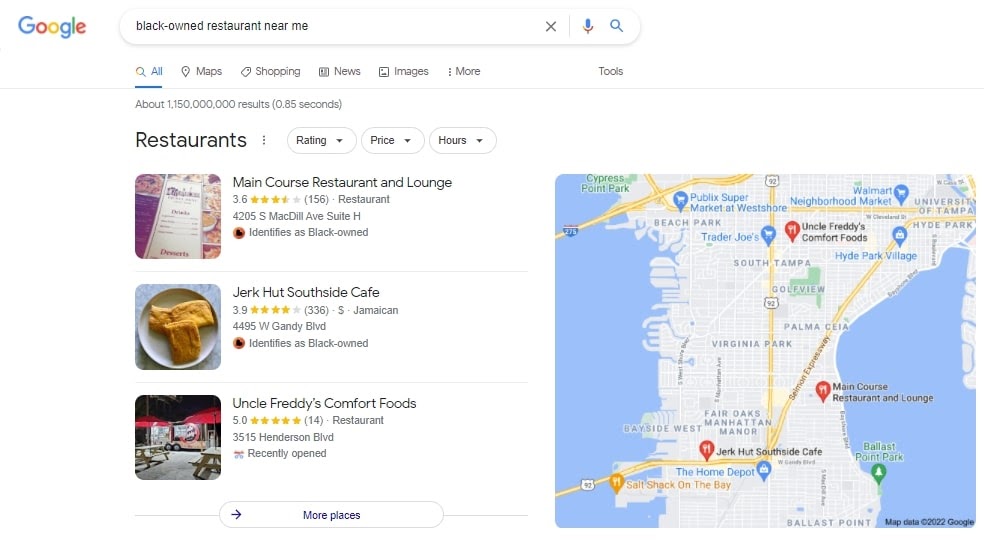
There is also a category titled From The Business, which allows you to share more about your leadership. In this section, you can highlight additional unique details about your company. For instance, if your business is women-led, veteran-led, or black-owned, you might want to include that information here.

Customers can then conduct a Google Search for a specific attribute. For example, when a potential customer searches “black-owned restaurant near me,” they will only see results with this attribute:

A search for businesses with a specific attribute.

Adding all applicable attributes to your Google Business Profile can optimize your listing and influence your local SEO. It can also help potential customers narrow down their search results, making it easier for them to choose your business.

How to Get Started with a Google Business Profile

Getting started with Google Business is straightforward. However, Google has several guidelines you must follow to avoid getting suspended.

First, you’ll want to sign in to the Google Business Profile Manager and search for your business on Google or in the Google Maps app. If you do not immediately see your company, you can select “Add Your Business” to Google.

You will then be prompted to verify your business using your real physical address. Physical businesses will receive a postcard by mail, while service-area businesses can verify their details through email. Once your business is approved, you can edit the listing to add your details and important information.

Like building a website, setting up a Google Business Profile can be somewhat challenging for beginners. Fortunately, you can hire industry experts to create and optimize your listing. Doing this will ensure that your profile is properly managed, so you can focus on running your business.

SEO Made (Really) Easy with Pro Services

We take the guesswork (and actual work) out of growing your website traffic with SEO.

shared hosting

An Important Marketing Tool

Attracting leads to your brick-and-mortar location can be difficult. Therefore, maximizing your online presence should be critical to your overall marketing strategy.

The new Google Business Profile can organically promote your products or services. Let’s recap the five newest features that can help you generate leads:

  1. Streamlined profile management: A new, simplified way to create and modify your profile directly in Google Search and Maps
  2. Customer engagement: Enhanced user interaction with direct messaging through Search, read receipts, and a call history feature
  3. Real-time inventory: An in-stock feature to display your local inventory
  4. Performance Planner: To help you use Google Ads for enhanced ad campaigns
  5. Expanded attributes: Further tell your business’s story, and share its health and safety standards

Are you looking for additional ways to grow your online business? Learn more about DreamHost’s SEO Pro Services and explore our extensive marketing and local business support solutions. If you need help setting up your Google Business Profile, you can always chat with an expert or schedule a free consultation for advice and guidance!

Now get out there, and get your business on Google!

The post Generate More Leads with a Strong Google Business Profile appeared first on Website Guides, Tips & Knowledge.


source https://www.dreamhost.com/blog/lead-generation-google-business/

Generate More Leads With a Strong Google Business profile

Attracting new customers online is not always an easy task. Finding your audience and ranking higher in search results can be more complicated than you expect. However, with organic search driving 53% of web traffic, maximizing your online presence is crucial if you want to grow your business.

While there are many steps you can take, creating a strong Google Business Profile is one easy way to boost your digital visibility. A fully-optimized listing can help you reach potential clients, scale your business, and generate more quality leads.

This post will discuss what a Google Business Profile is and how an optimized business listing can benefit your web presence. Then we’ll describe five of the tool’s newest features and how they can fuel lead generation. Let’s get started!

What is a Google Business Profile?

A Google Business Profile is an online tool that allows you to take charge of how your company appears on Google. This platform was formerly known as Google My Business (GMB), but in 2021 Google announced that it was updating GMB and rebranding.

This change is still in progress. Overall, it aims to simplify profile management and make Google Business listings more accessible for small businesses. However, Google Business Profile still helps all business owners to create an online presence and connect with customers:

The Google Business Profile website.

A Google Business Profile allows you to list the name and location of your company on Google Maps and Search. These listings can display further relevant information, such as your hours of operation, phone number, and website. The top Business Profile listings appear when a user types a query into Google Search, Google Maps, or Google Shopping.

All businesses that have a physical location or come in contact with customers can create a listing. Unfortunately, online-only businesses don’t currently qualify. However, if you meet the minimum requirements, it is completely free to create and maintain a listing. This makes it one of the great tools for small businesses with minimal marketing budgets.

After you sign up for your Business Profile, you can edit it to provide essential information and media in the knowledge panel. This is an automatically-generated information box that appears on Google when you conduct a search. A fully-optimized Google Business Profile will typically look similar to this:

Google knowledge panel with Hula Bay Club Business Profile.

Google Business Profiles’ extensive features help advertise your business and find more customers online. You can also save time and energy by providing important details ahead of time. For instance, if you post your business hours, you’ll likely reduce customer questions about what hours you’ve available.

When creating your listing, it’s wise to include as much information as possible. That way, you’re answering customer questions before they arise.

We highly recommend including all the basics, plus anything else that makes your business stand out. You can also provide information for special attributes, such as accessibility, activities, and dining options:

King of the Coop restaurant’s Google Business Profile.

Furthermore, you can upload photos and videos of your business’s location, products, and services. There is also a feature that allows you to accept orders, quotes, and bookings directly from your listing.

Your profile is also a place to interact with potential customers. They can use the Ask a question button or leave reviews about their experiences. The instant messaging feature even lets you chat directly with users to quickly answer questions and assist with any concerns directly from your account. However, you will need to enable this feature before you can use it.

How a Google Business Profile Works

Generate More Leads with a Google Business Profile

A Google Business Profile improves local Search Engine Optimization (SEO) for your business. If your listing is fully-optimized, your business is more likely to appear when customers make a related search using Google Maps, Google Search, or Google Shopping. That alone can generate plenty of new leads.

Since Google holds most of the search engine market share, it’s extremely likely that potential customers will see your Google Business Profile when they search for products and services. For listed businesses, Google’s search rankings are determined by relevance, distance, and quality. Therefore, ensuring that your listing includes the correct business name, location, and phone number is critical. You might also want to encourage customer testimonials in the review section.

Of course, the COVID-19 pandemic changed the way people shop. Many consumers now plan ahead and conduct a Google search to ensure that products are available before leaving their houses. In fact, the number of “Available near me” searches has grown by more than 100% since 2020.

Google Business Profiles appear in the “3-pack” area of local search results. This is comprised of the three business listings Google displays when a user conducts a “near me” or “near [location]” search:

Local 3-pack for “restaurants in Tampa” search.

If your listing is optimized for your Google Business location and you have solid reviews, the 3-pack feature can send leads your way. In fact, customers are 70% more likely to visit a business and 50% more likely to consider purchasing from it if it has a complete Business Profile.

5 New Google Business Profile Listing Features for 2022

Along with general improvements, the updated Google Business Profile account offers several new features. Google should continue rolling out more developments over the coming year. In the meantime, let’s take a closer look at some of the latest updates.

1. Simplified Profile Management

One of the most prominent characteristics of the new Google Business Profile is the way it is managed. Previously, most Google My Business listings had to be created and maintained through your account or the GMB mobile app.

The new Google Business Profile is designed with local businesses in mind. Now, you can verify, edit, and manage your business profile directly in Google Search and Google Maps. Simply search for your company’s name, and you will see an option to claim and verify your Business Profile.

This new feature makes it easier to get your business on Google. Once your profile is verified, you will be able to edit your details by clicking on Edit your business information. From this page, you can list important information, such as your address and business hours. You will also see options for uploading photos and responding to customer reviews.

This simplified management option can also help you edit your profile faster. Since an updated profile signals to Google that your listing is more relevant, you can more easily improve your SEO and improve your chances of appearing in Google local 3-pack.

Moving forward, the website for Google My Business will be renamed Business Profile Manager, and its primary use will be for larger businesses with multiple profiles. Google My Business profile management will be available through Search and Maps. Google also plans to retire the Google My Business app in order to streamline account management.

2. Customer Engagement Options

The new Google Business Profile includes additional ways to engage with customers. Business owners have always had the ability to message customers and respond to reviews through GMB listings.

Now, Google has created a call history feature for businesses in the U.S. and Canada. This will allow you to see a list of calls you’ve initiated, answered, or missed, right from your Google account.

You will also be able to send and receive messages directly from Search (with read receipts). As a result, customers will have a more direct way to reach you. With this tool, you may be able to provide a better customer service experience and convert more prospective visitors into customers.

3. Opportunities to Display Your Inventory

If your business sells products, the new in-stock feature is a great way to display your inventory and advertise to potential customers. This filter allows shoppers to see specific items that are in stock at nearby stores. When users see that products are available, they’ll be more likely to visit your store and make a purchase.

In order to take advantage of this new feature, you’ll need to sign up for Pointy. This is a free tool that connects to your point of sale system and automatically updates your inventory. Pointy uploads a product’s title, image, and description directly to Google, by simply scanning the barcode:

The Pointy inventory tool.

To do this, navigate to your Google Business Profile listing, click on Edit Profile, and then select Products from the drop-down menu. You can either add products with Pointy or upload products manually with Pointy’s Product Editor:

Adding products to Google with Pointy.

Automatic product uploads work best with items that have standard barcodes. If you sell products with non-standard barcodes, adding them manually is likely the best option.

4. Promotional Opportunities with Performance Planner

You can also connect your Business Profile account with Google Ads to take advantage of the new Performance Planner. This tool enables you to create advertising plans and illustrates how campaigns affect your key metrics and performance.

Performance Planner analyzes billions of queries each day and simulates relevant ad auctions to collect data and create forecasts. You can manage your budget, see campaign forecasts, explore possible outcomes, and gauge seasonal opportunities directly from the Performance Planner:

The Performance Planner analytics tool.

Once you connect your Business Profile to your Google Ads account, you can use your inventory to create local search campaigns that display your ads in search results. These ads include images and product descriptions based on your inventory. This can help you easily generate leads by putting your relevant product ads in front of more prospective customers.

5. Expanded Attributes

When creating or updating your listing, you’ll want to complete all applicable profile attributes to be sure potential customers understand your business. Attributes are personalized descriptors and identifiers that show what your company offers.

Attributes can vary depending on your Google Business categories. The most common attributes include Accessibility, Amenities, Payments, and Service Options. For example, if your business location is wheelchair-accessible, you can update your Accessibility attribute so customers will be aware.

The Health & Safety attribute is a relatively new option that was added due to the COVID-19 pandemic. This allows you to share important details, such as your mask guidelines and whether you have a temperature check policy in place.

There is also a category titled From The Business, which allows you to share more about your leadership. In this section, you can highlight additional unique details about your company. For instance, if your business is women-led, veteran-led, or black-owned, you might want to include that information here.

Customers can then conduct a Google Search for a specific attribute. For example, when a potential customer searches “black-owned restaurant near me,” they will only see results with this attribute:

A search for businesses with a specific attribute.

Adding all applicable attributes to your Google Business Profile can optimize your listing and influence your local SEO. It can also help potential customers narrow down their search results, making it easier for them to choose your business.

How to Get Started with a Google Business Profile

Getting started with Google Business is straightforward. However, Google has several guidelines you must follow to avoid getting suspended.

First, you’ll want to sign in to the Google Business Profile Manager and search for your business on Google or in the Google Maps app. If you do not immediately see your company, you can select “Add Your Business” to Google.

You will then be prompted to verify your business using your real physical address. Physical businesses will receive a postcard by mail, while service-area businesses can verify their details through email. Once your business is approved, you can edit the listing to add your details and important information.

Like building a website, setting up a Google Business Profile can be somewhat challenging for beginners. Fortunately, you can hire industry experts to create and optimize your listing. Doing this will ensure that your profile is properly managed, so you can focus on running your business.

SEO Made (Really) Easy with Pro Services

We take the guesswork (and actual work) out of growing your website traffic with SEO.

shared hosting

An Important Marketing Tool

Attracting leads to your brick-and-mortar location can be difficult. Therefore, maximizing your online presence should be critical to your overall marketing strategy.

The new Google Business Profile can organically promote your products or services. Let’s recap the five newest features that can help you generate leads:

  1. Streamlined profile management: A new, simplified way to create and modify your profile directly in Google Search and Maps
  2. Customer engagement: Enhanced user interaction with direct messaging through Search, read receipts, and a call history feature
  3. Real-time inventory: An in-stock feature to display your local inventory
  4. Performance Planner: To help you use Google Ads for enhanced ad campaigns
  5. Expanded attributes: Further tell your business’s story, and share its health and safety standards

Are you looking for additional ways to grow your online business? Learn more about DreamHost’s SEO Pro Services and explore our extensive marketing and local business support solutions. If you need help setting up your Google Business Profile, you can always chat with an expert or schedule a free consultation for advice and guidance!

Now get out there, and get your business on Google!

The post Generate More Leads With a Strong Google Business profile appeared first on Website Guides, Tips & Knowledge.


source https://www.dreamhost.com/blog/google-pro/

Generate More Leads with a Strong Google Business Profile

Attracting new customers online is not always an easy task. Finding your audience and ranking higher in search results can be more complicated than you expect. However, with organic search driving 53% of web traffic, maximizing your online presence is crucial if you want to grow your business.

While there are many steps you can take, creating a strong Google Business Profile is one easy way to boost your digital visibility. A fully-optimized listing can help you reach potential clients, scale your business, and generate more quality leads.

This post will discuss what a Google Business Profile is and how an optimized business listing can benefit your web presence. Then we’ll describe five of the tool’s newest features and how they can fuel lead generation. Let’s get started!

What is a Google Business Profile?

A Google Business Profile is an online tool that allows you to take charge of how your company appears on Google. This platform was formerly known as Google My Business (GMB), but in 2021 Google announced that it was updating GMB and rebranding.

This change is still in progress. Overall, it aims to simplify profile management and make Google Business listings more accessible for small businesses. However, Google Business Profile still helps all business owners to create an online presence and connect with customers:

The Google Business Profile website.

A Google Business Profile allows you to list the name and location of your company on Google Maps and Search. These listings can display further relevant information, such as your hours of operation, phone number, and website. The top Business Profile listings appear when a user types a query into Google Search, Google Maps, or Google Shopping.

All businesses that have a physical location or come in contact with customers can create a listing. Unfortunately, online-only businesses don’t currently qualify. However, if you meet the minimum requirements, it is completely free to create and maintain a listing. This makes it one of the great tools for small businesses with minimal marketing budgets.

After you sign up for your Business Profile, you can edit it to provide essential information and media in the knowledge panel. This is an automatically-generated information box that appears on Google when you conduct a search. A fully-optimized Google Business Profile will typically look similar to this:

Google knowledge panel with Hula Bay Club Business Profile.

Google Business Profiles’ extensive features help advertise your business and find more customers online. You can also save time and energy by providing important details ahead of time. For instance, if you post your business hours, you’ll likely reduce customer questions about what hours you’ve available.

When creating your listing, it’s wise to include as much information as possible. That way, you’re answering customer questions before they arise.

We highly recommend including all the basics, plus anything else that makes your business stand out. You can also provide information for special attributes, such as accessibility, activities, and dining options:

King of the Coop restaurant’s Google Business Profile.

Furthermore, you can upload photos and videos of your business’s location, products, and services. There is also a feature that allows you to accept orders, quotes, and bookings directly from your listing.

Your profile is also a place to interact with potential customers. They can use the Ask a question button or leave reviews about their experiences. The instant messaging feature even lets you chat directly with users to quickly answer questions and assist with any concerns directly from your account. However, you will need to enable this feature before you can use it.

How a Google Business Profile Works

Generate More Leads with a Google Business Profile

A Google Business Profile improves local Search Engine Optimization (SEO) for your business. If your listing is fully-optimized, your business is more likely to appear when customers make a related search using Google Maps, Google Search, or Google Shopping. That alone can generate plenty of new leads.

Since Google holds most of the search engine market share, it’s extremely likely that potential customers will see your Google Business Profile when they search for products and services. For listed businesses, Google’s search rankings are determined by relevance, distance, and quality. Therefore, ensuring that your listing includes the correct business name, location, and phone number is critical. You might also want to encourage customer testimonials in the review section.

Of course, the COVID-19 pandemic changed the way people shop. Many consumers now plan ahead and conduct a Google search to ensure that products are available before leaving their houses. In fact, the number of “Available near me” searches has grown by more than 100% since 2020.

Google Business Profiles appear in the “3-pack” area of local search results. This is comprised of the three business listings Google displays when a user conducts a “near me” or “near [location]” search:

Local 3-pack for “restaurants in Tampa” search.

If your listing is optimized for your Google Business location and you have solid reviews, the 3-pack feature can send leads your way. In fact, customers are 70% more likely to visit a business and 50% more likely to consider purchasing from it if it has a complete Business Profile.

5 New Google Business Profile Listing Features for 2022

Along with general improvements, the updated Google Business Profile account offers several new features. Google should continue rolling out more developments over the coming year. In the meantime, let’s take a closer look at some of the latest updates.

1. Simplified Profile Management

One of the most prominent characteristics of the new Google Business Profile is the way it is managed. Previously, most Google My Business listings had to be created and maintained through your account or the GMB mobile app.

The new Google Business Profile is designed with local businesses in mind. Now, you can verify, edit, and manage your business profile directly in Google Search and Google Maps. Simply search for your company’s name, and you will see an option to claim and verify your Business Profile.

This new feature makes it easier to get your business on Google. Once your profile is verified, you will be able to edit your details by clicking on Edit your business information. From this page, you can list important information, such as your address and business hours. You will also see options for uploading photos and responding to customer reviews.

This simplified management option can also help you edit your profile faster. Since an updated profile signals to Google that your listing is more relevant, you can more easily improve your SEO and improve your chances of appearing in Google local 3-pack.

Moving forward, the website for Google My Business will be renamed Business Profile Manager, and its primary use will be for larger businesses with multiple profiles. Google My Business profile management will be available through Search and Maps. Google also plans to retire the Google My Business app in order to streamline account management.

2. Customer Engagement Options

The new Google Business Profile includes additional ways to engage with customers. Business owners have always had the ability to message customers and respond to reviews through GMB listings.

Now, Google has created a call history feature for businesses in the U.S. and Canada. This will allow you to see a list of calls you’ve initiated, answered, or missed, right from your Google account.

You will also be able to send and receive messages directly from Search (with read receipts). As a result, customers will have a more direct way to reach you. With this tool, you may be able to provide a better customer service experience and convert more prospective visitors into customers.

3. Opportunities to Display Your Inventory

If your business sells products, the new in-stock feature is a great way to display your inventory and advertise to potential customers. This filter allows shoppers to see specific items that are in stock at nearby stores. When users see that products are available, they’ll be more likely to visit your store and make a purchase.

In order to take advantage of this new feature, you’ll need to sign up for Pointy. This is a free tool that connects to your point of sale system and automatically updates your inventory. Pointy uploads a product’s title, image, and description directly to Google, by simply scanning the barcode:

The Pointy inventory tool.

To do this, navigate to your Google Business Profile listing, click on Edit Profile, and then select Products from the drop-down menu. You can either add products with Pointy or upload products manually with Pointy’s Product Editor:

Adding products to Google with Pointy.

Automatic product uploads work best with items that have standard barcodes. If you sell products with non-standard barcodes, adding them manually is likely the best option.

4. Promotional Opportunities with Performance Planner

You can also connect your Business Profile account with Google Ads to take advantage of the new Performance Planner. This tool enables you to create advertising plans and illustrates how campaigns affect your key metrics and performance.

Performance Planner analyzes billions of queries each day and simulates relevant ad auctions to collect data and create forecasts. You can manage your budget, see campaign forecasts, explore possible outcomes, and gauge seasonal opportunities directly from the Performance Planner:

The Performance Planner analytics tool.

Once you connect your Business Profile to your Google Ads account, you can use your inventory to create local search campaigns that display your ads in search results. These ads include images and product descriptions based on your inventory. This can help you easily generate leads by putting your relevant product ads in front of more prospective customers.

5. Expanded Attributes

When creating or updating your listing, you’ll want to complete all applicable profile attributes to be sure potential customers understand your business. Attributes are personalized descriptors and identifiers that show what your company offers.

Attributes can vary depending on your Google Business categories. The most common attributes include Accessibility, Amenities, Payments, and Service Options. For example, if your business location is wheelchair-accessible, you can update your Accessibility attribute so customers will be aware.

The Health & Safety attribute is a relatively new option that was added due to the COVID-19 pandemic. This allows you to share important details, such as your mask guidelines and whether you have a temperature check policy in place.

There is also a category titled From The Business, which allows you to share more about your leadership. In this section, you can highlight additional unique details about your company. For instance, if your business is women-led, veteran-led, or black-owned, you might want to include that information here.

Customers can then conduct a Google Search for a specific attribute. For example, when a potential customer searches “black-owned restaurant near me,” they will only see results with this attribute:

A search for businesses with a specific attribute.

Adding all applicable attributes to your Google Business Profile can optimize your listing and influence your local SEO. It can also help potential customers narrow down their search results, making it easier for them to choose your business.

How to Get Started with a Google Business Profile

Getting started with Google Business is straightforward. However, Google has several guidelines you must follow to avoid getting suspended.

First, you’ll want to sign in to the Google Business Profile Manager and search for your business on Google or in the Google Maps app. If you do not immediately see your company, you can select “Add Your Business” to Google.

You will then be prompted to verify your business using your real physical address. Physical businesses will receive a postcard by mail, while service-area businesses can verify their details through email. Once your business is approved, you can edit the listing to add your details and important information.

Like building a website, setting up a Google Business Profile can be somewhat challenging for beginners. Fortunately, you can hire industry experts to create and optimize your listing. Doing this will ensure that your profile is properly managed, so you can focus on running your business.

SEO Made (Really) Easy with Pro Services

We take the guesswork (and actual work) out of growing your website traffic with SEO.

shared hosting

An Important Marketing Tool

Attracting leads to your brick-and-mortar location can be difficult. Therefore, maximizing your online presence should be critical to your overall marketing strategy.

The new Google Business Profile can organically promote your products or services. Let’s recap the five newest features that can help you generate leads:

  1. Streamlined profile management: A new, simplified way to create and modify your profile directly in Google Search and Maps
  2. Customer engagement: Enhanced user interaction with direct messaging through Search, read receipts, and a call history feature
  3. Real-time inventory: An in-stock feature to display your local inventory
  4. Performance Planner: To help you use Google Ads for enhanced ad campaigns
  5. Expanded attributes: Further tell your business’s story, and share its health and safety standards

Are you looking for additional ways to grow your online business? Learn more about DreamHost’s SEO Pro Services and explore our extensive marketing and local business support solutions. If you need help setting up your Google Business Profile, you can always chat with an expert or schedule a free consultation for advice and guidance!

Now get out there, and get your business on Google!

The post Generate More Leads with a Strong Google Business Profile appeared first on Website Guides, Tips & Knowledge.


source https://www.dreamhost.com/blog/strong-google-business-profile/

Generate More Leads with a Strong Google Business Profile

Attracting new customers online is not always an easy task. Finding your audience and ranking higher in search results can be more complicated than you expect. However, with organic search driving 53% of web traffic, maximizing your online presence is crucial if you want to grow your business.

While there are many steps you can take, creating a strong Google Business Profile is one easy way to boost your digital visibility. A fully-optimized listing can help you reach potential clients, scale your business, and generate more quality leads.

This post will discuss what a Google Business Profile is and how an optimized business listing can benefit your web presence. Then we’ll describe five of the tool’s newest features and how they can fuel lead generation. Let’s get started!

What is a Google Business Profile?

A Google Business Profile is an online tool that allows you to take charge of how your company appears on Google. This platform was formerly known as Google My Business (GMB), but in 2021 Google announced that it was updating GMB and rebranding.

This change is still in progress. Overall, it aims to simplify profile management and make Google Business listings more accessible for small businesses. However, Google Business Profile still helps all business owners to create an online presence and connect with customers:

The Google Business Profile website.

A Google Business Profile allows you to list the name and location of your company on Google Maps and Search. These listings can display further relevant information, such as your hours of operation, phone number, and website. The top Business Profile listings appear when a user types a query into Google Search, Google Maps, or Google Shopping.

All businesses that have a physical location or come in contact with customers can create a listing. Unfortunately, online-only businesses don’t currently qualify. However, if you meet the minimum requirements, it is completely free to create and maintain a listing. This makes it one of the great tools for small businesses with minimal marketing budgets.

After you sign up for your Business Profile, you can edit it to provide essential information and media in the knowledge panel. This is an automatically-generated information box that appears on Google when you conduct a search. A fully-optimized Google Business Profile will typically look similar to this:

Google knowledge panel with Hula Bay Club Business Profile.

Google Business Profiles’ extensive features help advertise your business and find more customers online. You can also save time and energy by providing important details ahead of time. For instance, if you post your business hours, you’ll likely reduce customer questions about what hours you’ve available.

When creating your listing, it’s wise to include as much information as possible. That way, you’re answering customer questions before they arise.

We highly recommend including all the basics, plus anything else that makes your business stand out. You can also provide information for special attributes, such as accessibility, activities, and dining options:

King of the Coop restaurant’s Google Business Profile.

Furthermore, you can upload photos and videos of your business’s location, products, and services. There is also a feature that allows you to accept orders, quotes, and bookings directly from your listing.

Your profile is also a place to interact with potential customers. They can use the Ask a question button or leave reviews about their experiences. The instant messaging feature even lets you chat directly with users to quickly answer questions and assist with any concerns directly from your account. However, you will need to enable this feature before you can use it.

How a Google Business Profile Works

Generate More Leads with a Google Business Profile

A Google Business Profile improves local Search Engine Optimization (SEO) for your business. If your listing is fully-optimized, your business is more likely to appear when customers make a related search using Google Maps, Google Search, or Google Shopping. That alone can generate plenty of new leads.

Since Google holds most of the search engine market share, it’s extremely likely that potential customers will see your Google Business Profile when they search for products and services. For listed businesses, Google’s search rankings are determined by relevance, distance, and quality. Therefore, ensuring that your listing includes the correct business name, location, and phone number is critical. You might also want to encourage customer testimonials in the review section.

Of course, the COVID-19 pandemic changed the way people shop. Many consumers now plan ahead and conduct a Google search to ensure that products are available before leaving their houses. In fact, the number of “Available near me” searches has grown by more than 100% since 2020.

Google Business Profiles appear in the “3-pack” area of local search results. This is comprised of the three business listings Google displays when a user conducts a “near me” or “near [location]” search:

Local 3-pack for “restaurants in Tampa” search.

If your listing is optimized for your Google Business location and you have solid reviews, the 3-pack feature can send leads your way. In fact, customers are 70% more likely to visit a business and 50% more likely to consider purchasing from it if it has a complete Business Profile.

5 New Google Business Profile Listing Features for 2022

Along with general improvements, the updated Google Business Profile account offers several new features. Google should continue rolling out more developments over the coming year. In the meantime, let’s take a closer look at some of the latest updates.

1. Simplified Profile Management

One of the most prominent characteristics of the new Google Business Profile is the way it is managed. Previously, most Google My Business listings had to be created and maintained through your account or the GMB mobile app.

The new Google Business Profile is designed with local businesses in mind. Now, you can verify, edit, and manage your business profile directly in Google Search and Google Maps. Simply search for your company’s name, and you will see an option to claim and verify your Business Profile.

This new feature makes it easier to get your business on Google. Once your profile is verified, you will be able to edit your details by clicking on Edit your business information. From this page, you can list important information, such as your address and business hours. You will also see options for uploading photos and responding to customer reviews.

This simplified management option can also help you edit your profile faster. Since an updated profile signals to Google that your listing is more relevant, you can more easily improve your SEO and improve your chances of appearing in Google local 3-pack.

Moving forward, the website for Google My Business will be renamed Business Profile Manager, and its primary use will be for larger businesses with multiple profiles. Google My Business profile management will be available through Search and Maps. Google also plans to retire the Google My Business app in order to streamline account management.

2. Customer Engagement Options

The new Google Business Profile includes additional ways to engage with customers. Business owners have always had the ability to message customers and respond to reviews through GMB listings.

Now, Google has created a call history feature for businesses in the U.S. and Canada. This will allow you to see a list of calls you’ve initiated, answered, or missed, right from your Google account.

You will also be able to send and receive messages directly from Search (with read receipts). As a result, customers will have a more direct way to reach you. With this tool, you may be able to provide a better customer service experience and convert more prospective visitors into customers.

3. Opportunities to Display Your Inventory

If your business sells products, the new in-stock feature is a great way to display your inventory and advertise to potential customers. This filter allows shoppers to see specific items that are in stock at nearby stores. When users see that products are available, they’ll be more likely to visit your store and make a purchase.

In order to take advantage of this new feature, you’ll need to sign up for Pointy. This is a free tool that connects to your point of sale system and automatically updates your inventory. Pointy uploads a product’s title, image, and description directly to Google, by simply scanning the barcode:

The Pointy inventory tool.

To do this, navigate to your Google Business Profile listing, click on Edit Profile, and then select Products from the drop-down menu. You can either add products with Pointy or upload products manually with Pointy’s Product Editor:

Adding products to Google with Pointy.

Automatic product uploads work best with items that have standard barcodes. If you sell products with non-standard barcodes, adding them manually is likely the best option.

4. Promotional Opportunities with Performance Planner

You can also connect your Business Profile account with Google Ads to take advantage of the new Performance Planner. This tool enables you to create advertising plans and illustrates how campaigns affect your key metrics and performance.

Performance Planner analyzes billions of queries each day and simulates relevant ad auctions to collect data and create forecasts. You can manage your budget, see campaign forecasts, explore possible outcomes, and gauge seasonal opportunities directly from the Performance Planner:

The Performance Planner analytics tool.

Once you connect your Business Profile to your Google Ads account, you can use your inventory to create local search campaigns that display your ads in search results. These ads include images and product descriptions based on your inventory. This can help you easily generate leads by putting your relevant product ads in front of more prospective customers.

5. Expanded Attributes

When creating or updating your listing, you’ll want to complete all applicable profile attributes to be sure potential customers understand your business. Attributes are personalized descriptors and identifiers that show what your company offers.

Attributes can vary depending on your Google Business categories. The most common attributes include Accessibility, Amenities, Payments, and Service Options. For example, if your business location is wheelchair-accessible, you can update your Accessibility attribute so customers will be aware.

The Health & Safety attribute is a relatively new option that was added due to the COVID-19 pandemic. This allows you to share important details, such as your mask guidelines and whether you have a temperature check policy in place.

There is also a category titled From The Business, which allows you to share more about your leadership. In this section, you can highlight additional unique details about your company. For instance, if your business is women-led, veteran-led, or black-owned, you might want to include that information here.

Customers can then conduct a Google Search for a specific attribute. For example, when a potential customer searches “black-owned restaurant near me,” they will only see results with this attribute:

A search for businesses with a specific attribute.

Adding all applicable attributes to your Google Business Profile can optimize your listing and influence your local SEO. It can also help potential customers narrow down their search results, making it easier for them to choose your business.

How to Get Started with a Google Business Profile

Getting started with Google Business is straightforward. However, Google has several guidelines you must follow to avoid getting suspended.

First, you’ll want to sign in to the Google Business Profile Manager and search for your business on Google or in the Google Maps app. If you do not immediately see your company, you can select “Add Your Business” to Google.

You will then be prompted to verify your business using your real physical address. Physical businesses will receive a postcard by mail, while service-area businesses can verify their details through email. Once your business is approved, you can edit the listing to add your details and important information.

Like building a website, setting up a Google Business Profile can be somewhat challenging for beginners. Fortunately, you can hire industry experts to create and optimize your listing. Doing this will ensure that your profile is properly managed, so you can focus on running your business.

SEO Made (Really) Easy with Pro Services

We take the guesswork (and actual work) out of growing your website traffic with SEO.

shared hosting

An Important Marketing Tool

Attracting leads to your brick-and-mortar location can be difficult. Therefore, maximizing your online presence should be critical to your overall marketing strategy.

The new Google Business Profile can organically promote your products or services. Let’s recap the five newest features that can help you generate leads:

  1. Streamlined profile management: A new, simplified way to create and modify your profile directly in Google Search and Maps
  2. Customer engagement: Enhanced user interaction with direct messaging through Search, read receipts, and a call history feature
  3. Real-time inventory: An in-stock feature to display your local inventory
  4. Performance Planner: To help you use Google Ads for enhanced ad campaigns
  5. Expanded attributes: Further tell your business’s story, and share its health and safety standards

Are you looking for additional ways to grow your online business? Learn more about DreamHost’s SEO Pro Services and explore our extensive marketing and local business support solutions. If you need help setting up your Google Business Profile, you can always chat with an expert or schedule a free consultation for advice and guidance!

Now get out there, and get your business on Google!

The post Generate More Leads with a Strong Google Business Profile appeared first on Website Guides, Tips & Knowledge.


source https://www.dreamhost.com/blog/create-strong-google-business-profile/

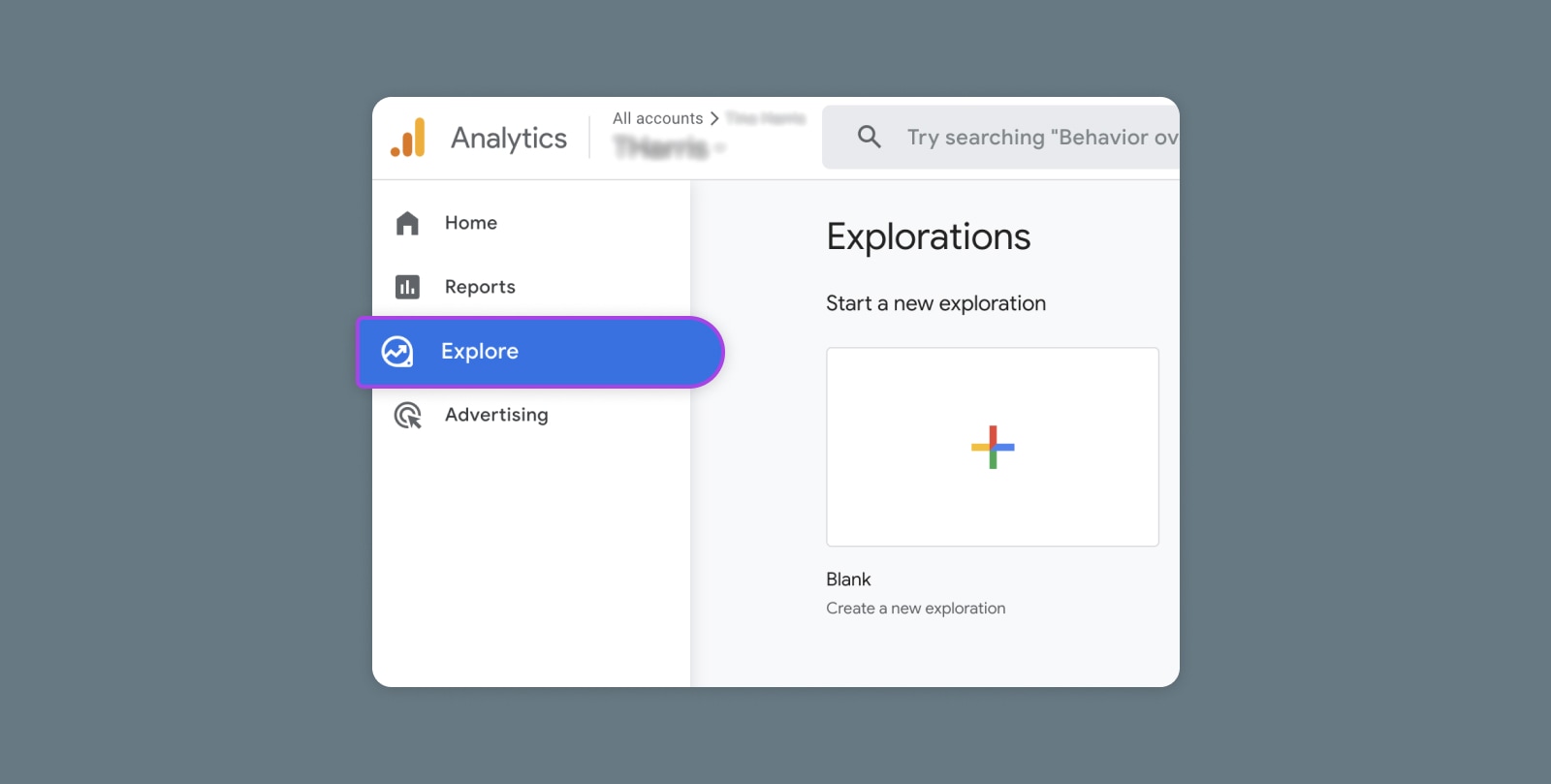
Creating and Mastering GA4 Explorations

In the switch from Universal Analytics (UA) to Google Analytics 4 (GA4) — which will go fully into effect July 2023 — a lot of things have...