You probably haven’t started thinking about turkey and cranberry sauce, but maybe it’s time you did.
No, you don’t need to go grocery shopping or plan your Thanksgiving feast quite yet. Still, as your hosting experts, we’re telling all you website owners out there: You need to start strategizing for the epic holiday weekend.
We know it’s been a difficult time in many ways. You’ve likely felt that strain hard in your business as you’ve adjusted during COVID-19 conditions and embraced an online environment. The reality is this: Many people are out of work, small businesses are struggling, and consumers likely have less $$$ to spend.
But that doesn’t mean you have to end the year on a sour note. As the calendar approaches the normally mammoth holiday shopping dates of Black Friday and Cyber Monday, you can prep your business — and your website — to make the most of the spending season.
Even in less-than-ideal conditions, holiday shopping has a lot of potential to boost your business.
Historically, the Thanksgiving holiday weekend has been a record-shattering buying event that you’ll want to get your business on board with. Last year, Black Friday brought in more than $14 billion in online sales.
Those aren’t the only eye-opening numbers; a survey reported that more than 186 million Americans shopped online during the holiday shopping season’s Thanksgiving weekend. That’s a lot of potential customers — and potential sales — for your business.
Here’s the catch: If you aren’t anticipating the Black Friday e-rush well ahead of time, you could be looking at a mass exodus of your site’s visitors, who will happily take their credit cards elsewhere for the year‘s biggest spending season. Cue the flying-money emoji. 💸💸💸
Over the years, people have increasingly turned to their screens for Black Friday deals rather than retail stores. For example, in 2020, consumers spent a whopping $9 billion at online stores on Black Friday — a 21.6% increase from 2019. This year will likely break ecommerce records as people shop from the safety of their homes.
And never underestimate Cyber Monday’s money-making potential; in 2020, Cyber Monday brought in $10.8 billion online, a 15.1% jump from the previous year and markedly the biggest online shopping day in history.
So what’s on your Black Friday/Cyber Monday To-Do list? Well, you need to prep. Your site needs to be whip-quick and bug-free, not to mention stocked with quality products and smart navigation.
And we can help with that!
First, we’ll talk strategy, helping you plan out the best ways to get your sales in front of customers.
- Review Your Site & Goals
- Plan Out Sales
- Create a Marketing Campaign
- Track the Competition
- Generate Buzz
Then we’ll get into the nuts and bolts of prepping your sites for the e-crowds, one technical task at a time.
- Assess Your Web Hosting
- Build Your E-commerce Store
- Focus on Safe Shopping
- Edit Your Return Policy
- Fine-Tune for Optimization
- Prep for Customer Service
- Test Your Site
- Plan for Contingencies
- Analyze the Results
With a website primed for a critical weekend of sales, you can put on your stretchy pants and enjoy another slice of pumpkin pie — while you watch your business grow.
Get Ready for BFCM Weekend
Join our monthly newsletter for tips and tricks to build a better site, increase traffic, and boost sales during the holiday season and beyond!

Create Your Marketing Strategy
Whether your small biz is a team of one or one hundred, you need to have a pow-wow, STAT. You must organize a Black Friday plan of attack before your site gets left out in the dust. With an increased focus on online sales during the holiday shopping season, you have to be ready. Start with baby steps.
1. Take Stock (Literally and Figuratively)
It’s smart first to take a look at where your business stands. What are your goals? How established is your brand? How is your social media presence? And what are you hoping for — in sales terms and otherwise — for the big Thanksgiving shopping holiday?

Knowing where you are and where you want to go helps you set appropriate goals and put a plan in place to accomplish them.
Then there’s physical merchandise or, if you sell a service or non-physical commodity, virtual goods.
In the case of tangible products, you will need to take stock of your items and increase inventory (and shipping supplies) in anticipation of sales (especially of your best-selling items) so that those ever-important buying days run as smoothly as possible. Keep a spreadsheet of inventory handy — this can help you stay organized and be useful if contingencies arise (more on this later).
Regardless of what you sell, you need to make sure you have the tools in place to run a sale on your site and figure out the kind of sale you want to offer — based on lifetime customer value or cost per acquisition stats — or if you’d be better to provide more out-of-the-box savings, like service upgrades or add-ons.
So, make some calculations and gather your data — you need this information for our next stage of planning.
Remember that COVID-19 has moved many businesses nearly entirely online. So how you approach inventory, shipping, and the services you offer will differ from years past. It will likely require additional time, planning, and resources to successfully navigate a successful holiday shopping season. Plan ahead and prepare for contingencies (we know you’ve been dealing with a whole year of contingencies).
2. Plan Out Your Sales
Believe it or not, holiday shoppers are researching products and scouting deals well ahead of time — like, now. So it’s important — crucial even — to take time to get organized by mapping out the sales you’re going to offer for the Black Friday/Cyber Monday weekend. Plan ahead to avoid messy last-minute sale scrambles and fly-by-the-seat-of-your-pants deals (yikes).
Also, note that coronavirus conditions have caused shortages in many industries, many of which could affect your manufacturers, suppliers, or operation suppliers. It may take extra time to get what you need, so plan for these delays well ahead of time when planning sales.
The sooner you have a plan in place, the sooner you can bring attention to your Black Friday sale and prep customers to bring their holiday dollars to your shop.
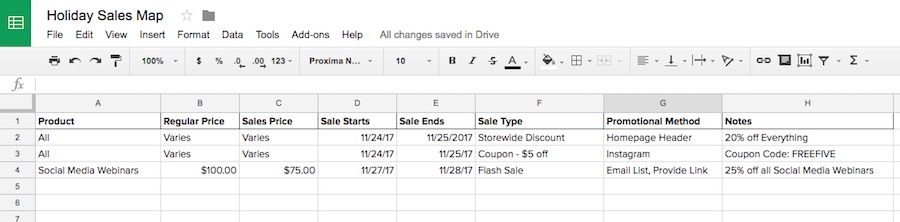
A simple Excel sheet works well for outlining planned sales — identify products or a set discount, regular and sale prices, the sale timeline, and how you anticipate promoting that sale.
You may need to talk with your supplier (if it’s not you) to work out the production details of increased demand.
Also, keep in mind that most Black Friday and Cyber Monday shoppers haven’t completed their holiday shopping at the end of the Thanksgiving spending spree. Studies show that shoppers usually wait to buy gifts at the last minute — in 2020, 75% purchased in the two weeks preceding Christmas. So don’t see Black Friday as the end-all, be-all.
In your plan, include actions (and additional incentives) that encourage Black Friday shoppers to return to your e-commerce store throughout their holiday shopping and, eventually, become loyal customers.
3. Map Out a Marketing Campaign
Now that you know what kind of sales you’re going to offer, you need to disseminate that information effectively to consumers. Advertise well ahead of time and prep your customers for buying.
We know things this year have been hard. Since we’re all pinching our pennies, here are some affordable — and creative — ways you can create a BFCM campaign that drives sales.
Related: The Best Holiday Marketing Campaigns (And What You Can Learn from Them)
Email Marketing
If you’re wondering where to start with Black Friday marketing, email is truly a safe bet, since a healthy, growing email list is invaluable for your small business or ecommerce website.
Sending marketing campaigns to those who have chosen to be engaged with your business allows you to tailor personalized messages that have the most impact come buying time.

Promotional emails can prep your most loyal consumers for an upcoming sale or reward frequent buyers, and specific types of communications (like abandoned cart emails) can help wary or slow-to-act visitors complete unfinished purchases.
Your promotions can also help you to build an email list. It’s like an epic circle of benefits.
Related: Build an Email List With Your WordPress Website in 3 Simple Steps
Social Media Marketing
While social media tends to cast a wider net in marketing, platforms such as Facebook, Twitter, and Instagram can help you tease upcoming promotions and provide creative ways of distributing Cyber Week deals. You can also boost your posts to target specific audiences or reach a larger crowd for only pennies on the dollar. Tailor your content to each platform for maximum effectiveness.
Create a calendar to help you determine and plan out the best times to distribute marketing content — then stick to it! Consistency rules.
Pay-Per-Click Advertising
Sure, the saying goes that the early bird gets the worm, but if you’re planning deals late in the game, all hope is not lost. While search engine optimization (SEO) and other organic traffic drivers take time to implement, pay-per-click advertising allows you to pay for more clicks (hence the name) right now.
If you’ve got more of a marketing budget at your disposal, you can utilize PPC campaigns to have more control over your search engine rankings and, at best, turn clicks into customers and see strong ROI.
The basic steps are to create an ad and make bids on virtual auctions for top placement in search engines. Check out Google AdWords to learn more and start generating more traffic to your site.
4. Keep an Eye on the Competition
With a tidal wave of Black Friday and Cyber Monday deals flooding every inch of the web, your small biz needs to set itself apart against other small operations and big-name retailers.

Extra touches can help distinguish your site from a rival online retailer; consider offering a gift (or an additional discount on future return purchases) with each sale, expedited or free shipping, special packaging, or customized thanks-for-shopping messages from your business. Watch your industry competitors and work to have the leg up.

And even if manpower or budget limitations restrict you from including additional incentives, always provide hassle-free returns and friendly, prompt customer service. Emphasize the personality and care offered by your small business versus big-box retailers. Customers like to support small businesses and, in most cases, will appreciate, remember, and reward a more intimate online shopping experience.
Related: 11 Ways Your Online Store Can Compete with Mega-Retailers and Win
5. Build (More) Buzz
In addition to your organized marketing efforts, you can boost the hype for your Black Friday steals by engaging in additional awareness-building activities.
Craft Winning Copy and Create Alluring Graphics
Time is on your side; with your early-bird preparation, you can plan out and prep copy that is engaging, personable, and error-free. Same with photos and graphics; planning ahead guarantees you have attractive visuals that impress and persuade. Putting special attention to even these most basic of website fundamentals can significantly improve your users’ experience during their holiday shopping.
Related: How to Write Product Descriptions That Really Sell: 8 Simple Tips
Utilize Hashtags
Insert yourself into the popular topics of each week by taking advantage of trending hashtags. The viral hype will seamlessly (and effortlessly) aid in spreading the word about your products and upcoming sales. #blessed
Build in Scarcity
Shoppers will naturally feel a sense of urgency to buy if they know your limited-edition, few-in-number, or wildly-discounted product won’t last long. Use language that reminds shoppers to act quickly to score the best deals.

Display Shop Signage
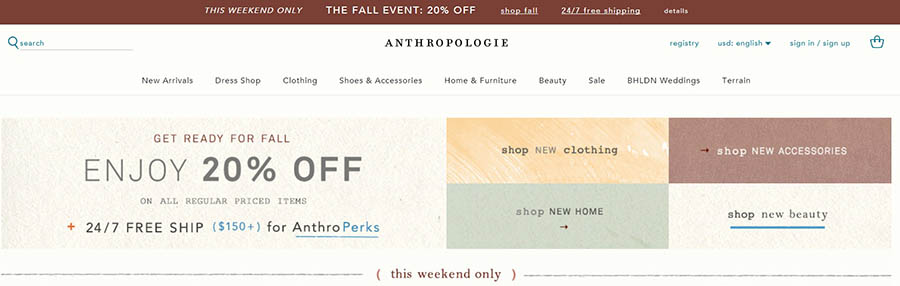
Well before the actual Black Friday/Cyber Monday crowds hit your e-shop, you can outfit your site to prep visitors for approaching sales. Consider updating your homepage with a special Black Friday header or landing page signage that cements SALE into your customers’ minds — especially those who are conducting their holiday gift-giving research now.
Update Your Blog
Hopefully, your blog is regularly outfitted with quality posts that are relevant and engaging. If it’s not, get writing. A blog consistently updated with useful content brings visitors back to your site and builds your brand. Use friendly, personable language that establishes you as a trusted authority in your field or industry.
Related: How to Write a Blog Post — A Step-By-Step Guide
In the next few weeks, consider publishing useful holiday shopping content, like curated gift lists or helpful instructional guides (wink, wink) that feature your products and provide a service to customers.

Pitch to Other Blogs and Social Media Influencers
Influencers are called influencers for a reason. Get your products in front of the web’s most influential people, and you could be rewarded with more traffic to your site — and ideally, new shoppers.
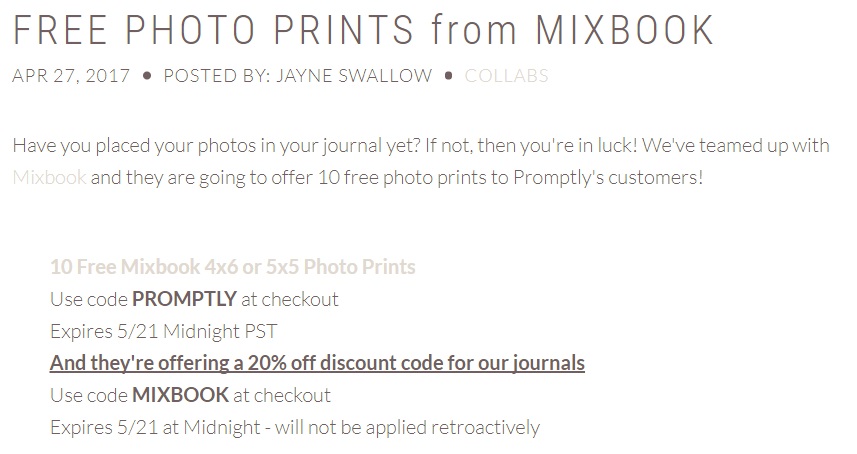
Pitch your products to other sites (for their gift guides, guest posts, or other content), and you’re inviting a whole new set of eyes to explore your offerings. Score!
Share Positive Product Reviews
Word-of-mouth marketing is powerful, especially in e-commerce. With prompts on your site or through after-purchase email messages, invite your customers to leave product reviews. Share the glowing ones with new customers (and turn them into repeat customers) or use them to persuade on-the-fence buyers.

Write and Share Customer Spotlights
Bring attention to the superstars championing your products or services — your existing customers! Profile their unique story and how your business helps them achieve success. These stories (like our own tales of a millennial-minded online publication creator or writer looking for a quick way to set up a website) will inspire other consumers to engage with your brand and, ideally, make purchases.
If you’re looking to go even more out of the box, try these other creative promotional ideas.
And lastly, know this: According to Adobe, the power of social media influence on purchases is decreasing, but retailers have greater opportunities to invest in email marketing and search optimization for increased revenue. That could be a major thumbs up for your site if done well. So plan now.
Prepare the Technical Aspects of Your Site
Planning the details of your Black Friday/Cyber Monday sales is essential. But that’s only the first step. Especially when shoppers notice the buzz you’ve created and want to make purchases. Is your website up to the challenge? If not, start here!
1. Consult With Your Hosting Provider
As is necessary for success in all parts of your website, a site that’s functional and ready to deliver during the fall’s killer shopping holidays depends on your website’s foundation: your hosting provider. Your provider should be reliable and helpful, and at the most fundamental level, keep your site up and running 24/7.
Yes, a good hosting provider is essential. So consider:
- Can your hosting plan handle surges in traffic that may occur during Black Friday/Cyber Monday sales?
- Can it keep you safe from virtual vulnerabilities?
- And if your site does go down, will you be compensated by an uptime guarantee?
Based on your needs, you may need to consider upgrading to a plan that can do more heavy lifting during the rush.
Not sure what plan is best for your site? Chat with us. We’ve totally got your back.
Is Your Site Ready for a Cyber Monday Sale?
DreamHost has the perfect hosting plan to handle your holiday season traffic.

2. Set Up Your E-Shop
Before you can draw customers in with deep discounts, you need to make sure your site is actually outfitted for e-commerce, if you haven’t already.
Whatever tool you use — like WooCommerce or Shopify — get it up and running well before the big day. Ensure that it’s capable of handling your site’s crowds and that it allows customers to make purchases using a simplified checkout process.
Related: How to Build an Awesome Online Store with the OceanWP Theme
3. Provide a Safe Shopping Experience
A vital part of building trust with your clients (and ensuring that they make return visits) is shopping safety.
Shoppers — especially ones with the seasonal inclination to splurge — want to know that their information is safe on your site. That’s a big reason to think about security. A study by the Department of Commerce revealed that half of U.S. internet users are deterred from buying online because of worries about privacy and security.
To remove worry from customers’ minds, display prominently on your site’s checkout pages signage that proves it’s safe to shop with you.

More often than not, your hosting provider can help you get set up with a free or low-cost SSL/TLS certificate (an authentication and encryption system — meaning, data is transferred online safely). If you’re a DreamHost user, we’ve got you covered.
Another way to ease your customers’ minds about security: Share the other websites that have featured your products. Display endorsements from other blogs and companies, (it’s OK to toot your own horn!) and give your products and services an outside seal of approval.

Visitors to your site will see the buzz already building around your business from other familiar companies and will be more likely to engage. Consider it e-commerce FOMO.
These trust-building measures that can make a world of difference, especially on those big shopping days.
4. Create an Easy-to-Find Return Policy
It’s inevitable — some customers are just not going to love their purchases. During the 2020 holiday season, retailers experienced a 41% increase in returns of online orders. Currently, 88% of consumers report that they make returns at least “occasionally,” but 96% of customers said they would shop with a retailer again if their return experience with that business was positive.
With the vast majority embracing online shopping this year, you’re likely to see an increased rate of returns. Returns are not only a part of the holiday season but a valuable point of interaction with consumers. They are an opportunity to connect with your audiences, provide them the best possible experience, and encourage repeat business and customer loyalty.

First, make your return policy easy to find — in a limited number of glances or clicks. Keep your customers loyal by avoiding “the fine print” mentality; clearly state shipping costs, deadlines, and return policies (and make it big enough to read, please).
5. Fine-Tune for Optimization
You want every aspect of your site to be optimized for the best possible web experience. With eyes on increased sales, more traffic, and a loyal following, fine-tuning your site in these specific areas will help you build your numbers.
Make Your Site Mobile
We could easily inundate you with reasons why having a mobile-responsive site is so important, but we’ve already been there, done that. So instead, we’ll just pass along a few key statistics to prove our point.
Like the fact that Black Friday is big (no, let’s say B-I-G!!!) for mobile. Last year, both Black Friday and Cyber Monday were record-breaking days in retail history for e-commerce, with sales reaching $3.6 billion on mobile and 40% of all online retail coming from smartphone transactions (consumers spent $6.3 million a minute shopping online!)— and that’s only on Black Friday.
Cyber Monday also made waves for mobile in big ways, with transactions soaring to $10.8 billion, the highest ever year-over-year dollar gain for smartphones. What’s more, smartphones accounted for more than half of all traffic on retail websites on Cyber Monday.
Holy smartphone, Batman.

Mobile is also crucial for good SEO. How? Well, having a site that’s mobile-responsive increases your chances of earning a high ranking in search engines, and therefore, your chances of being found by potential customers.
Your site can look snazzy on a desktop, but if it delivers a disappointing mobile presence, then you can say adios to your sales.
Ensure that your site’s template is mobile-responsive. Make sure that your site loads fast on a mobile device, links work, images load correctly, and any pop-up forms display correctly. Consider utilizing the AMP initiative to upgrade your mobile experience for users.
Boost Your SEO
As a small business or website owner, you’ve probably already had a rudimentary education in the importance of SEO.
Simply put, SEO means positioning your site for discovery in search engines. After all, a simple search is where most people begin their holiday (or basically any) shopping.

More than any other shopping season, you want your site — and by extension, your products — to have the best chance of meeting the eyes of potential customers. So prepping your website by establishing good SEO is a task of high importance as you anticipate Black Friday and Cyber Monday.
Even if you’re a beginner, you can take a few small steps to improve your SEO. But remember, SEO gains take time, so get started now — the sooner you optimize, the better.
If you want to dig deeper into optimization, consider taking a few additional measures to improve. We recently outlined 13 key steps to boosting your SEO, but check out these main takeaways:
- Ensure that you’re using a quality hosting provider. (Ahem, over here. Waves.) This can make a big difference. A reliable hosting service that helps your site perform will aid in your site ranking highly.
- Choose a site theme that’s designed with SEO in mind. There are many themes available out there, but not all will help your site increase in rank. Not only does a well-picked web template provide an attractive layout and improved functionality (which aids SEO, too), but its quality code does wonders for optimization. When choosing a theme, look for ones identified as “SEO-Friendly.”
- Use an SEO plugin, like Yoast.
- Improve your permalink structure.
- Use a responsive design (meaning: works across devices — see the “Make Your Site Mobile” section above).
- Get wordy! Long-form content is rewarded by Google algorithms, so go in-depth on your blog posts and be comprehensive. Provide value. And don’t forget to analyze and organize content. Perform a content audit if necessary.
- Optimize your images. Resize your photos to increase load times and use the right file format. Oh, and no “asdfjk.jpeg” file names here. Get descriptive on your photo files. Really, it helps.
Related: How to Create a Content Marketing Strategy
Simplify Your Navigation
The Black Friday/Cyber Monday shopping weekend is crucial for your business or website. Fail to simplify your navigation, and you could be looking at potentially lost sales and disengaged — not to mention frustrated — customers.

Don’t squander your opportunity by making your website a maze of riddles. It’s got to be easy to navigate.
Whether that means streamlining your design or improving the menu, tidy up your site structure. Simplify searches and checkout processes so that your customer can get from Point A to Point B in a minimal number of clicks — and you can make those sales that much faster.
Reduce Your Load Times
A reality check here: No customer (Black Friday-frenzied or not) will stick around on a slow site.
As attention spans on the web get increasingly shortened, you need to think speed. One major key to a speedy site? Your site’s design. We outlined all the dos and don’ts in-depth, but here’s what you need to know for the holiday crunch:
- Choose a good hosting provider (Check! We’ve got your back).
- Optimize your images.
- Minify resources like JavaScript and CSS.
- Leverage browser caching. If you’re using WordPress, you can use a handy plugin or utilize our services.
- Get rid of outdated or unused plugins.
- Utilize expired headers.
- Enable CSS sprites.
- Implement open-source AMP technology (a Google-developed initiative designed to help developers build sites run optimally on mobile). Use the AMP WordPress plugin to start.
- Once you’ve used your load-speed toolbox, test your site’s performance with Google’s PageSpeed Insights.
6. Be Available for Customer Service
While shopping, your customers may have an urgent question about your holiday sale, sizing, or shipping (or a million other things).
If possible, be available to answer their up-to-the-minute questions during the Thanksgiving weekend. If you anticipate heavy crowds, assemble a team to help address consumers’ pressing needs, and leave them with a positive and memorable customer service experience.
Related: How Your Online Business Can Nail Customer Service
Enable a live chat function on your site or have a customer service email readily available for them to contact you — and be waiting by the keyboard.

(And you DreamHost users know that you can count on us on Black Friday. We’re just a chat away.)
7. Test, Test, Test
The best way to anticipate any potential glitches or problems with your e-commerce site during the holiday shopping rush is to test it.
We know we sound like a broken-record-meets-Jan-Brady, but: TEST, TEST, TEST.
Think about it: You wouldn’t turn in a term paper without reading through it, using spell check, or editing for grammar mistakes. And the way your site looks is just as high-stakes for your business, so perform necessary trial runs.
Test your links for functionality (this handy WordPress tool can help), analyze responsiveness across devices, check load times, and even request visitors’ feedback. The more you can correct beforehand, the better.
8. Plan for Contingencies
By now, 2020 has taught us all that even the best-laid plans sometimes go awry. So in your preparation, you should try to account for unforeseen circumstances (like website downtime) and — dare we say it — emergencies you might encounter during the holiday shopping rush.
Besides allowing us to Zoom in our pajamas and inspiring our makeshift WFH spaces, the pandemic has caused us to pivot in many business-altering ways. Some things to think about as you prepare for Black Friday and Cyber Monday:
- Do you have no-contact pickup options for online sales? Make sure to set up curbside pickup as a delivery option on your website.
- You might need to bulk-buy hand sanitizer or make your meetings virtual. But your website also needs crisis-friendly adjustments. Website owners should make sure to update eleven key things.
- Are you a service-based business used to running your business IRL? If you’re needing to adapt and run operations online, consult these moving tips. (No heavy-furniture-lifting required.)
Luckily, preparation can help you anticipate some of those potential mishaps. Make a contingency plan for situations that may arise — like an “if ___, then ___” exercise — so that you can quickly correct problems (and keep your blood pressure low because #holidaystress).
To help prevent unanticipated issues, take a few prep steps, like analyzing your site’s past Black Friday statistics (see the next section) and asking helpers to stand by.
9. Analyze Your Results
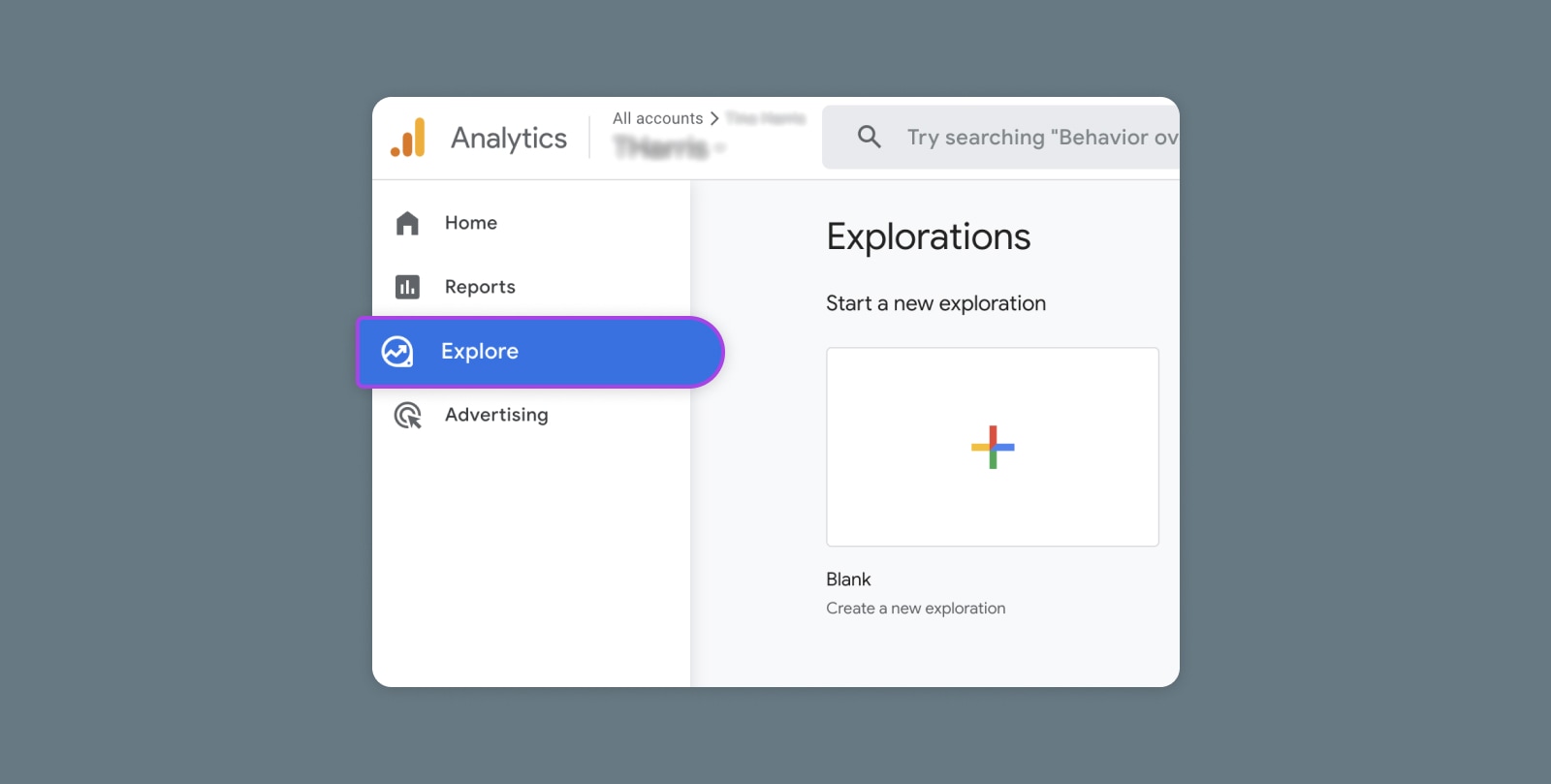
A good rule of thumb after executing a plan is to review your outcomes. Whether you utilize Google Analytics or another metrics platform, gather the data and use it to make informed decisions on how to improve your site.

Don’t let those numbers go to waste — they provide you with valuable info about customers’ behavioral patterns and a starting point for further improvement. Dedicate specific time to reviewing last year’s data (as you prep for this year’s shopping rush) and this year’s — so that you can continue to reap the financial benefits of the holiday shopping season.
Related: 20 Metrics Every Blogger Needs to Track to Measure Success
Are You Ready for Black Friday Weekend?
Hey, you’ve made it this far into 2021. Give yourself a pat on the back. Wave your mask in the air. We know it’s been hard. But as the holiday shopping season approaches, you can still prime your business operations to take advantage of and prepare for the increase in online traffic. Black Friday and Cyber Monday are a big deal for your website, and the time to prepare your site and strategy is now!
With a website primed for handling the e-crowds and a winning marketing strategy designed for our “new normal”, you’ll be able to navigate Black Friday and Cyber Monday 2020 and turn seasonal shoppers into frequent buyers that’ll follow you into 2021.
Ready to optimize your site for Black Friday? Start with DreamHost. Leave migrating your site, installing WordPress, managing security and updates, and optimizing server performance to us. Now you can focus on what matters most — taking care of your customers! Check out plans today.
The post How to Prepare Your Website for Black Friday and Cyber Monday appeared first on Website Guides, Tips & Knowledge.
source https://www.dreamhost.com/blog/prepare-your-website-black-friday-cyber-monday/